ER605 HW 2.20: Login fails after

ER605 HW 2.20: Login fails after

ER605 HW 2.20: Login fails after
a week ago
Model: ER605 (TL-R605)  
Hardware Version: V2
Firmware Version: 2.3.0

Hello,

I am experiencing a serious issue with two TP-Link Omada ER605 routers (hardware version 2.20).

After upgrading from firmware 2.2.5 to 2.3.0, the local web login no longer works correctly.


What happens:

  1. I factory reset the ER605.
  2. I connect directly via browser to the device.
  3. The initial setup wizard appears.
  4. I create a new local administrator password.
  5. After finishing the wizard, the device redirects me to the login page.
  6. The password I literally just created is immediately rejected as invalid.


Important observations:

  • This happens on TWO different ER605 devices.
  • Both are hardware version 2.20.
  • I reproduced the issue intentionally on the second device.
  • The issue occurs immediately after factory reset and fresh setup.
  • Browser cache / private mode / different browsers do not help.
  • The problem occurs even without Omada Controller adoption.
  • I can reproduce it with only a laptop directly connected to the ER605.
  • Cloud login itself works, but the devices do not appear in the Omada portal.


At this point the devices are effectively unusable because I cannot log in anymore after setup.

Questions:

  1.  
  2. Is this a known bug in firmware 2.3.0 for ER605 v2.20?
  3. Is there a working downgrade procedure?
  4. Is there a hidden default account or recovery method?
  5. Has anybody successfully recovered from this state?
  6. Are firmware files for ER605 v2.20 available somewhere? The TP-Link firmware archive/download pages seem confusing and inconsistent regarding hardware revisions.


Additional information: The Firmware download page ist listig several FW versions such as 2.2.6, 2.3.0, 2.3.2, 2.3.2, etc for the HW 2.20 device, but after downloading the file names reveal that the zip archives are for HW Version 2.0, so the FW upgrade procedure fails with with "please check file content", except for the FW 2.3.0 file which seems to be OK and thus I upgraded to this version, knowing that it is not the latest version, but the latest available. According to this issue I can not choese 2.20 in the above listed " Hardware Version" field. 


Serios question folks: is this really sort of quality management at TP link?


Any help would be greatly appreciated.

Thank you.

0
0
#1
5 Reply
Re:ER605 HW 2.20: Login fails after
a week ago

Hi @mrhugg 


Thanks for reaching out to TP-Link Business Forums.


It's a regret to hear that you may encounter the issue regarding unable to login to the Omada interface.

Can I confirm what's the specific issue or error when you fail to login to it? 

Are you experiencing this same issue as this thread? ER605 new firmware login page - missing keystrokes in Firefox - Business Community

Did you try different browsers?


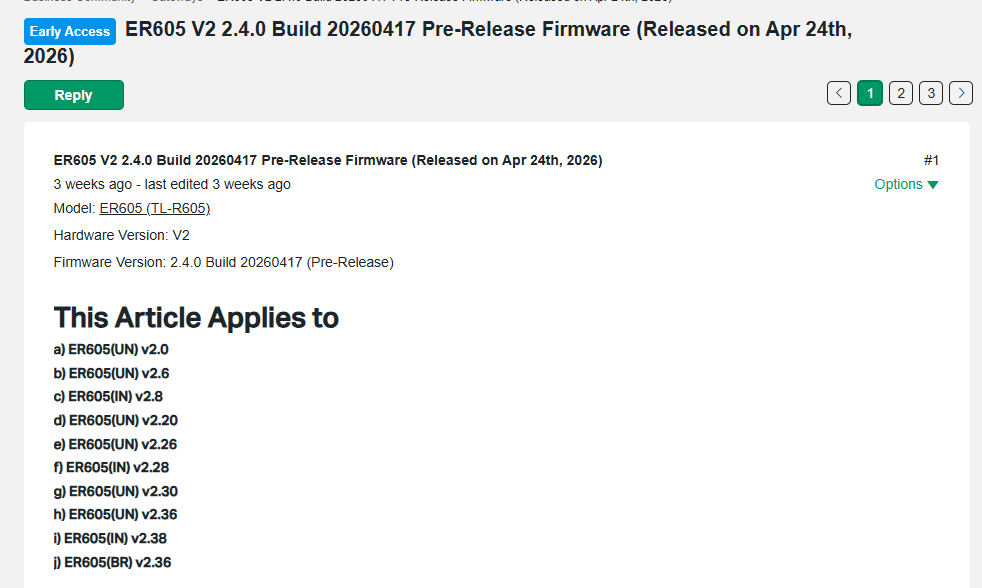
Regarding the firmware version, as currently most firmwares are universal, though they share different hardware versions, they are still applied to various hardware models.

A quick example is the pre-released firmware 2.4.0:

0
0
#2
Re:ER605 HW 2.20: Login fails after
a week ago

Hello, thanks fo response.


I can add some information that may be important to fix the issue:


- The problem is browser and OS idependant (Linux, Windows), while Firefox indeed seems to be worst candaidate.

- I managed to log in with Chrome/Ubuntu immediately after resetting the device randomly, but not reproducable every time.

- However, after being able to login I could rolback the firmware to the shipped version (2.2.4 I guess) and immediately got back my original setting. That is the only thing I can report as an positive aspect.


While having ordered a device from an other manufacturer and waiting to throw as many as possible tp link devices into the trash bin, I would like to ask some questions:


1. Why is TP link not able to do the testing before shipping instead of annyoing customers with non working firmware?

2. Why isn't it possible to clean the mess regarding downloadable firmware versions to hardware versions matrix?

3. What is the the mess all about anyway regarding hardware version V2 and 2.20? I can not even post an issue for 2.20 in this forum.


Sorry folks, that is an unusable product that annoys me and wastes my time. I'm almost 60 years old now and don't have plenty of time left to waste into error fixing or finding out why or if I'm to stupid to set a router password correctly.


These are the reason why I definitly won't test a beta 2.4 firmware version.


My workaround is downgrade the firmware and replace with working products.

0
0
#3
Re:ER605 HW 2.20: Login fails after
a week ago

Hi @mrhugg 


First of all, we would like to sincerely apologize for the inconvenience you have experienced. We understand how frustrating this situation is, especially when it affects basic access to your device. Please rest assured that we take your feedback seriously and will do our best to assist you in resolving this issue.

Regarding the inability to log in immediately after creating a new password, we need a bit more detail to analyze the root cause effectively.

1. Would it be possible for you to provide a complete video recording of the entire process, from the factory reset through the initial setup wizard, password creation, and the subsequent login attempt where it's immediately rejected?
This visual information would be invaluable for our technical team to understand and diagnose the problem precisely.

2. When you enter the newly created password, do you ever observe any instances where some characters appear to be missing or not registered during the input process, even if you typed them correctly?

3. As a diagnostic step, if you attempt to set the password to a very simple, common one like Admin1234@ (case-sensitive as written), do you experience the exact same issue upon logging in immediately afterward?


We also want to address the important questions and concerns you've raised:

1.  All our products and firmware go through comprehensive validation and testing before release. However, due to the wide variety of real-world environments (different browsers, OS platforms, network conditions, and usage scenarios), there may still be unexpected behaviors that only appear under specific conditions.

For your current case, we fully understand the impact and are very willing to follow up closely and assist until it is resolved. If needed, you can get our real-time support from chat or phone to speed up troubleshooting. Contact | TP-Link

2. We do have a standardized process for firmware releases and do not upload firmware arbitrarily.

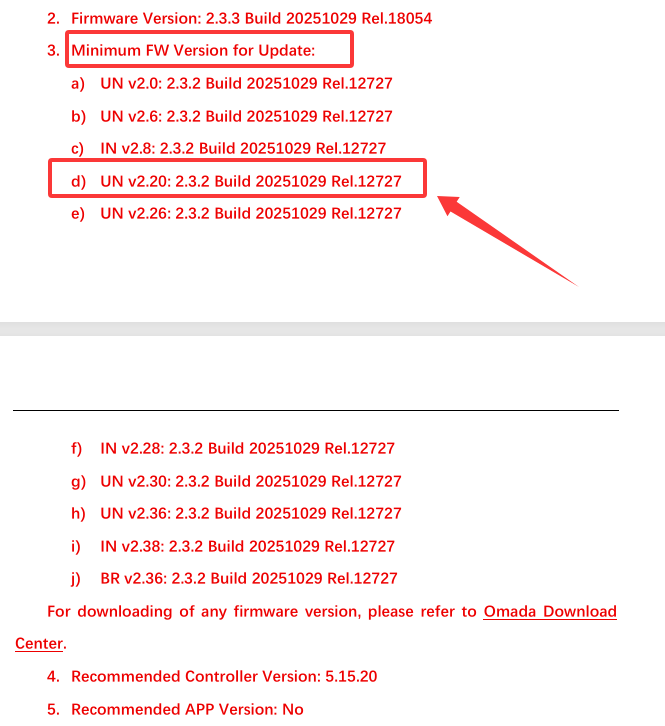
In your case, the reason why you cannot upgrade it to V2.3.3 is because you need to upgrade it to V2.3.2 first.  This requirement is already noted in the release notes.

However, we acknowledge that the download page does not clearly highlight this dependency, which can understandably cause confusion.  We appreciate you pointing this out, and we will feedback this internally for improvement.

3.  You've also pointed out the difficulty in selecting specific hardware sub-versions like V2.20 in our forum's hardware version field. We appreciate you bringing this to our attention. Due to the extensive number of product models and iterations we support, the forum's initial design did not fully account for such granular version distinctions in its dropdown menus. This is indeed an area where we can improve. I will forward this feedback to our development team for future optimization of the forum interface. In the meantime, please continue to clearly state your specific hardware version (e.g., 'ER605 V2.20') within the title or body of your post, as you have done, to ensure accuracy.


We understand your current frustration and decision to explore other manufacturers. However, we genuinely hope to have the opportunity to resolve this specific issue for you and restore your confidence in TP-Link products. Your detailed feedback is invaluable in helping us improve.

1
1
#4
Re:ER605 HW 2.20: Login fails after
a week ago - last edited a week ago

  @Gabriel-TP Thanks for the hint regarding 2.3.2.I read this before and decided to update to every single intermedeate version.


But this had not been possible as I received the error "please check file" while trying this. That led me to the assumption that the firmware archives offered for HW 2.20 had been mixed with hardware version 2.0 because the zip archive names sometimes contain "2.0" and sometimes "2.20". I thought that accidentally picking a 2.0 archive was the cause for the file error.


I just found that this was not correct. In fact it was possible to upgrade to FW 2.3.2 directly from 2.2.5 - BUT I had to reset the switch before, set a new password and then immediately do the FW upgrade. Trying to recall my earlier steps I thing that this was the crux. Of course I wanted to avoid creating a new configuration because I did not expect to be able to make a configuration backup with FW 2.5.2and then recover it in 2.3.2.


In fact this step succeeded though, possibly by intention or possibly because I don't have a very sophisticated configuration.


After upgrade to 2.3.2 I expected to be able to flawlessly upgrade to 2.3.3 but this time I got the "check file" error again.


So I had to RESET once more (although no configuration had changed at this time), pick a "new" password and then upgrade to FW 2.3.3.


Additionally I have to mention that WAN port was offline all the time as I did the steps on the second failover device.


So finally I got it running with FW 2.3.3, but: sorry folks, this is not an acceptable upgrade path for an online device as I expect it.


The character missing problems did occur after having upgraded to 2.3.2 or 2.3.3 (as I remember) but typing slowly or copy&paste the password did work for me. I remember having observed that this behavior occured only immedeately after Reboot, so possibly it's a load situation that's responsible here.


Good luck. 

0
0
#5
Re:ER605 HW 2.20: Login fails after
Yesterday

Hi @mrhugg 


Thank you very much for taking the time to update your progress in such detail. We fully understand how frustrating it must have been to go through multiple resets and upgrade attempts, and we sincerely apologize for the inconvenience caused.

We also appreciate the effort you put into troubleshooting and identifying a workable upgrade path. Your observations are very valuable to us.

It's quite strange that you have to reset the gateway before the succesful firmware upgrade. We did not receive this kind of report before.

Did you record this strange behaviour when tried to upgrade the firmware?

Are you still unable to login to the Web interface?

Regarding the missing characters issue, we have identified the true root of cause and would fix this issue in the next firmware upgrade.

Thanks again for your understanding and cooperation.

0
0
#6