
EAP787 V1.0, LED no longer lights up (blue)
EAP787 V1.0, LED no longer lights up (blue)

Dear TP-Link Team,
I noticed that the (blue) LED on my EAP787 V1.0 (Firmware 1.5.2) no longer lights up. The AP is connected to a SG3428XPP-M2 switch on Port 1 (PoE++). I forced provision, reset the AP and re-adopted it - no success. After connecting the AP to the PoE switch, the LED briefly turns orange during startup and then goes off completely. Also the function "identify" does not work - the LED remains off. The AP itself is working normally. Any idea what could be causing this? Many thanks!
- Copy Link
- Subscribe
- Bookmark
- Report Inappropriate Content


Hi @Geotrupus
Thanks for posting here.
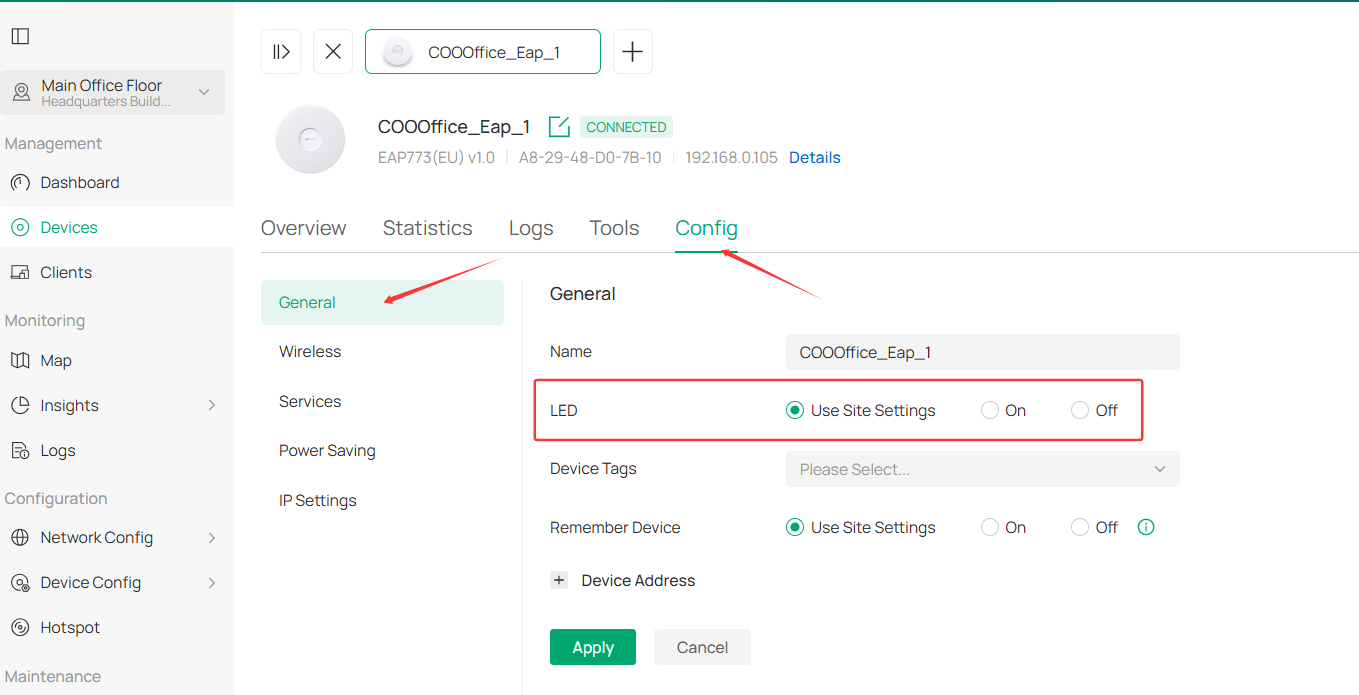
This is mostly because the LED was set to off. You can go to the EAP's config page to check:
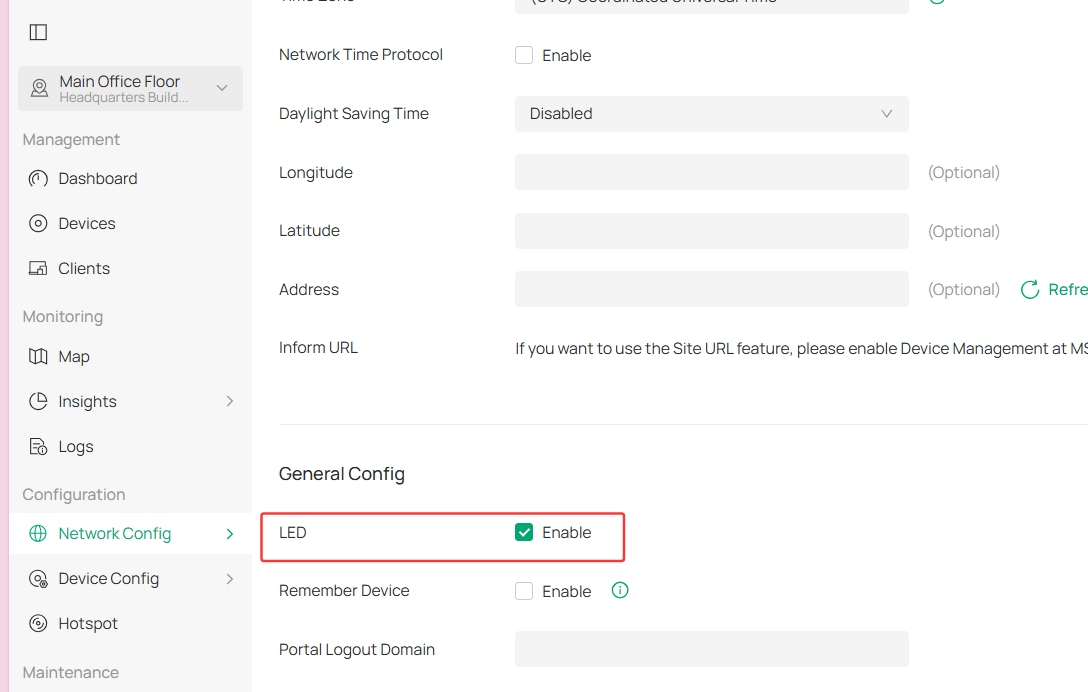
Below is the page of Site Settings page: (Network Config > General Settings > Site Setting)
- Copy Link
- Report Inappropriate Content
Thank you. The LED is set to on, but it is still off. I even set the AP to factory default and removed it from my Omafa Environment, but the LED briefly shows orange when powering on and stays off afterwards. No blue light anymore.
- Copy Link
- Report Inappropriate Content
Hi @Geotrupus
Thanks for your reply.
After upgrading our sample unit to version 1.5.2, the LED lights displayed normally. How do you power on the EAP787? This may happen if the power input is insufficient.
The issue you described sounds like the LEDs may have been set to “off.” Please double-check the LED configuration on both the EAP's config page and the Site settings page.
If it is indeed set to “on,” the LED lights may be malfunctioning. You might consider contacting the retailer to check the warranty and potentially have the device replaced.
Geotrupus wrote
Thank you. The LED is set to on, but it is still off. I even set the AP to factory default and removed it from my Omafa Environment, but the LED briefly shows orange when powering on and stays off afterwards. No blue light anymore.
- Copy Link
- Report Inappropriate Content
Hi @Geotrupus
Any update on this concern?
Did you contact your retailer to get a replacement, or did the LED status turn to normal?
- Copy Link
- Report Inappropriate Content

@Geotrupus , I have exectly the same problem today, and I have ver 1.5.2 as well. And I have also gone through the same steps and still the blue light fails to light up.
I have two units of EAP787, this symptom you described only occured on one of the EAP.
In addition, I tested on a PoE+ switch, and the amber light turns on as usual, so this error (no blue light) is specific to when the unit is powered through a PoE++ (I have a separate TP-Link PoE++ (POE308S injector).
My suspicion is either the firmware, or a faulty batch of EAP787 v.1
Any help from support is appreciated.
- Copy Link
- Report Inappropriate Content
Hi @AR_2025
Thanks for your feedback.
To confirm:
When the EAP787 is powered by a POE+ switch, the LED status is normal;
When the two EAP787s are powered by the POE++ supply (POE308S), the LED won't light up. Is it correct?
Would you please tell us the model number of the POE+ switch?
Did you test both EAP787s with POE308S? Did they behave the same? The LED won't light up?
How long are the cables you used?
AR_2025 wrote
@Geotrupus , I have exectly the same problem today, and I have ver 1.5.2 as well. And I have also gone through the same steps and still the blue light fails to light up.
I have two units of EAP787, this symptom you described only occured on one of the EAP.
In addition, I tested on a PoE+ switch, and the amber light turns on as usual, so this error (no blue light) is specific to when the unit is powered through a PoE++ (I have a separate TP-Link PoE++ (POE308S injector).
My suspicion is either the firmware, or a faulty batch of EAP787 v.1
Any help from support is appreciated.
- Copy Link
- Report Inappropriate Content
@Vincent-TP
for clarification, the issue in my post is on one of my two EAP787. Only one unit is showing the symptom (exactly as described by OP).
when powered by a Omada SG2210XMP-M2 PoE+ port, the Led light acted normally (colored Amber) indicating limited mode (not an issue). When powered by the Omada POE308S 10G PoE++ injector, the led turned off (normal behaviour should indicate a blue colored LED). In other words, the Blue LED stops working.
In any case, the port continued with normal tx/rx rate, but I suspect that it is not negotiating at the full 10G. I have this assumption because my other EAP787 unit, which is also powered by an POE308S injector, but connected to a 10G switch (TL-SX108) indicated on the switch port that the connection is at lower than 10G rate (1000/100 G) and not 10G, despite the EAP787 (the other working unit) displaying a blue LED.
- Copy Link
- Report Inappropriate Content
Hi @AR_2025
So it seems that in your case, when the EAP787 negotiates to 10G, the light does not turn on.
Would you mind exchanging the locations of the two EAP787s and checking if that's the case?
AR_2025 wrote
@Vincent-TP
for clarification, the issue in my post is on one of my two EAP787. Only one unit is showing the symptom (exactly as described by OP).
when powered by a Omada SG2210XMP-M2 PoE+ port, the Led light acted normally (colored Amber) indicating limited mode (not an issue). When powered by the Omada POE308S 10G PoE++ injector, the led turned off (normal behaviour should indicate a blue colored LED). In other words, the Blue LED stops working.
In any case, the port continued with normal tx/rx rate, but I suspect that it is not negotiating at the full 10G. I have this assumption because my other EAP787 unit, which is also powered by an POE308S injector, but connected to a 10G switch (TL-SX108) indicated on the switch port that the connection is at lower than 10G rate (1000/100 G) and not 10G, despite the EAP787 (the other working unit) displaying a blue LED.
- Copy Link
- Report Inappropriate Content
@Vincent-TP
unfortunately, i am unable to switch the units as yet because its installed on the ceiling.
what is clear it seem is that the LED indicator does not indicate the link speed, but only the PoE++ power injected. The reason I say this is that when my 10G switch negatiated at "2.5G/1G/100M" (as indicated at the switch port's LED, the EAP787 LED remained at blue (suggesting a 10G link), which ia incorrect. However, I need to stress that this is on the working EAP787. The OP issue here is on the malfunctioning EAP787, which seem to just stops displaying any blue LED. Seems like a handshaking issue between the PoE++ supply vs. Link speed. Or just a faulty blue LED?
- Copy Link
- Report Inappropriate Content
Sorry for late reply, I was quite busy.
When I moved the AP from my SG3428XPP-M2, Port 1 (PoE++) to Port 21 (PoE+ only), the LED keep light up in amber - which is correct, but no blue light with PoE++, regardless if connected to a PoE++ switch or an injector which provides the same. Last week, the LED briefly flickered very faint blue for a short period of time. It was barely visible in the dark, and since then it has remained off again. I'm afraid the LED itself may be defective. However, it's quite strange that the issue appeared immediately after the firmware update from 1.5.0 to 1.5.2. It looks like I will have to contact the seller and request a replacement or repair, which is unfortunate given that the access point is otherwise working perfectly.
- Copy Link
- Report Inappropriate Content
Information
Helpful: 0
Views: 307
Replies: 12
Voters 0
No one has voted for it yet.