ER707-M2 + ER701-5G: Same-Site Adoption with IP Passthrough & Failover

Hi everyone,
I am running a full Omada ecosystem in my shop. Here is my exact hardware setup:
Gateway: ER707-M2 (utilizing its 2.5 Gbps ports for maximum throughput)
Switch: Omada Managed PoE Switch (connected to the gateway's LAN 2 2.5 Gbps port)
Controller: Hardware Controller OC200 (wired directly to the PoE Switch)
Access Point: Omada EAP Access Point (connected to the PoE Switch via a 2.5 Gbps uplink)
Since my internal backbone (Gateway LAN 2, Switch, and Access Point) is fully optimized for 2.5 Gbps, network efficiency is top priority.
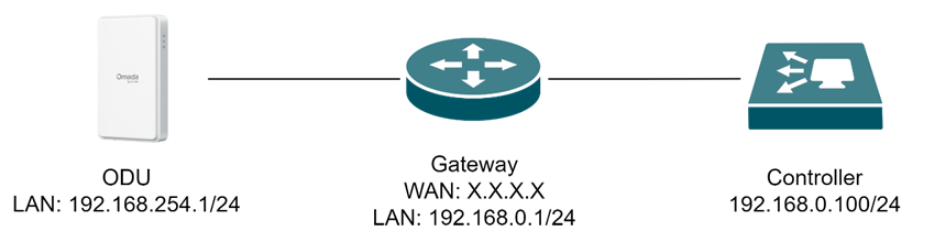
I recently bought an ER701-5G outdoor antenna to use as a pure cellular backup line (Failover) on the WAN 3 port of my ER707-M2. The main WAN 1 is connected to a fiber line in PPPoE.
My goal is very simple, yet I am stuck in an Omada software paradox:
1 No Double NAT: I need the ER701-5G to run in IP Passthrough mode. If I leave it in Router mode, the double NAT messes up my credit card POS terminal and introduces latency/sluggishness to web browsing, completely bottlenecking my 2.5 Gbps local network capabilities.
2 Same Site Management: I want BOTH the ER707-M2 and the ER701-5G adopted and visible under the SAME Omada Site. I do not want to split my shop into two artificial sites just to see the antenna.
The Problem:
If I put the ER701-5G in Router Mode, I can adopt it in a second site, but I get Double NAT (which I cannot have).
If I put the ER701-5G in IP Passthrough Mode and connect it directly to the WAN 3 port of the ER707-M2, the ER707's WAN firewall blocks the controller traffic. The antenna becomes totally invisible to the controller, and adoption fails (Pending/Disconnected loop).
Since the ER701-5G is physically connected straight into the WAN 3 port of the gateway (it doesn't go through the switch first), how can I bypass the WAN firewall to allow the OC200 Controller to adopt and manage the antenna via management VLAN, while keeping IP Passthrough active for internet failover?
Has anyone successfully configured a WAN-side VLAN Interface on the ER707-M2 to handle this scenario within the same site without sacrificing the 2.5 Gbps routing performance?
TP-Link engineering team, please consider a "Modem/Slave mode" firmware update for the ER701-5G when used behind another Omada Gateway!
Thanks in advance for any step-by-step workaround.