
ER605v2 VPN kill switch

I noticed when the VPN connection fails, our ISP's IP is exposed silently. This is a huge security risk and we cannot use it for our business. Unfortunately if a fix isn't in the pipeline from TPLink/Omada will have to return it and swap this for a Cudy gateway. Are there any updates on adding the VPN kill switch to Omada gateways?
I noticed other routers have gotten an update https://community.tp-link.com/en/home/forum/topic/615390?sortDir=ASC&page=4
Please advise.
Thanks.
- Copy Link
- Subscribe
- Bookmark
- Report Inappropriate Content


Hi @meltech
Thanks for posting here.
ER605 doesn't have this security concern. To understand the situation better, please let us know the following info:
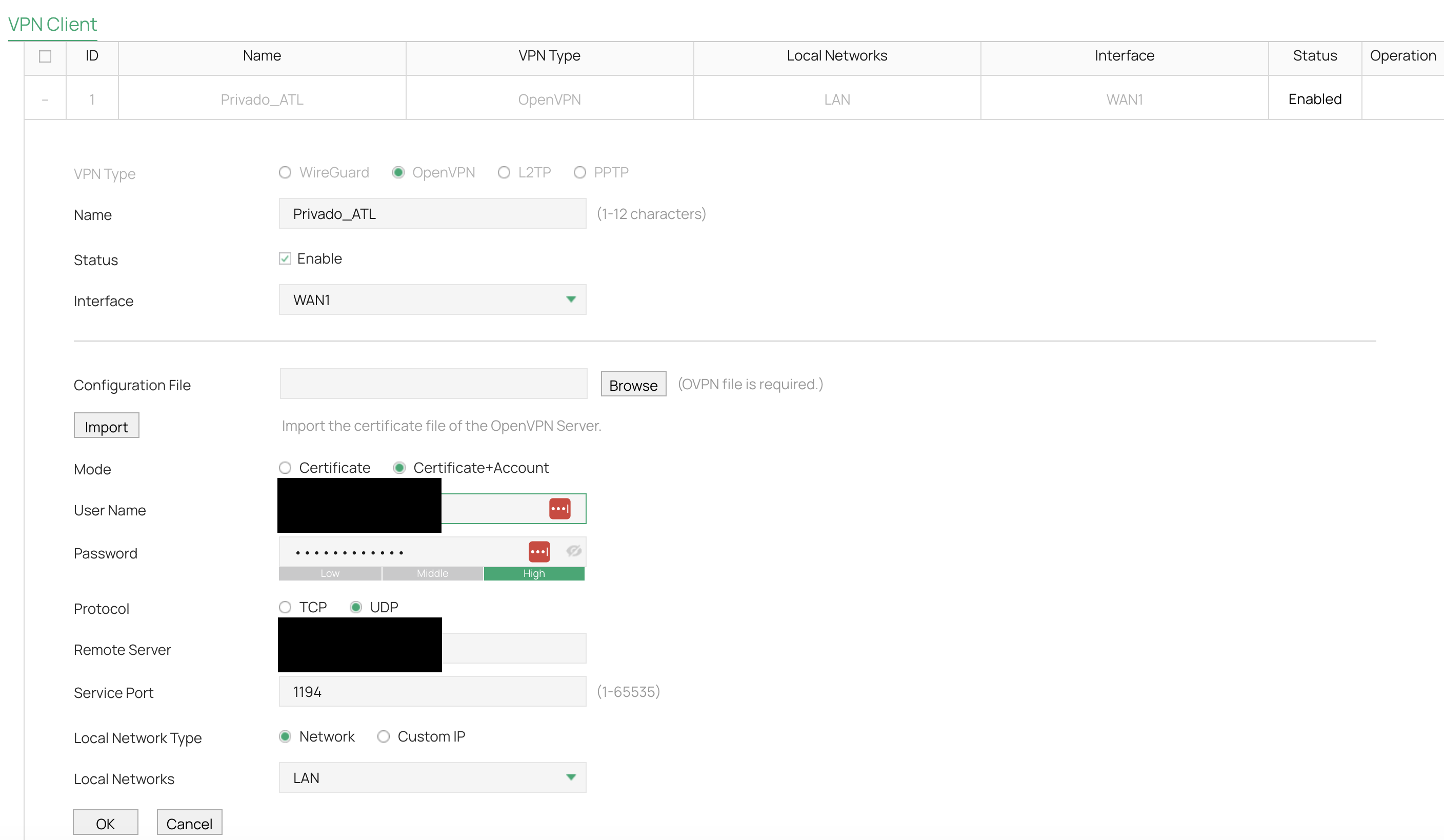
1. What kind of VPN do you configure? Better share the config screenshots.
2. How did you find the ISP's IP is exposed?
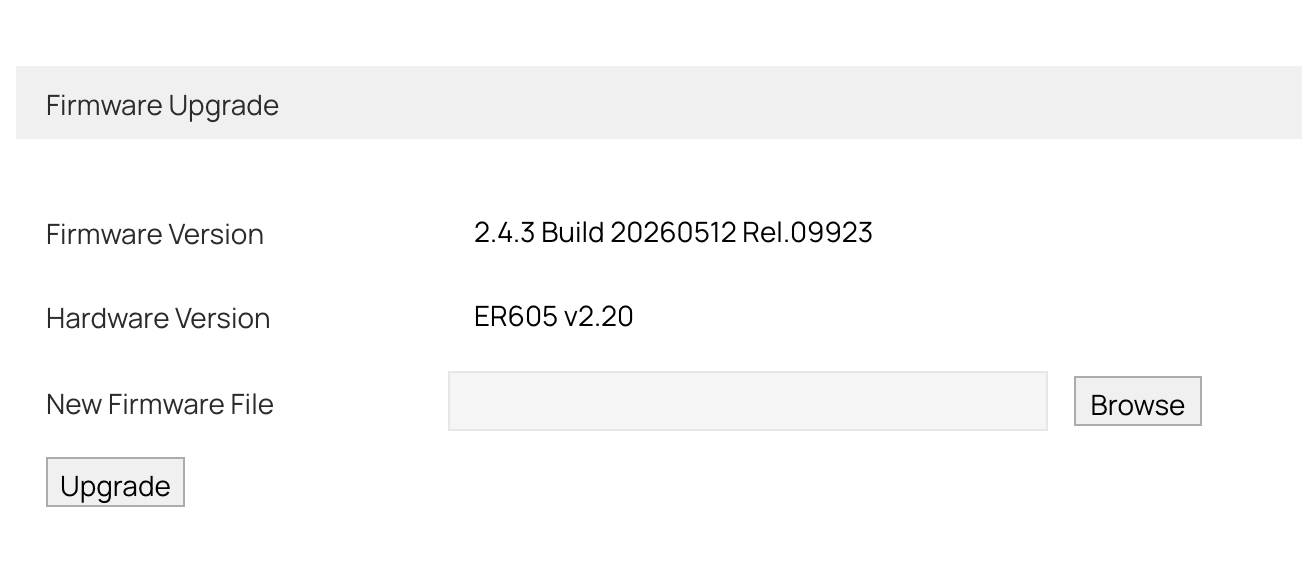
3. What's the firmware version of the ER605?
- Copy Link
- Report Inappropriate Content
- Copy Link
- Report Inappropriate Content
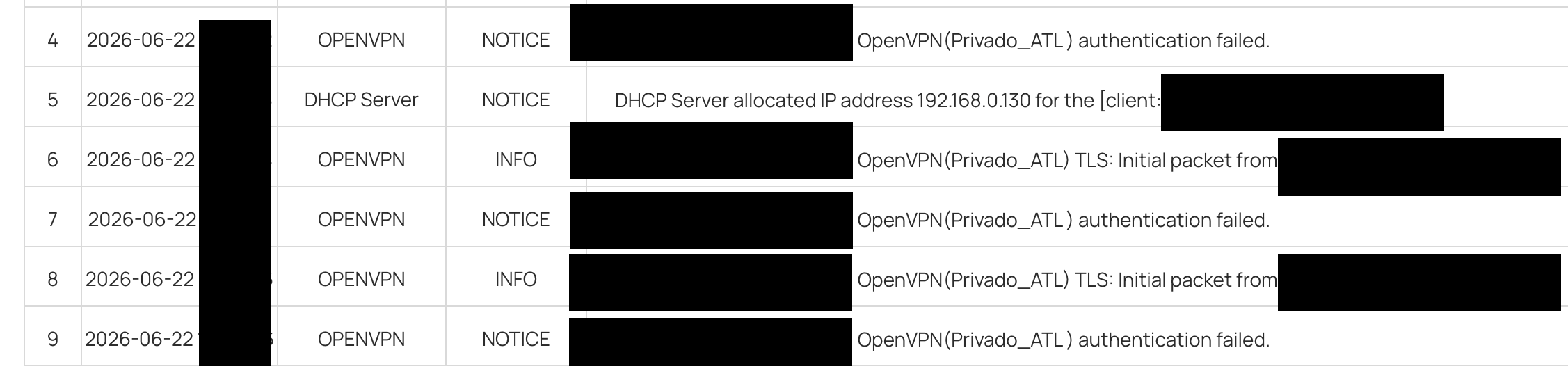
Hi I am trying an OpenVPN client with settings like below. To test a situation where my VPN service gets cut off (i.e. payment declined and subscription suspended), I put the wrong password on purpose.
The logs show authentication fails as expected, but instead off cutting of the internet like one would expect with a secure VPN client, I still have internet access where my actual IP address is exposed (determined by using a simple whats my ip google search).
There should be a VPN kill switch setting somewhere here, where if the VPN connection or authentication fails, there should be no internet traffic whatsoever. Cudy routers have this setting, and I believe some TPlink models have this as well in recent updates, so why not ER605v2?
- Copy Link
- Report Inappropriate Content
Hi @meltech
Thanks for the reply.
You mean you intentionally entered the wrong payment password when trying to make a payment? This would not disconnect the VPN; it would only cause the payment to fail. Therefore, the VPN client would remain connected, and the outbound IP would remain the VPN server's, as expected.
Is there something I misunderstood? Please correct me if I’m wrong. Thank you.
meltech wrote
Hi I am trying an OpenVPN client with settings like below. To test a situation where my VPN service gets cut off (i.e. payment declined and subscription suspended), I put the wrong password on purpose.
The logs show authentication fails as expected, but instead off cutting of the internet like one would expect with a secure VPN client, I still have internet access where my actual IP address is exposed (determined by using a simple whats my ip google search).
There should be a VPN kill switch setting somewhere here, where if the VPN connection or authentication fails, there should be no internet traffic whatsoever. Cudy routers have this setting, and I believe some TPlink models have this as well in recent updates, so why not ER605v2?
- Copy Link
- Report Inappropriate Content
Yes, there is a misunderstanding regarding the test scenario.
I intentionally entered incorrect OpenVPN credentials to simulate a situation where the VPN service is no longer usable (for example, after a subscription suspension, account issue, authentication failure, or VPN server rejection).
In this case, the VPN tunnel cannot be established, which results in the client falling back to the regular WAN connection.
My concern is that when VPN authentication or connectivity fails, the router continues to allow internet traffic through the WAN interface, exposing the public ISP IP address. From a privacy and security standpoint, I would expect an optional VPN kill switch feature that blocks all internet traffic unless the VPN tunnel is successfully established.
Is there any plan to add a VPN kill switch feature in a future firmware release? Alternatively, are there firewall or routing settings that can be configured to ensure internet traffic is only allowed when it is routed through the VPN tunnel, and blocked if the VPN connection is unavailable?
- Copy Link
- Report Inappropriate Content

I dont see the concern here - since the gateway has a WAN connection that IP will always exist anyway, and the firewall will deal with any incoming connection / attack attempts anyway. You can harden it further with gateway ACLs.
If you want to completely disable WAN access if the VPN tunnel fails, im not sure how you could achieve that - maybe a IP_GROUP_ANY policy route could work - but still, the general WAN connection still exists and is active so.....? even if a kill switch was present, the WAN is still active always....... like any other gateway - otherwise, how would it know when to re-enable it and try the VPN again ?
- Copy Link
- Report Inappropriate Content
@GRL
I guess, how does your competitor CUDY implement the kill switch (see screenshot #1)?
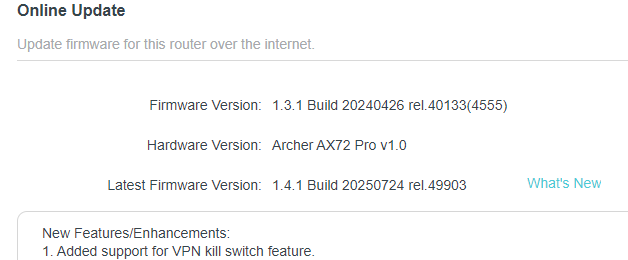
Furthermore, how did you (TPLINK) implement it in another router (see screenshot #2)?
This clearly is a recurring topic in this forum.
To many of us, there should be some feature that forces internet traffic through VPN only, kill traffic if VPN fails, and only allow traffic once VPN becomes healthy again.
There are many use cases where IT department must have all traffic flow through a VPN, all or nothing.
I guess if no solution is in the firmware schedule, I will return this ER605v2 and get a CUDY. Thanks.
1)
O
2)
- Copy Link
- Report Inappropriate Content
Hi @meltech
Thanks for the information.
Please have a look at the following post, Is this what you want?
- Copy Link
- Report Inappropriate Content
Information
Helpful: 0
Views: 338
Replies: 8
Voters 0
No one has voted for it yet.