
Suspected same network - mismatching Wifi security causing wifi instability over area
Suspected same network - mismatching Wifi security causing wifi instability over area

I have 3 EAP225. an EAP225-Outdoor and an EAP615-Wall.
Since the last (I thnk two) updates (I update as and when they're released) my home wifi has become incredibly volatile.
Initially I assumed it was caused by standard settings so I deleted my home wifi and recreated it, turned off features like wifi 6 on the single access point that supported it, removed roaming features, adjusted power and channels (both automatically and then manually) but to no avail.
Upon investigation I found devices that authenticated with the EAP615-Wall would refuse to then authenticate with any other access point due to the differing security as pointed out by my phone (have to forget and re-add the network on my Pixel 10 to work around this). Also complaints from iphone users having similar issues etc.
Likewise if I authenticate with the non-EAP615-Wall access points first it'd try to connect to the wall when i was close and then ban the network for mismatching security then and not try again. Disabling wifi on this device entirely has fixed this problem. Don't know if anyone else gets this issue but thought i'd mention it.
- Copy Link
- Subscribe
- Bookmark
- Report Inappropriate Content
@Vincent-TP Hi Vincent, thanks for following up on this.
Right I worked out what causes the issue: In order to gather the information I created a new network called TEST and it worked flawlessly.
I just went back through to compare the settings with my broken network:
It's becuase my home network was on WPA2-PSK/WPA3-SAE/AES after I temporarily enabled and then disabled 6Ghz. I hadn't spotted it'd moved it on from WPA2-PSK/AES.
When the wifi network is centrally set to WPA2-PSK/WPA3-SAE/AES my devices that support WPA3-SAE (iphone / pixel 10) connect to the 615-Wall box with WPA3-SAE but all other access points with WPA2-PSK. Hence the network gets disabled because my phone says the same network has different credentials.
I've moved it back to WPA2-PSK/AES and all is fine again now. *kicks can down the road*
Thanks for your and the other person's time.
for info: I'm using 6.2.10.17 I updated all the firmware about a week ago, prior to that i was on the last version that was generally available because i log in to my wifi almost daily and apply patches pretty much immediately. I don't have any screenshots. affected devices were just hte newer ones like phones / tablets (that support WPA3 i guess). topology is a house with access points in garden, under stairs, lounge, loft, bedroom (to work around thick walls of extension)
- Copy Link
- Report Inappropriate Content

Are the access points controlled by controllers or are they stand alone? If they are stand alone, the SSID settings must be exactly the same on all access points, you will also lose the roaming function that you would have if you used controllers.
- Copy Link
- Report Inappropriate Content
@MR.S Thanks for getting back to me, yes via a dedicated controller so the WiFi is configured for all devices centrally. I've been working with them for 7 years, set up various vlan configurations, vpns, routes, segregated networks, etc and this is the first time I've had issues otherwise I'd assume I'd done something stupid.
- Copy Link
- Report Inappropriate Content
try creating an SSID with default settings, set only SSID and password and which vlan, leave everything else as default.
try to see how roam works then.
i know that WPA3 and PMF can cause problems on some devices. set PMF to Disable or cpabel. do not use mandatory.
- Copy Link
- Report Inappropriate Content
And as you probably discovered, 6GHZ requires WPA3 and Manatory PMF. I had the same problem and ended up creating a separate SSID for 6Ghz, and one for 2.4 and 5 GHZ, all the devices that were problematic were just old devices and did not have 6GHz
- Copy Link
- Report Inappropriate Content
@MR.S Thanks again for the quick reply. I did that first and which is what showed me that it was certainly the authentication mismatch. If my wifi was just disconnecting it'd be different, it's my phone identifying the authentication method doesn't match and refusint to connect to it for security reasons. (shows an error meaning the authentication method doesn't match what's stored for that network).
First thing i did was turn off wifi 6 on that one device becuase it was the only one that supports it. I also deleted and recreate my two wifi profiles (I seperate 5G / 2.5G) and use default settings (with all roaming assists etc off(as per your suggestion))
I also created individual wifi profiles for each device so i could track down the issue, checked interference and moved 5GHz out of the DFS range in case somehow i was getting too much of that causing channel shifting.
I've removed the wifi from it now and that device is functioning as an expensive ethernet adaptor, but my wifi works flawlessly again across the other EAP225 devices (other than the deadspot this one was covering of course).
It's not a big deal to be honest, it covers my front drive - just annoying becuase I'm thinking about upgrading and now i'm having to look at ubiquiti and I'd rather stick with Omada so hoping this is a firmware glitch and gets fixed because it has until now been bullet proof. (The only other thing lacking i've had with Omada is that conditional routing of traffic over a VPN is all or nothing so I can't send individual devices to connect via a country by IP)
- Copy Link
- Report Inappropriate Content
ok, if you are using different wifi profiles that may be part of the problem, it is not possible to roam between wifi profiles or WLAN groups as they are called. if you have multiple WLAN groups then you will experience what you are experiencing.
- Copy Link
- Report Inappropriate Content
@MR.S I think I might have confused by listing what i've tried, apolgies
I have 2 Wifi Networks. One called XXXXXX2.5G (just 2.5Ghz wifi) and one called XXXXXX5G(with both 2.5Ghz and 5Ghz enabled but no 6Ghz).
These two networks are pushed out to 1xEAP615-Wall, 3xEAP225, 1xEAP225-Outdoor
On both 2.5Ghz network and 5Ghz which work independently i get the authentication caused by the EAP615-Wall. The issue goes away if I deactive the EAP615-Wall.
I have used default settings with all roaming etc turned off.
This setup has worked for years and broke following the last 2 updates.
- Copy Link
- Report Inappropriate Content
Ok, so you don't use WLAN Groups, well then I don't know, could be firmware problem as you say.
maybe Omada team on the forum has some good advice..
- Copy Link
- Report Inappropriate Content
@MR.S I use the profiles as per below.

I appreciate your help, i'm an IT engineer with >20 years of troubleshooting experience (though not wireless networking) but I do sometimes make very stupid mistakes, but your suggestions have reassured me that i've tried all the obvious things.
- Copy Link
- Report Inappropriate Content


Hi @pete32117
Thanks for posting here. To better understand the situation, please give us the following info:
1. The topology of the network;
2. The config page of the involved SSID settings, including the WPA settings;
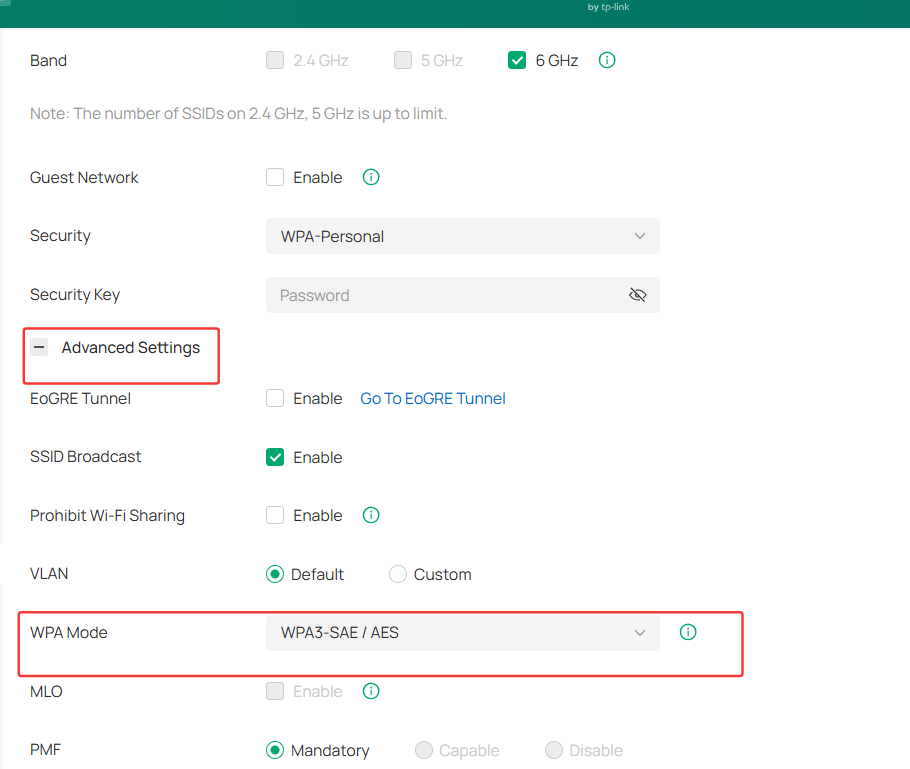
3. Apart from the mentioned pixel and iPhones, what about other clients? Or does this happen on all kinds of wireless clients?
4. Did you update the firmware for all the EAPs? Do you remember the EAP615-wall's firmware before this update?
5. Some screenshots showing the error message when failing to pass the authentication.
6. What type of controller are you using? What's the firmware version?
7. Disabling wifi on this device entirely has fixed this problem.
>>>Does this mean turn off wireless radios of EAP615-wall?
- Copy Link
- Report Inappropriate Content
Information
Helpful: 0
Views: 304
Replies: 13
Voters 0
No one has voted for it yet.