
Log Onto Cable Modem Webpage With ER605

I'm trying to log onto my Arris S33 webpage from my PC connected to my ER605 router at WAN1
My LAN is: 192.168.0.x
The S33 webpage is at: 192.168.100.1
I created a static route as follows:
Destination IP: 192.168.100.1
Subnet mask: 255.255.255.255
Next Hop: 98.25.210.143 (I got this from WhatIsMyIP.com)
Interface WAN1
I also tried:
Destination IP: 192.168.100.0
Subnet mask: 255.255.255.0
Neither route works. Can anyone help with what I'm missing?
Thanks in advance
- Copy Link
- Subscribe
- Bookmark
- Report Inappropriate Content

What happens when you leave the ER605 connected to the S33's main 2.5 Gbps port and then connect the laptop (with the static IP of 192.168.100.2) to the S33's secondary 1 Gbps port? If you can access the S33 GUI, then I would recommend that you configure a second WAN port on the ER605 and connect it to the secondary port on the S33.
On the idea of changing the LAN to 192.168.100.0/24, that might work OK. To test it, I would assign the ER605 a static IP, such as 192.168.100.2, and ensure that 192.168.100.2 is configured as the default gateway for the rest of your LAN devices. You will need to connect the secondary port on the S33 to a LAN port on the ER605 or the unmanaged switch for connectivity.
- Copy Link
- Report Inappropriate Content
Several questions...
1. How is the ER605 connected to the Arris S33?
2. Why is the PC connected to the WAN1 port of the ER605?
A topology map would be most helpful if someone is going to help you.
- Copy Link
- Report Inappropriate Content
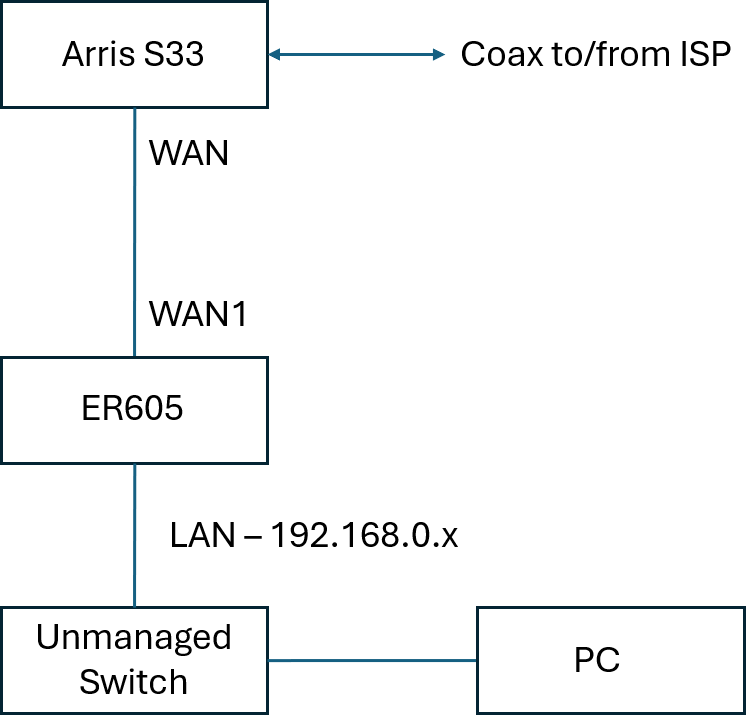
Sorry for the poor description in my post.
The ER605 is connected to the Arris S33 at the WAN1 port.
My poor description led you to think the PC is connected to the WAN1 port.
By the way, I did connect a laptop to the WAN1 port of the Arris S33 just to see if I could get to the Arris' webpage. I gave the laptop a static IP of 192.168.100.2 and was successfully able to get to the Arris' webpage - this isn't a useful solution for me.
I'm guessing my static route is OK, but I need to make one or more other configuration settings in the ER605. The problem is I have no idea what I should do next as I reached my level of understanding of router behavior.
- Copy Link
- Report Inappropriate Content
- Copy Link
- Report Inappropriate Content


Hi @rplentz55
Thanks for reaching out to TP-Link Business Forums.
Normally, you don't need any additional configuration to access the Arris's GUI.
Did you configure any advanced settings that might block access from the LAN side?
I've tested the topology below, and it works perfectly without any issues.
ISP - - (20.20.20.20) Archer Router (192.168.1.1) - - (192.168.1.2) ER605 (192.168.0.1) - - PC (192.168.0.100)
I can access 192.168.1.1 from the PC without additional setup.
- Copy Link
- Report Inappropriate Content
From your diagram, I don't see the need for a static route in the ER605. The ER605's WAN 1 port should receive an IP address (via DHCP) from the Arris device. The ER605 will then NAT the devices (such as your PC) connected to its LAN ports and no static routes are needed.
If the ER605 is not receiving an address from the Arris device, then configure the ER605 with a static IP address (such as 192.168.100.2) on the WAN 1 port and make sure you configure the default gateway as 192.168.100.1.
- Copy Link
- Report Inappropriate Content
After researching this issue further, it appears that the Arris S33 is somewhat problematic when trying to access the GUI through a LAN router.
The Arris S33 does not use DHCP to assign private IP addresses to your home network devices. Instead, it acts as a bridge, passing your ISP's public IP address directly to your ER605 (or any other device connected to its 2.5 Gbps port).
When unable to access the Arris S33 GUI, one of the possible solutions found on the internet includes adding a static route to the ER605 as you have done. I am only guessing here but another possible solution might be to configure a second WAN port on the ER605 with a static IP address (192.168.100.2) and connect it to the second port on the S33.
Note: Because cable modems only lease one public IP at a time, you must reboot or power-cycle the S33 every time you change the device connected to its Ethernet port (e.g., swapping a laptop for the router). This is due to the MAC address change that happens when a different device is connected.
- Copy Link
- Report Inappropriate Content
Hello,
I appreciate all the help, but I still haven't been able to get this to work.
I got a laptop, assigned it a static IP (192.168.100.2) and plugged it directly into the S33 WAN port - this worked and I was able to get to the S33 webpage without issue.
I thought the ER605 would bridge my local LAN (192.168.0.x) to the S33 (on 192.168.100.x) at the WAN port, but apparently that is not working - this is what led me to try a static route. I have not made other changes in the ER605.
I really don't want to try this, but... If I changed my LAN to 192.168.100.x, what do you think will happen? Of course I'd have to give the ER605 a static IP other than 192.168.100.1.
This approach seems unnecessarily complicated and I really don't want to try it.
- Copy Link
- Report Inappropriate Content
What happens when you leave the ER605 connected to the S33's main 2.5 Gbps port and then connect the laptop (with the static IP of 192.168.100.2) to the S33's secondary 1 Gbps port? If you can access the S33 GUI, then I would recommend that you configure a second WAN port on the ER605 and connect it to the secondary port on the S33.
On the idea of changing the LAN to 192.168.100.0/24, that might work OK. To test it, I would assign the ER605 a static IP, such as 192.168.100.2, and ensure that 192.168.100.2 is configured as the default gateway for the rest of your LAN devices. You will need to connect the secondary port on the S33 to a LAN port on the ER605 or the unmanaged switch for connectivity.
- Copy Link
- Report Inappropriate Content
Hello again,
Right now I have the ER605 connected to the 1Gb port and the 2.5 Gb port is free. I think I'll give your idea a try since it's fairly easy to implement. Either way, thank you for your suggestions; you have been very helpful. I think I'll consider this thread closed
Ray
- Copy Link
- Report Inappropriate Content
Information
Helpful: 0
Views: 183
Replies: 9
Voters 0
No one has voted for it yet.