
Omada Client Solutions 06: Bite-Sized Business
 NeilR_M

Omada Client Solutions 06: Bite-Sized Business
This article series simulates real-world examples of network configurations completed with Omada equipment for home lab and/or business environments. Any similarities to real persons or organizations are purely coincidental.
Omar decides to take on several smaller, quicker jobs around his town to supplement his main business.
First Bite: Distracted Teenager
Barry Gibbs is a customer with a teenage son, Robin, who is not doing so well in school. He believes it is due to the apps on his phone distracting him from schoolwork. Barry asks Omar to help him configure his Omada network so that his son’s devices cannot access apps like YouTube when he should be doing schoolwork.
Omar checks his network and discovers he has an Access Point and a Router, but no switch. To make sure that he catches all devices, Omar decides to use PPSK to place all of Junior’s devices in a VLAN that restricts network traffic during his study hours.
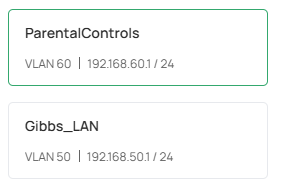
First, Omar sets up two VLANs called ParentalControls (VLAN 60) and Gibbs_LAN (VLAN 50).
He takes the existing WLAN, Gibbs_Wi-Fi, and changes the security settings to PPSK without RADIUS.
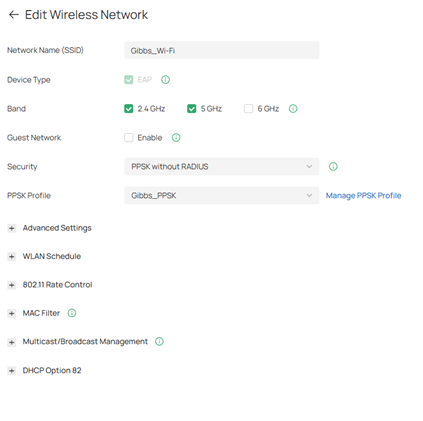
The PPSK Profile settings are shown below.
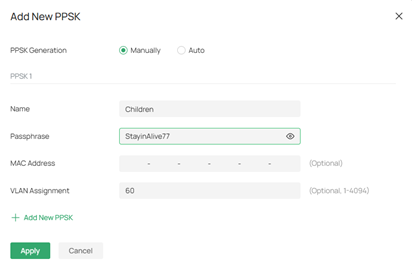
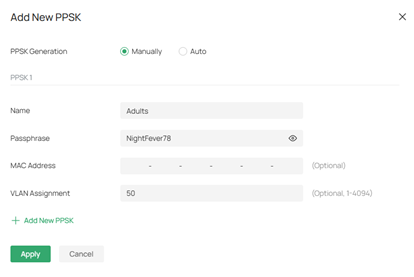
The Children PPSK is set to the existing password, so Robin’s devices will remain connected to the Wi-Fi. Omar then sets the Adults PPSK to a new phrase to place the devices on a different VLAN.
Next, he implements URL filtering rules on the ParentalControls VLAN.
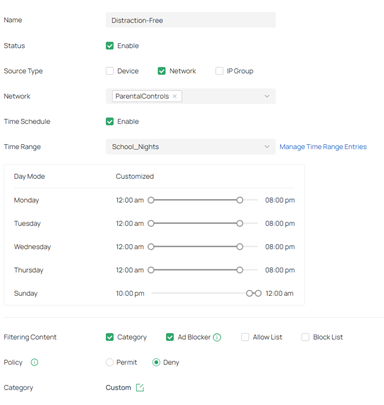
The Time Range is set to school nights to help Robin focus, with the filtered categories being set to “distracting” content.
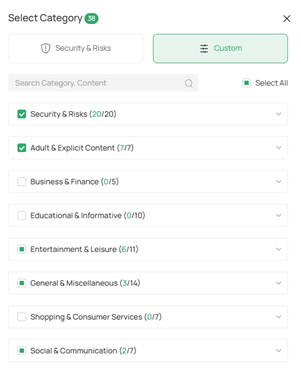
Verification
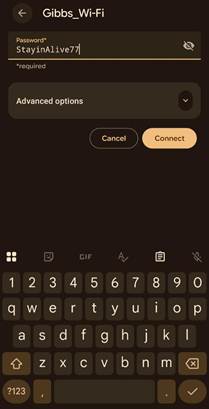
Omar tests with his phone, connecting to their Wi-Fi using the Children PPSK.
 |
|

The site refuses to connect during the scheduled windows. Using this creative approach to parental controls, Barry can hopefully help Robin improve his grades.
Second Bite: Split the Tunnel
Next, a client named Michael J. contracts Omar to help him set up a Split-Tunnel VPN. He wants to be able to access his printers in his home while still accessing his office servers and documents.
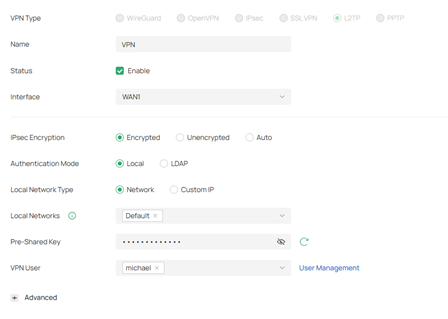
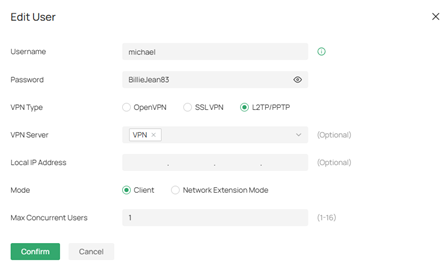
Omar creates an L2TP VPN server and creates a credential for Michael to use. He sets up a Pre-Shared Key, then sets up the user credential for an added layer of security.
L2TP is selected for its integration with the built-in Windows VPN client and its performance. Split-Tunnel VPN can be accomplished with WireGuard and OpenVPN as well.
 |
|
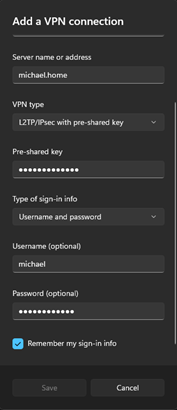
He then sets up the client connection on Michael’s computer, using the same details and credentials he just set up.
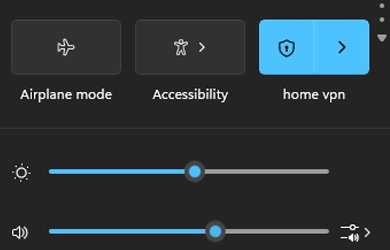
The VPN shows a successful connection. Michael then logs into his server at home.
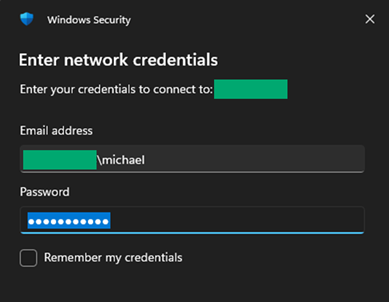
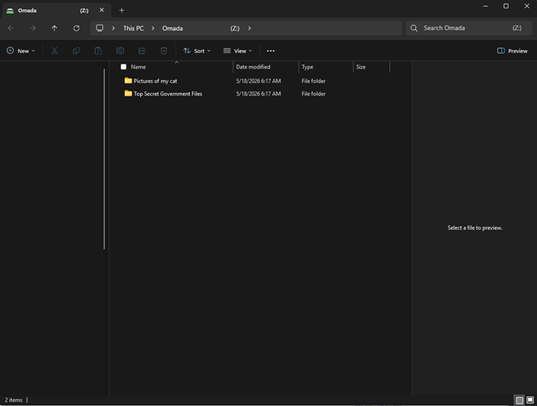
Michael’s computer can successfully access his home server from his office over the VPN.
Verification
With Michael successfully connected, Omar now needs to verify that Michael can still access the resources in the office. Omar has Michael print a document from his home server to the printer in his office.
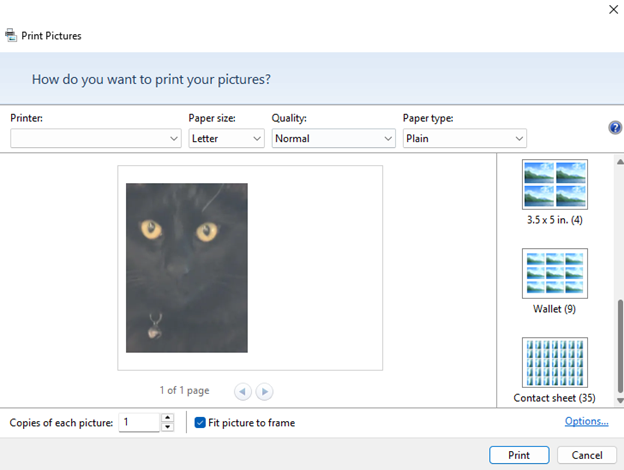
Success! Now Michael can access his swaths of cat pictures from anywhere in the world.
Third Bite: Passively Powerful
Omar gets a call from a client, Steve Morris, with several EAP devices. Steve can’t figure out why some of his EAPs aren’t working on his smart switch. He gives Omar a quick layout of how he wants all his devices connected, as well as model numbers.
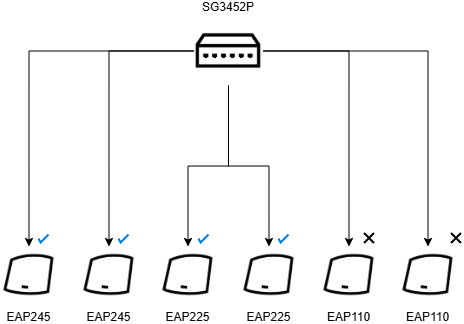
Omar lets Steve explain the situation in his own words.
“I pulled these other APs from my old office, and they were working just fine. But when I plugged them into the switch here, they wouldn’t turn on. All the other APs in our office work just fine, and they’re plugged into the same switch!”
Omar inspects the cables with a cable tester but finds that all the cables are testing perfectly fine. He swaps the ports that each cable is being plugged into, but the issue still persists.
He then goes to check the specifications for each AP as well as the switch. Maybe the PoE budget is being exhausted?
He finds the answer in the specifications for the EAP110. The EAP110s only support Passive PoE. Steve mentions that they weren’t previously plugged into any switch for the power, but used an adapter that he put in storage as a backup. Omar plugs the adapters in, and, sure enough, the EAPs power on just fine.
Passive PoE devices are incompatible with Active PoE devices. Similarly, if a Passive PoE adapter is used to power an Active PoE device, it may physically burn out the device if the voltage provided is too much for the device.
Are there any other smaller topics you would like to see Omar cover? Let us know in the comments below!
| Previous Article | r/Omada_Networks |