
Need help with mac based VLAN

Reading about mac based VLAN the TP-Link guides state that is the source mac address is bound to the MAC VLAN the packet will be tagged with the desired VLAN id. What happens when the response comes back, how does it get back to the correct VLAN?
Here's what I have.
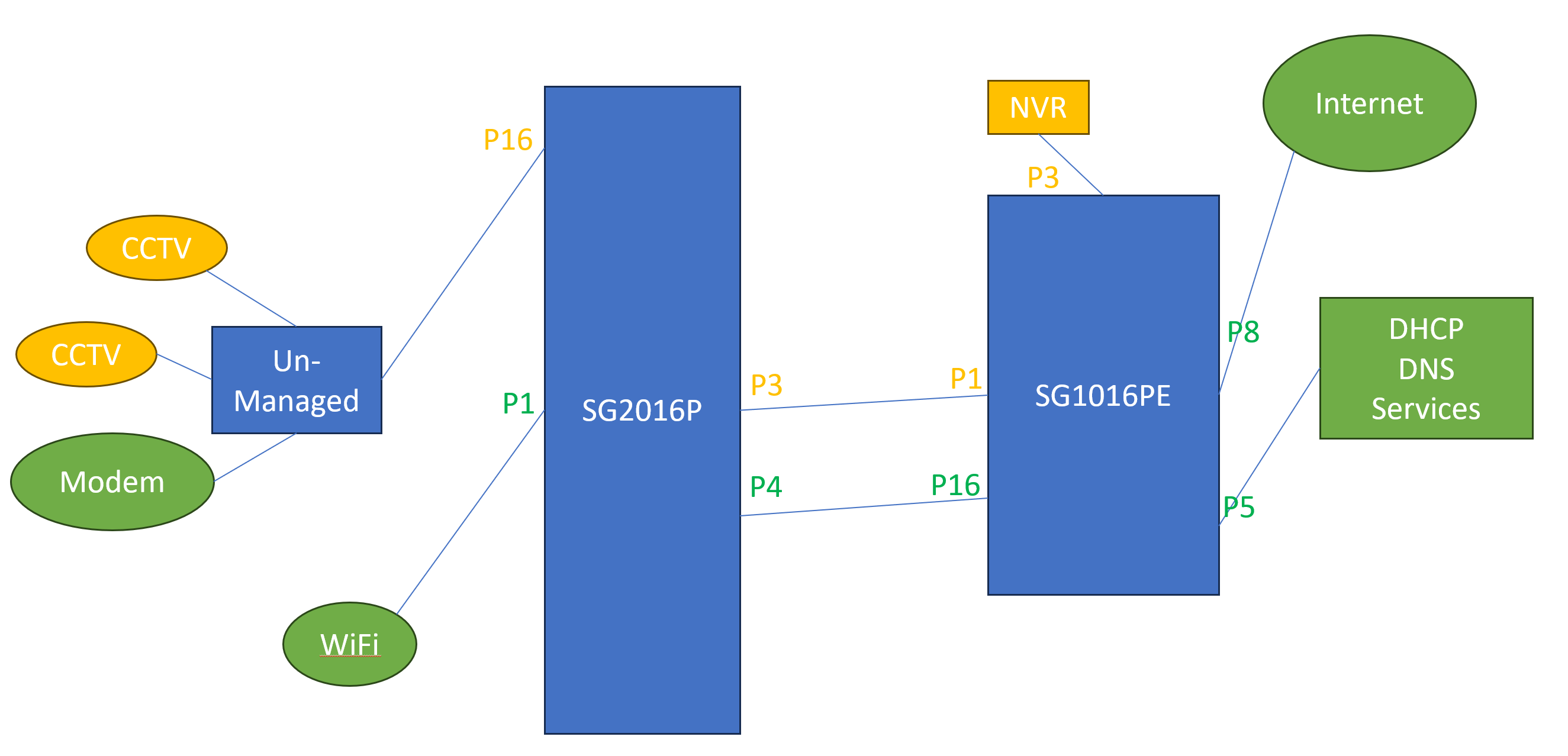
The yellow ports were all defined as untagged in 802.1Q VLAN 10 and the green ones as untagged in 802.1Q VLAN 1. Everything worked until I had to add in the modem. It needs DHCP/DNS and Internet access.
So I created a MAC VLAN binding on the SG2016P for the modem using port 16 and VLAN 1. Traffic from the modem started flowing to the DHCP server but the responses were unable to get back to the modem because they were on VLAN 1. I added port 16 on the SG2016P into VLAN 1 and everything worked but I'm not happy that all the VLAN 1 traffic will be going out to the un-managed switch which is in a public area and accessible to everyone.
What did I do wrong?
Thanks in advance.