@TimBNL
This may be the best speed you could get from Deco M9 Plus. I have gigabit Internet and a set of Deco M9 Plus, I never get speeds faster than 500Mbps when connected to Satellite Deco. Next time my ISP raises Internet subscription prices, I plan to downgrade to 500Mbps data plan.
Still, it makes sense to double check your home network. The rest of my post is recommendations on how to do it.
1. On your PC, I recommend installing "Speedtest by Ookla" app from App Store. At Internet connection speeds over 300-500Mbps it'll provide you with more reliable results than opening www.speedtest.net in browser and running speed test from browser.
Run speed test in Ookla app, see what it reports. Run it few times and note best results.
2. Check if your Satellite Deco has good WiFi connectivity with Main Deco. In Deco app, open Satellite Deco page and check what it reports under Signal Source. Example:

In this example Main Deco is named Living Room. You should expect to see 2 or 3 blue bars if Satellite Deco is properly positioned.
3. Power off Satellite Deco. Connect PC by Ethernet cable to second Ethernet port of Main Deco and run speed test on PC. With good Ethernet cables and gigabit Internet you should expect to see around 940Mbps reported in speed test app.
4. Get 4-5 meters long Ethernet cable and connect Main Deco with Satellite Deco by Ethernet cable. You'll daisy chain them into this setup:
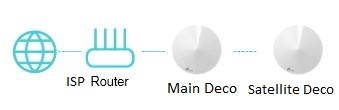
In Deco app, open Satellite Deco page. It should report Ethernet connection now:

Keep PC connected to second Ethernet port of Satellite Deco and run speed test again. You should see same speed you saw on PC connected directly to Main Deco by Ethernet cable, which is around 940Mbps.
------------------------
If all these tests got expected results, what you get from your M9 Plus set, when Satellite Deco is connected to Main Deco wirelessly and PC is wired to Satellite Deco, is the best it can deliver.
There are no configuration settings in Deco mesh running in Access Point mode to boost its performance.

 This thread has been locked for further replies. You can start a new thread to share your ideas or ask questions.
