
deco network setup with existing gw/router
 This thread has been locked for further replies. You can start a new thread to share your ideas or ask questions.
Hi
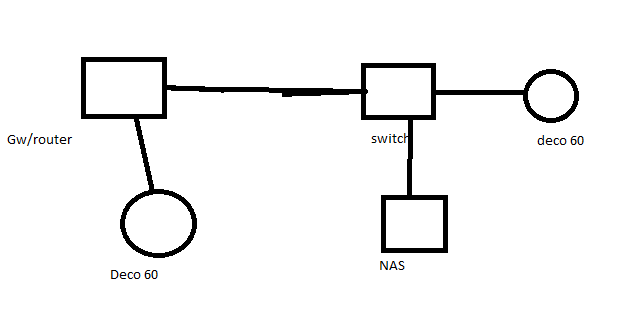
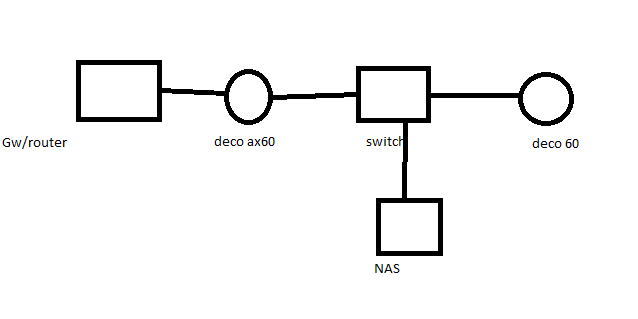
So I have a setup made in paint pic1=)
The NAS is getting a fixed dhcp address from gw/router. And I want the first deco act as a Router as in pic 2, parent controll and stuff.
Pic2: Is it possible to pass through the ports through deco to the nas and keep the fixed address from the gw/router?
- Copy Link
- Subscribe
- Bookmark
- Report Inappropriate Content

If you want to keep Deco parental controls, that would mean running Deco in router mode. With that in mind, I am going to simplify your picture, leaving only relevant to your quesiton parts. This is what you want to have:
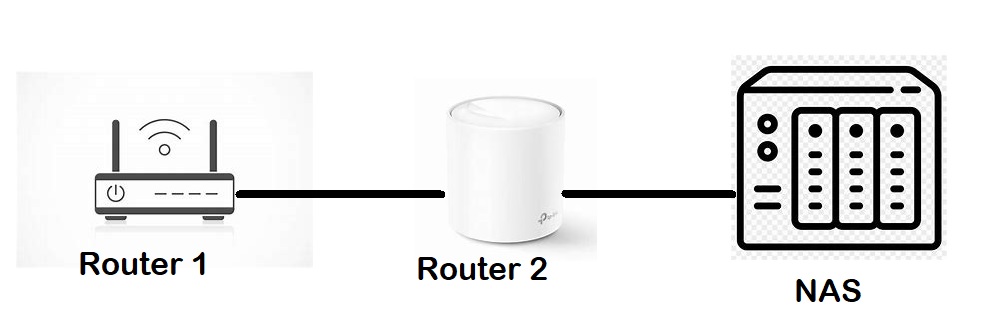
With this setup, these are answers to your questions.
1. Keep the NAS fixed address
As it is now obvious from the picture, Router 2 (a.k.a. Main Deco) should be providing fixed IP address to NAS, not Router 1. You can configure fixed IP address for NAS on Deco, by following this document: How to configure Address Reservation with Deco?
2. Pass through the ports through deco to the NAS
You can set port forwarding on Main Deco (a.k.a. Router 2). This is how: How to set up Port Forwarding feature on the Deco?
3. Access to NAS from the Internet
I am assuming you asked for port forwarding, because you need access to NAS from the Internet. If not, you are all set.
If you do need access to NAS from the Internet, you have Router 1 standing between Internet and Main Deco. You have multiple options to try, each should work:
- Configure Router 1 in bridge mode;
- Set port forwarding on Router 1 to Router 2 (to Main Deco);
- Put Router 2 (Main Deco) into DMZ of Router 1.
Also, for last two options to work reliably, you may wish to set static IP address for Main Deco on Router 1.
- Copy Link
- Report Inappropriate Content
Thanks for the input. Your setup means that i will have to change the ip of the NAS, and that can be troublesome if missconfigured and i would rather not do that.
Or I can change the dhcp range on router 1 and use it on router 2. that might actually work.
Or perhaps only change the mask to a B address scope as in 255.255.0.0 on router 1, then I might be able to set 192.168.0.1 on router 2. 192.168.0.1 address range is used by router 1 today. Thanks.
I want to keep the adress of the nas intact =)
- Copy Link
- Report Inappropriate Content
Hello
Kind a fun to have 3 dhcp servers where 2 of them work together.
So for now i can access my nas from the deco network even if the nas is on another network as in pic 1(address from old router). And I have been able to add a second address to the NAS. =)
So if i shutdown the dhcp function it will work even better. And test to see if the old router can act as a switch.
Also need to check if the router 1 can be bridged and still act as a switch.
- Copy Link
- Report Inappropriate Content
- Copy Link
- Report Inappropriate Content
Information
Helpful: 0
Views: 645
Replies: 4
Voters 0
No one has voted for it yet.