Archer AX50 isolated network for IoT

This thread has been locked for further replies. You can start a new thread to share your ideas or ask questions.

Archer AX50 isolated network for IoT

This thread has been locked for further replies. You can start a new thread to share your ideas or ask questions.

Archer AX50 isolated network for IoT
2021-12-30 22:17:33
Model: Archer AX50  
Hardware Version: V1
Firmware Version: 1.0.11 Build 20210730 rel.54485

Hello,

I bought Archer AX50 for my smart home. I have a variety of smart devices on my network, but for security reasons, it’s better to keep them on a separate network. I expected the AX50 router to have VLAN functionality, but it doesn’t. I have to use a guest network with unchecked "Allow Guests to Access My Local Network", that partially performs this function, but I have other problems.

  1. I have Home Assistant on the Guest network. I can't access it from PC or smartphone from main network.
  2. I want to move TV box to Guest network. However I can't, because it uses wired connection.
  3. If the TV box is on the Guest network, it will not be able to access the PLEX server on the NAS or use the Chromecast.

Is it possible to solve these problems? Or Maybe this router is not suitable for this, or additional equipment is required.

I also have some older routers, maybe they can be used on the network.

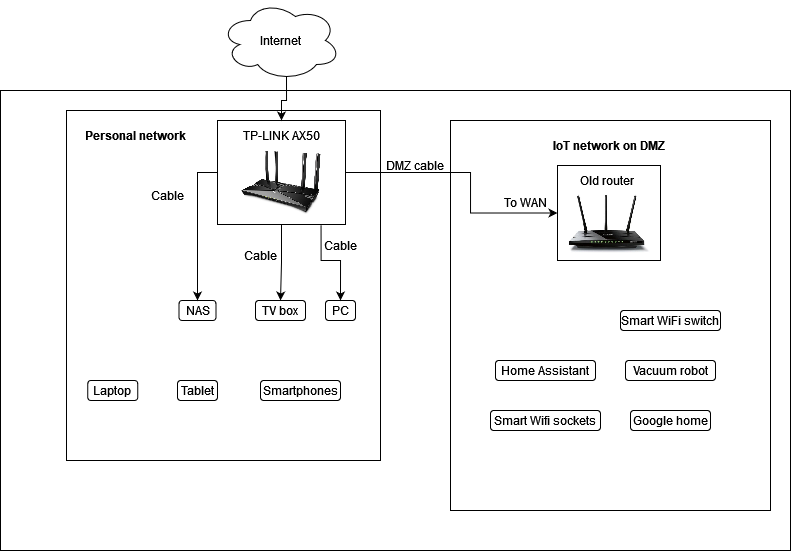
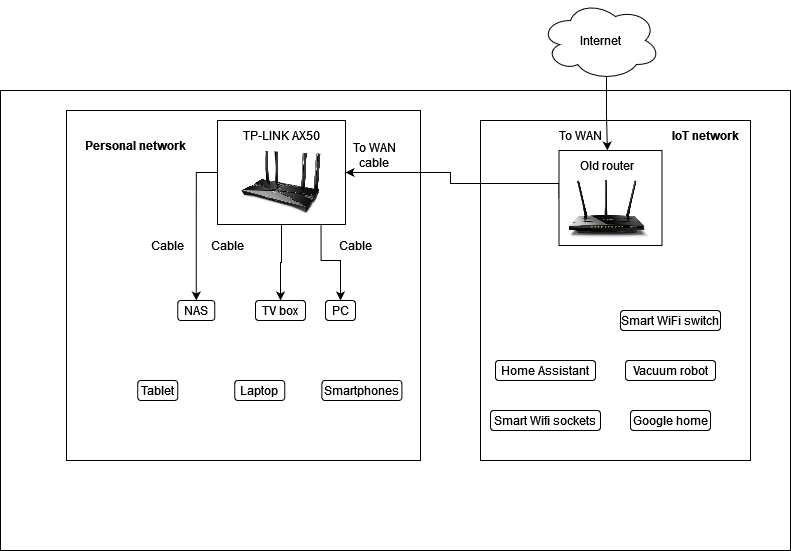
I drew my network simplified diagram and pinned it below.


  0      
  0      
#1
Options
3 Reply
Re:Archer AX50 isolated network for IoT
2021-12-31 09:56:59

@baltbena 


I can think of three options you could use to achieve your goals:

1. To be able to use VLANs you need a business grade router like these here.

2. If you choose to use your AX50 with one of your spare routers then you can hide your personal network behind a second NAT (on the spare router).

   Thus your personal network would be isolated behind the spare router's NAT and the IoT network would be served by the AX50.

3. You can just switch to wireless guest network on your smartphone or PC (with additional wi-fi adapter) when you want to manage IoT devices.

In the last two scenarios you should have your TV in your personal network though.


If this was helpful click on the arrow pointing upward to make it blue. If this solves your issue, click the star to make it blue and mark the post as a "Recommended Solution".
  1  
  1  
#2
Options
Re:Archer AX50 isolated network for IoT
2022-01-05 19:59:16

@terziyski 
Thanks for your reply.

The first option would be a fairly expensive solution.

I am considering using two routers. I want to use the AX50 on a personal network because it has WIFI6 and IoT devices don't need it. Therefore, I am considering an older router to connect as a DMZ to the AX50, and use it only for IoT devices.

What would be the advantages or disadvantages? I have never used a DMZ, so maybe there would be security vulnerabilities in this configuration?

I also redrawed both possible network options.

  0  
  0  
#3
Options
Re:Archer AX50 isolated network for IoT
2022-01-05 23:26:09

@baltbena 


I would use the second scenario topology.

This way your personal network would be isolated behind the second NAT (on AX50) from the IoT network (old router).

Your personal network would be able to communicate with IoT network freely, but IoT network could communicate with personal network only if you allow that (on AX50).

You don't have to use a DMZ on AX50 or the old router, only a port-forwarding for the neccessary ports would be enough.

The neccessary ports are these you would need visible from Internet (probably only NAS if you'll need that).


If this was helpful click on the arrow pointing upward to make it blue. If this solves your issue, click the star to make it blue and mark the post as a "Recommended Solution".
  0  
  0  
#4
Options