
Deco x60 - problem with VOIP phone
 This thread has been locked for further replies. You can start a new thread to share your ideas or ask questions.
I just installed new Deco X60 routers. All is going pretty well, other than 1 connection. I have a Cisco 8865 VOIP phone with video, so I can video call with all my colleagues (I work remotely). When I engage the video feature, the connection is very poor and eventually the call will drop. The entire Cisco phone then essentially disconnects from the network, it goes through a log--in process again. I have already turned off the "mesh" feature for this client (that helped solve even some audio chopiness).
All other clients on the network remain connected. The Deco light remains green.
How do I fix this issue?
- Copy Link
- Subscribe
- Bookmark
- Report Inappropriate Content

Cisco 8865 VOIP phone specs say it supports gigabit Ethernet connection. Wire it to Main or to Satellite Deco by Ethernet cable.
- Copy Link
- Report Inappropriate Content
@Alexandre. The issue is the location of my Cisco phone compared to my router makes it impractical. I am reading speeds (tested on my cell) of 500 mbps download/100 mbps upload right next to my Cisco phone. I would have anticipated that speed to have been sufficient, but something is going wrong.
- Copy Link
- Report Inappropriate Content
Wiring Cisco 8865 VOIP to Deco helps to eliminate possible issues, and also if that works - provides a solution without need for more troubleshooting.
You can't bring two close together to wire them, even for troubleshooting purposes?
The possible issues I can think of are weak link between Satellite and Main Deco, band steering, "mesh" feature. So, if Ethernet wiring is not a preferred option, let's work with these three.
1. If your phone is not connected to Main Deco, but to Satellite Deco - check Signal Source for each of your Satellite Deco, in Deco app. Example:

Less than 2 blue bars - Satellite is too far from Main Deco. Move it closer.
2. Band steering, or having 2.4GHz and 5GHz broadcasted under same SSID. Some devices may not handle it well.
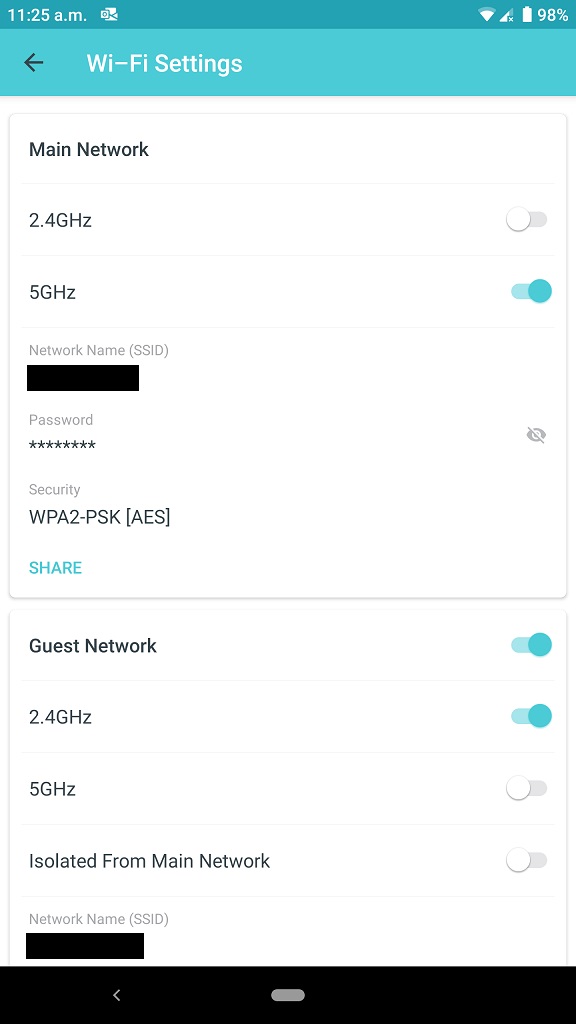
Enable Guest network in Deco, password protect it (it is not by default), turn 5GHz off and leave it with just 2.4GHz. Connect Cisco 8865 VOIP to Guest network SSID and see if it now works better.
In case your Cisco 8865 VOIP supports 5GHz the process is opposite: disable 2.4GHz on Guest Network and keep it running with 5GHz only. It is the preferred setup: to force phone on 5GHz exclusively.
3. "Mesh" feature. You got this one - keep it turned off for Cisco 8865 VOIP.
---------------
If nothing helps, you will be facing the following options: A) return X60 set; B) buy different VOIP phone; or you can consider buying additional X60 node, setting it as Satellite and wiring Cisco 8865 VOIP to it. My recommendation would still be wiring Cisco 8865 VOIP to X60 with Ethernet cable. You can even test that with one of Satellites you have already, to see if it'll work.
Whatever seem better option for you.
- Copy Link
- Report Inappropriate Content
@Alexandre. Thanks, you have helped me identify the problem.
1) Satelite to main deco connection not an issue, I am using ethernet backhaul.
2) This was a fantastic suggestion. I have now figured out that the 2.4ghz network being broadcast by my deco x60 is severly underspeed. I set up the guest network to 2.4ghz only, and tested the speed with my iphone standing right above the router. I am getting speeds in the range of 50mbps only. But the 5gzh network is getting speeds of over 500mbps.
So why is my deco 2.4ghz network so slow? How can I fix that?
- Copy Link
- Report Inappropriate Content
I noticed slow WiFi 2.4GHz speed with my Deco mesh, which has M9 Plus and M5. Whatever I tested it with, I could never get faster than 80Mbps. Meanwhile, I am getting up to 650Mbps with WiFi5 on M9 Plus connected to gigabit Internet.
As I do like Deco mesh and I do not have WiFi 2.4GHz devices that need faster speeds, I decided to just split WiFi bands between Main and Guest network. At my house smart plugs and smart thermostat connect to Guest network, everything else runs on WiFi5 and uses Main network.
There is nothing else you can do or configure in Deco mesh. You'll either have to accept it, or try different WiFi mesh brand.
- Copy Link
- Report Inappropriate Content
@Alexandre. I feel like there is definitely some false advertising going on. They plaster all over their product page that the 2.4ghz band can reach speeds up to 574 mbps. I wish I could return these things, but I am currently overseas.
- Copy Link
- Report Inappropriate Content
Information
Helpful: 0
Views: 2082
Replies: 6
Voters 0
No one has voted for it yet.