Archer AX6000 bootloop

This thread has been locked for further replies. You can start a new thread to share your ideas or ask questions.

Archer AX6000 bootloop

This thread has been locked for further replies. You can start a new thread to share your ideas or ask questions.

Archer AX6000 bootloop
2023-09-04 07:22:35 - last edited 2023-09-04 07:24:07
Model: Archer AX6000  
Hardware Version: V1
Firmware Version:

I have an AX6000 router after a storm. I have access to the router console. It's in bootloop. 
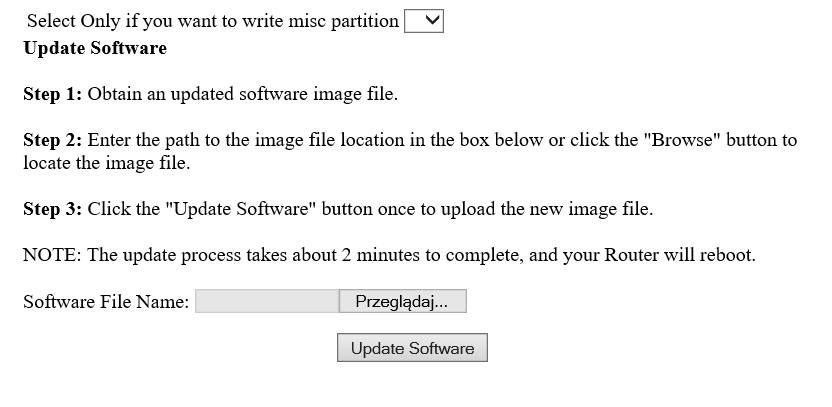
I can abort boot and get into recovery mode. Then I have access via www and I can upload the firmware. After uploading, I get the message "Illegal image".

When I upload via TFTP server, the message is like this

Loading 192.168.0.66:AX6000v1_tp_recovery.bin ...
web info: Waiting for connection on socket 0.
Finished loading 48894535 bytes
Illegal whole flash image
Finished flashing image.
FW Recovery Fail.Err -1. (Err Code[-21]: tftp timeout.)
Resetting board in 0 seconds...


I download the appropriate firmware from the website for hardware version 1.0 and EU
How can I repair the firmware?

  0      
  0      
#1
Options
5 Reply
Re:Archer AX6000 bootloop
2023-09-04 11:50:56

  @sp7dpt 


Hi, thank you very much for posting on TP-Link Community.

1. May I know the LED status and the procedure when you try to turn on the router?

2. Do you remember the current firmware version of your Archer AX6000 V1?

3. Please disconnect all the Ethernet cables from the router, don't connect any wireless client devices, then check if the router will be able to stay powered on, if so, please try factory reset the router by holding reset button until the LED begins circulating blue to its factory default settings.


By the way, did you update the firmware or enabled auto update before the issue happens? and when you tried the firmware recovery, did you follow the Method 2 in this guide:

How to recover the router when it bricked


If the firmware Archer AX6000(EU)_V1_1.3.1 Build 20230731 doesn't work, please also try previous firmware Archer AX6000(EU)_V1_1.3.0 Build 20221208.

Nice to Meet You in Our TP-Link Community. Check Out the Latest Posts: Archer GE550 - BE9300 Tri-Band Wi-Fi 7 Gaming Router EasyMesh Is Available When Wi-Fi Routers Work in AP Mode as A Controller. Archer BE550 New Software Enhances System Stability and Optimizes MLO Network Stability. TL-WA3001 Supports EasyMesh, Speed Limit, Guest Network in AP Mode and/or Multi-SSID Mode. If you found the post or response helpful, please click Helpful. If an answer solves your problem, click "Recommended Solution" so that others can benefit from it.
  0  
  0  
#2
Options
Re:Archer AX6000 bootloop
2023-09-04 12:15:09

  @Sunshine 


1. May I know the LED status and the procedure when you try to turn on the router?

LED begins circulating blue


2. Do you remember the current firmware version of your Archer AX6000 V1?

No, but I think it's the newest


Did you update the firmware or enabled auto update before the issue happens? 

No


When you tried the firmware recovery, did you follow the Method 2 in this guid?

Yes, I got a message after uploading "invalid image"


If the firmware Archer AX6000(EU)_V1_1.3.1 Build 20230731 doesn't work, please also try previous firmware Archer AX6000(EU)_V1_1.3.0 Build 20221208.

I tried but I also have message "invalid image"


  0  
  0  
#3
Options
Re:Archer AX6000 bootloop
2023-09-04 12:16:47

  @Sunshine 

Log file 

File:
log.zipDownload
  0  
  0  
#4
Options
Re:Archer AX6000 bootloop
2023-09-04 12:41:17

  @Sunshine 


When the bootloop breaks in the console, I have access to recover www


recover www


when i upload the firmware i get an invalid image message


  0  
  0  
#5
Options
Re:Archer AX6000 bootloop
2023-09-07 07:44:57

  @sp7dpt 


Hi, I've sent you a private message, please check if it solves the problem.

Nice to Meet You in Our TP-Link Community. Check Out the Latest Posts: Archer GE550 - BE9300 Tri-Band Wi-Fi 7 Gaming Router EasyMesh Is Available When Wi-Fi Routers Work in AP Mode as A Controller. Archer BE550 New Software Enhances System Stability and Optimizes MLO Network Stability. TL-WA3001 Supports EasyMesh, Speed Limit, Guest Network in AP Mode and/or Multi-SSID Mode. If you found the post or response helpful, please click Helpful. If an answer solves your problem, click "Recommended Solution" so that others can benefit from it.
  0  
  0  
#6
Options