Omada: Netzwerkänderung Gastnetzwerk (WLAN) hinzufügen mit fremdem Switch

This thread has been locked for further replies. You can start a new thread to share your ideas or ask questions.

Omada: Netzwerkänderung Gastnetzwerk (WLAN) hinzufügen mit fremdem Switch

This thread has been locked for further replies. You can start a new thread to share your ideas or ask questions.

Omada: Netzwerkänderung Gastnetzwerk (WLAN) hinzufügen mit fremdem Switch
2023-11-17 13:19:12
Model: ER605 (TL-R605)  
Hardware Version: V2
Firmware Version: 2.0.0

Hallo,


wir haben folgende Topologie:

WAN - ER605 - Switch 1(managed, Netgear)

Am Switch 1 sind u.a. angeschlossen:

- Switch 2(managed, Netgear)

- 3x EAPs (über Omada eingebunden)

- Windows Server 2022(DHCP-Server&Domänencontroller)


Ich würde nun gerne das Netzwerk so einstellen das ich zwei SSIDs nutze, in welchem sich die Geräte aber nicht sehen dürfen.

Am Router würde ich gerne Lan 1 und Lan 2 beide auf den Switch legen, Lan 1 als VLAN 1 und Lan 2 als VLAN 55.


Switch 1

Ports 1,2,7 sind EAPs

Port 23 ist die Verbindung zum ER605 an LAN1 (VLAN 1)

Port 22 wollte ich für die Verbindung zum ER605 an LAN2 nutzen (VLAN 55)

Also habe ich 1,2,7 und 23 Tagged VLAN 1 

1,2,7 und 22 Tagged VLAN 55


VLAN 1 ist das normale Netzwerk, VLAN 55 das Gastnetzwerk.

Da nun nicht alles vom Omada-Controller gemanagt wird tue ich mich da gerade etwas schwer mit.


Ich versuche also das VLAN 1 so zu lassen, erstelle eine Gast-SSID mit VLAN 55 und eigenem DHCP-Server (was der Router machen soll) in einem anderen Adressbereich zu nutzen.

In den Netgear-Routern stelle ich die Ports der EAPs und die Ports die an den Router gehen auf ?tagged?.

Nun habe ich ein Netzwerk in Omada erstellt das nur an LAN2 geht mit VLAN55.

Das andere, Standard-LAN hat immer noch VLAN 1, aber den Port LAN2 kann ich hier nicht entfernen.


Sobald ich nun LAN2 und den Switch am VLAN-Port 55 einstecke ist das Netzwerk zum WAN aus, komplett. Die Anmeldung an der Gast-SSID funktioniert auch nicht, es wird keine IP zugewiesen. Alle anderen Geräte im Netzwerk verlieren dann auch die Verbindung.


Der Anleitung von TP-Link kann ich nicht ganz folgen, da dort ein Switch genutzt wird der ebenfalls über Omada administriert wird, mir hier also die Zuweisung und das Hintergrundwissen fehlt um das im Netgear einzustellen.


Ich hoffe ich konnte das nun etwas erläutern und mir kann jemand behilflich sein, meine Kenntnisse sind leider nur rudimentär. Vielleicht gehe ich es auch falsch an.

  0      
  0      
#1
Options
3 Reply
Re:Omada: Netzwerkänderung Gastnetzwerk (WLAN) hinzufügen mit fremdem Switch
2023-11-20 02:27:03 - last edited 2023-11-20 02:27:48

Hi @Escride 

Thanks for posting in our business forum.

Hope this will be helpful in allowing you to understand how VLAN works.

Guest network is not working, seem to be the case where you set the VLAN incorrectly. If you have a diagram, this would be a lot easier.

  0  
  0  
#2
Options
Re:Omada: Netzwerkänderung Gastnetzwerk (WLAN) hinzufügen mit fremdem Switch
2023-11-21 08:11:58

  @Clive_A 

Thank You for the diagram, but I didn't get into it.


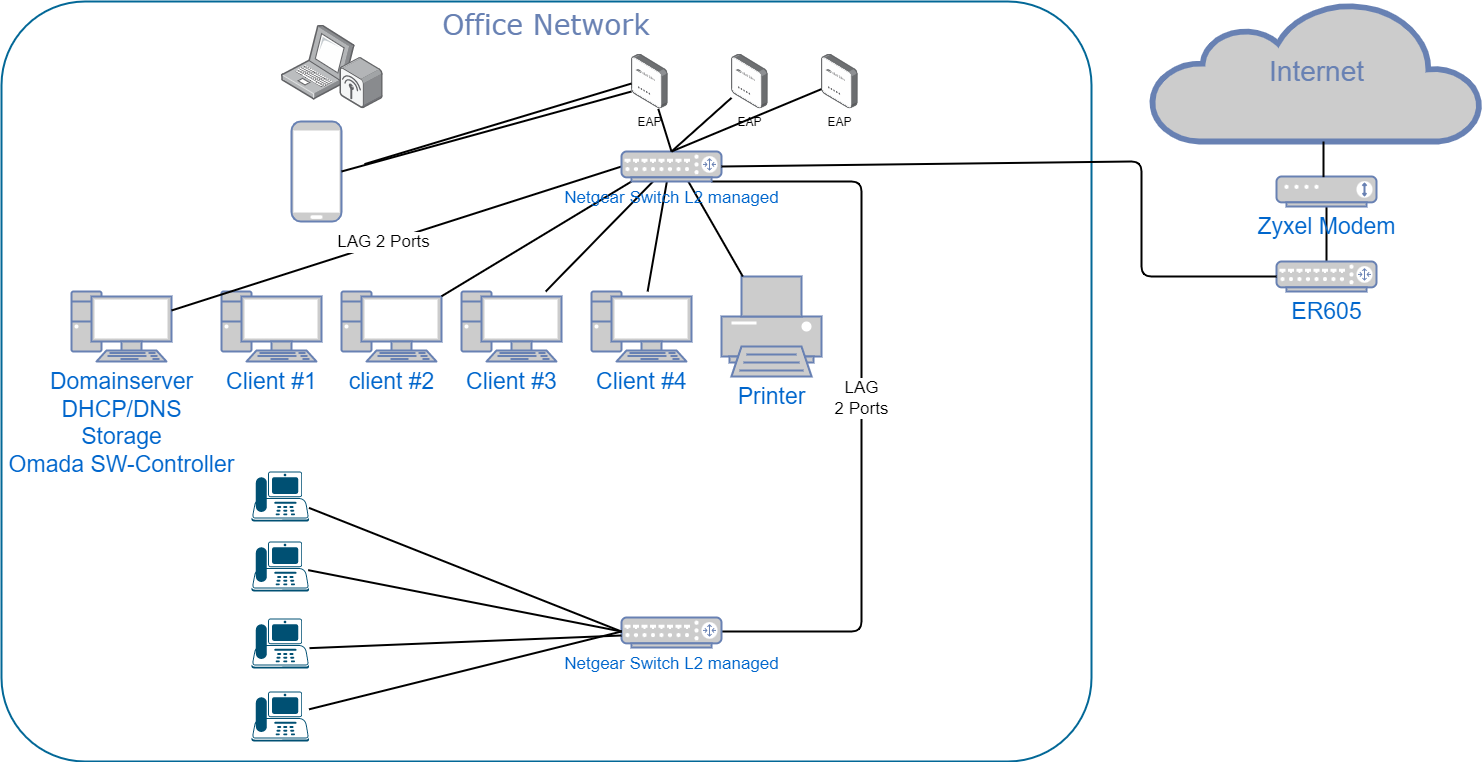
You're right, it is easier with a diagram, so I created one with outtopology:

So this is our actual network. No VLAN is defined yet and the LAN-Network is the one created by TP-Link (Standard), which isn't changeable.

This Network is running in 198.93.195.1/24, where 198.93.195.2 is the server and 198.93.195.253 the ER605-Router.

Both switches are "Netgear JGS524PE – 24-Port Gigabit ProSAFE Plus Switch with PoE".

The EAP are all three EAP245(EU) v3.0.


Now, we want that the EAPs create a 2nd Wireless Lan to connect some devices to the internet only. It is strictly forbidden that any device in the Office Network is accessible.


My problem is that I don't know what the Controller will setup inside so I think I do something wrong with the Netgear-Switches.

I tried to follow https://www.tp-link.com/de/support/faq/3091/ but since I dont use a TP-Link switch something is always wrong. I cannot create an Switch-ACL because I don't have a TP-Link switch, what I think is my problem, but since we got 2 manageable switches, it should work.


Any suggestions how to set it up properly for me?


Regards


Escride


  0  
  0  
#3
Options
Re:Omada: Netzwerkänderung Gastnetzwerk (WLAN) hinzufügen mit fremdem Switch
2023-11-21 09:27:06

Hi @Escride 

Thanks for posting in our business forum.

Escride wrote

  @Clive_A 

Thank You for the diagram, but I didn't get into it.


You're right, it is easier with a diagram, so I created one with outtopology:


So this is our actual network. No VLAN is defined yet and the LAN-Network is the one created by TP-Link (Standard), which isn't changeable.

This Network is running in 198.93.195.1/24, where 198.93.195.2 is the server and 198.93.195.253 the ER605-Router.

Both switches are "Netgear JGS524PE – 24-Port Gigabit ProSAFE Plus Switch with PoE".

The EAP are all three EAP245(EU) v3.0.


Now, we want that the EAPs create a 2nd Wireless Lan to connect some devices to the internet only. It is strictly forbidden that any device in the Office Network is accessible.


My problem is that I don't know what the Controller will setup inside so I think I do something wrong with the Netgear-Switches.

I tried to follow https://www.tp-link.com/de/support/faq/3091/ but since I dont use a TP-Link switch something is always wrong. I cannot create an Switch-ACL because I don't have a TP-Link switch, what I think is my problem, but since we got 2 manageable switches, it should work.


Any suggestions how to set it up properly for me?


Regards


Escride


Try the GW ACL instead if you don't have a TP-Link switch.

You should use VLAN and you should follow instructions from either our 802.1Q VLAN guide or your brand.

Your Router should tag all the ports when you configure the Networks > Interfaces > LAN interfaces, pick the switch port or select all. This will become a tagged port. If you have multiple VLAN interfaces, it'll become a trunk automatically.

Then set up your SW with the tag VLAN. So, this VLAN from the router will pass on to the switch. Then switch to EAP, and set up the VLAN on the switch port as well. Then set up the SSID VLAN on your EAP.

This is a brief setup guide for you. You need to set up the VLAN.


If you need help with step-by-step, you can set up the router first and then set up the switch by calling support of the switch and walk through the switch setup.

EAP SSID VLAN is under Advanced Settings in your SSID settings. Set up the VLAN correspondingly.

  0  
  0  
#4
Options