
TL-WR1043N only forwards to one virtual server, second one inaccessible
 This thread has been locked for further replies. You can start a new thread to share your ideas or ask questions.
TL-WR1043N only forwards to one virtual server, second one inaccessible
This issue has been solved meanwhile. Please delete this thread.
Region : Slovakia
Model : TL-WR1043ND
Hardware Version : V2
Firmware Version :
ISP :
Hello, we have a following situation in our office:
The router is TL-WR1043N with a public IP on the WAN interface and 192.168.226.1 on the LAN.
There's a Windows server 2008 PC running several services. It's LAN IP is 192.168.226.2.
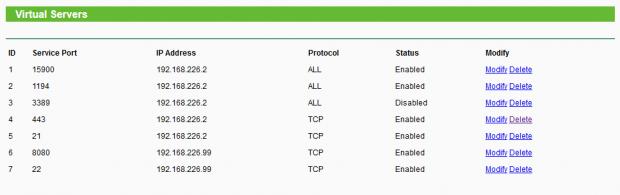
There are several ports forwarded to the Windows Server (21 for SFTP and 443 for SVN) and all are working OK.
We have a Oracle Virtualbox installed on the Windows Server. Inside it is a Linux server with LAN IP 192.168.226.99.
The Linux Server's SSH and HTTP are working OK on the ports 22 and 8080 respectively within LAN.
The problem is:
There are 2 port forwarded to the Linux Server (22 for SSH and 8080 for HTTP) and these are not working when accessing from the internet.
Here's a screenshot of the Virtual servers settings;
To sum this situation up:
Internet -> Public IP, port 21 -> forwarded to Windows server, port 21 -> Works OK
Internet -> Public IP, port 22 -> forwarded to Linux server, port 22 -> Works NOT
LAN -> Linux server, port 22-> Works OK
I turned off firewalls on the Windows server and on the Linux server, just in case. Still no change.
What's puzzling me is that everything works within LAN. Therefore I presume the Linux server's settings are OK. But port forwarding works when forwarding to the Windows server. Therefore I presume the port forwarding works too. Then how come the port forwarding to the Linux server fails?
Thanks for any suggestions.
Region : Slovakia
Model : TL-WR1043ND
Hardware Version : V2
Firmware Version :
ISP :
Hello, we have a following situation in our office:
The router is TL-WR1043N with a public IP on the WAN interface and 192.168.226.1 on the LAN.
There's a Windows server 2008 PC running several services. It's LAN IP is 192.168.226.2.
There are several ports forwarded to the Windows Server (21 for SFTP and 443 for SVN) and all are working OK.
We have a Oracle Virtualbox installed on the Windows Server. Inside it is a Linux server with LAN IP 192.168.226.99.
The Linux Server's SSH and HTTP are working OK on the ports 22 and 8080 respectively within LAN.
The problem is:
There are 2 port forwarded to the Linux Server (22 for SSH and 8080 for HTTP) and these are not working when accessing from the internet.
Here's a screenshot of the Virtual servers settings;
To sum this situation up:
Internet -> Public IP, port 21 -> forwarded to Windows server, port 21 -> Works OK
Internet -> Public IP, port 22 -> forwarded to Linux server, port 22 -> Works NOT
LAN -> Linux server, port 22-> Works OK
I turned off firewalls on the Windows server and on the Linux server, just in case. Still no change.
What's puzzling me is that everything works within LAN. Therefore I presume the Linux server's settings are OK. But port forwarding works when forwarding to the Windows server. Therefore I presume the port forwarding works too. Then how come the port forwarding to the Linux server fails?
Thanks for any suggestions.
