
switch between cabled M4 for backhaul and also LAN devices

This thread has been locked for further replies. You can start a new thread to share your ideas or ask questions.

switch between cabled M4 for backhaul and also LAN devices

This thread has been locked for further replies. You can start a new thread to share your ideas or ask questions.
switch between cabled M4 for backhaul and also LAN devices
2025-10-01 15:17:14 - last edited 2025-11-05 08:07:26
Model: Deco M4  
Hardware Version: V2
Firmware Version: 1.6.5 build 20241231 rel. 41802

I am moving home and this time I will cable my (2) deco M4 units.
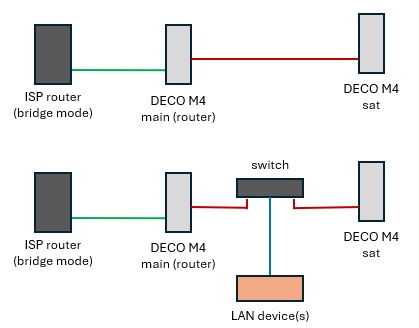
 

The scenario 1 was tested and works, but I have more devices that I need to have cabled on, so I am planning to add a switch between the decos that can service both backhaul and LAN. I would prefer tp-link ones to ensure compatibility, but neither the eco pages or switches mention anything related to compatibility of both devices.
And I could not find anything relevant tru searches, so, I would like to know from tp-link, or community experience, what (current) tp-link switches do work without any issues (managed or unmanaged, later preferably, but I can handle both). I only need 5 ports 1GBps but if only 8 ports are known to work, I am also open to that.


PS: I know, version 1.6.5... but I don't jump to any new release until they are shown to be very stable.

  2      
  2      
#1
Options
1 Accepted Solution
Re:switch between cabled M4 for backhaul and also LAN devices-Solution
2025-10-02 15:10:24 - last edited 2025-11-05 08:07:26

Thanks, but that is is a desktop version, I need one to put into the comm closet with the ports forward and slimmer (box shape).
The specs of TL-SG1008D look the same as the LS1008G indeed, while the later is slim. Also, the TS-SG608E looks a good option with 802.1q+802.1p added, so maybe on of these two will do the trick, the later a bit more future proof.

Recommended Solution
  0  
  0  
#5
Options
4 Reply
Re:switch between cabled M4 for backhaul and also LAN devices
2025-10-01 20:22:37

  @VCL 


Any TP-Link unmanaged switch you buy today new can do.


I have been using inexpensive 5-port TL-SG1005D gigabit switch with Deco mesh with no issues.

  1  
  1  
#2
Options
Re:switch between cabled M4 for backhaul and also LAN devices
2025-10-02 13:53:43

I just calculated the number or ports and I will need 6 to cable all house divisions, so, the best is switch with 8 ports.
This will be inside the comm box in the wall, the smaller and low power the better.

So, what about the tp-link LS1008G switch, any feedback on this one, does it work fine?
Also, on the tp-link website, I see several versions and on my region it seems to show only v1 and a v4: are there any major differences between these?

  0  
  0  
#3
Options
Re:switch between cabled M4 for backhaul and also LAN devices
2025-10-02 14:19:36

  @VCL 


Then, consider TP-Link 8 Port Gigabit Ethernet Network Switch (TL-SG1008D). Inexpensive and should work. Switch hardware version does not matter.

  0  
  0  
#4
Options
Re:switch between cabled M4 for backhaul and also LAN devices-Solution
2025-10-02 15:10:24 - last edited 2025-11-05 08:07:26

Thanks, but that is is a desktop version, I need one to put into the comm closet with the ports forward and slimmer (box shape).
The specs of TL-SG1008D look the same as the LS1008G indeed, while the later is slim. Also, the TS-SG608E looks a good option with 802.1q+802.1p added, so maybe on of these two will do the trick, the later a bit more future proof.

Recommended Solution
  0  
  0  
#5
Options