
Resolving Interference
 This thread has been locked for further replies. You can start a new thread to share your ideas or ask questions.
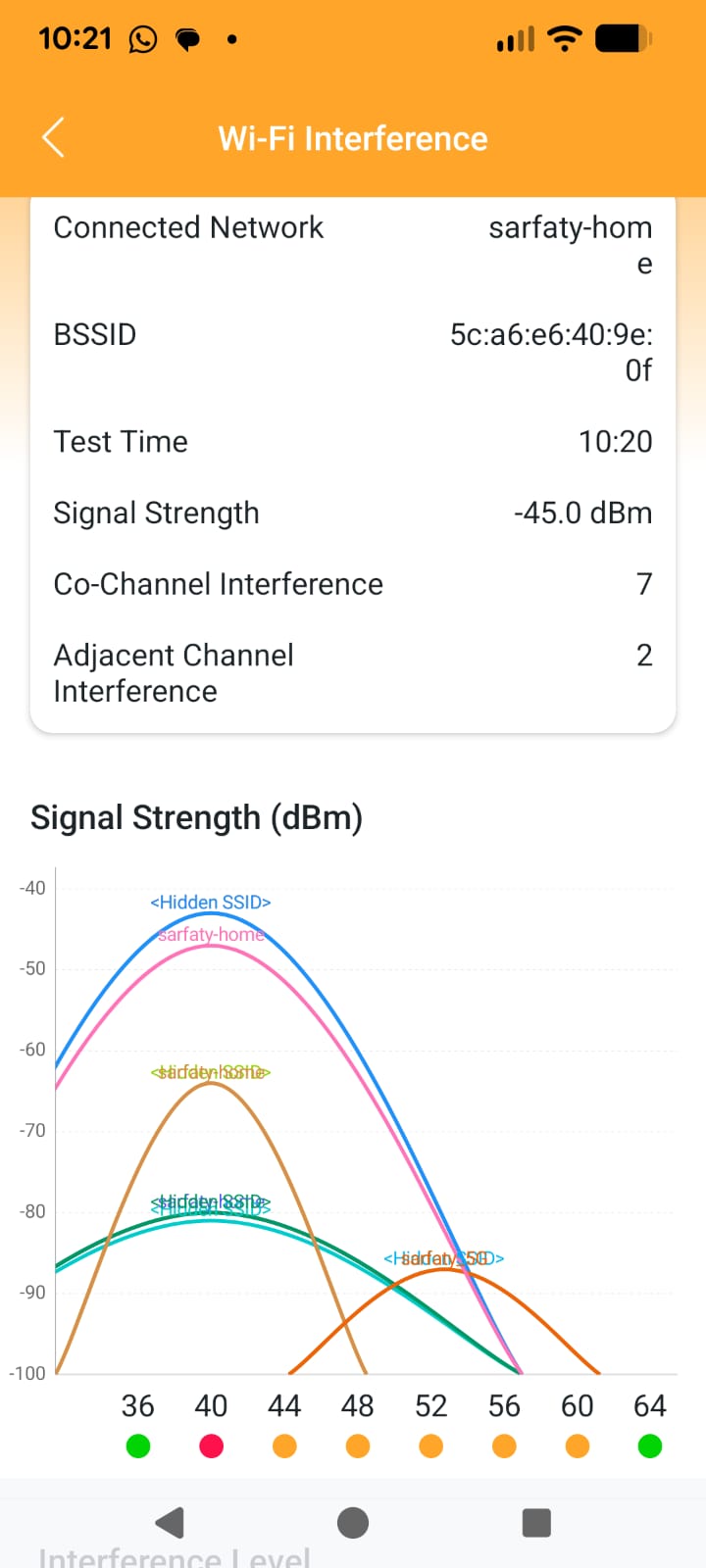
I'm getting the following interference results. How to identify and resolve the interference?

- Copy Link
- Subscribe
- Bookmark
- Report Inappropriate Content

Have you tried the Network optimization tool in the deco app? You can find the tool under the More tab (bottom right) > Advanced > Network Optimization
When you optimize the network on the Deco APP, it sorts of restarts the Wi-Fi module of Deco once to re-detect the nearby wireless condition and decide whether or not to switch to other wireless channels.
A similar effect could be obtained using the reboot schedule.You could set the schedule to reboot once a day which will force the decos to see if they need to switch to a different wireless channel.
- Copy Link
- Report Inappropriate Content
@Orisar I think the interference is coming from your other deco units.
- Copy Link
- Report Inappropriate Content
Have you tried the Network optimization tool in the deco app? You can find the tool under the More tab (bottom right) > Advanced > Network Optimization
When you optimize the network on the Deco APP, it sorts of restarts the Wi-Fi module of Deco once to re-detect the nearby wireless condition and decide whether or not to switch to other wireless channels.
A similar effect could be obtained using the reboot schedule.You could set the schedule to reboot once a day which will force the decos to see if they need to switch to a different wireless channel.
- Copy Link
- Report Inappropriate Content
Information
Helpful: 2
Views: 647
Replies: 2
Voters 2

