R7212PC + SG2428P: VLAN 30 (KidsLAN) configured but 0 traffic reaching router — EAP653 mesh

R7212PC + SG2428P: VLAN 30 (KidsLAN) configured but 0 traffic reaching router — EAP653 mesh

R7212PC + SG2428P: VLAN 30 (KidsLAN) configured but 0 traffic reaching router — EAP653 mesh
Yesterday - last edited 13 hours ago
Model: ER7212PC   TL-SG2428P   EAP653  
Hardware Version:
Firmware Version:

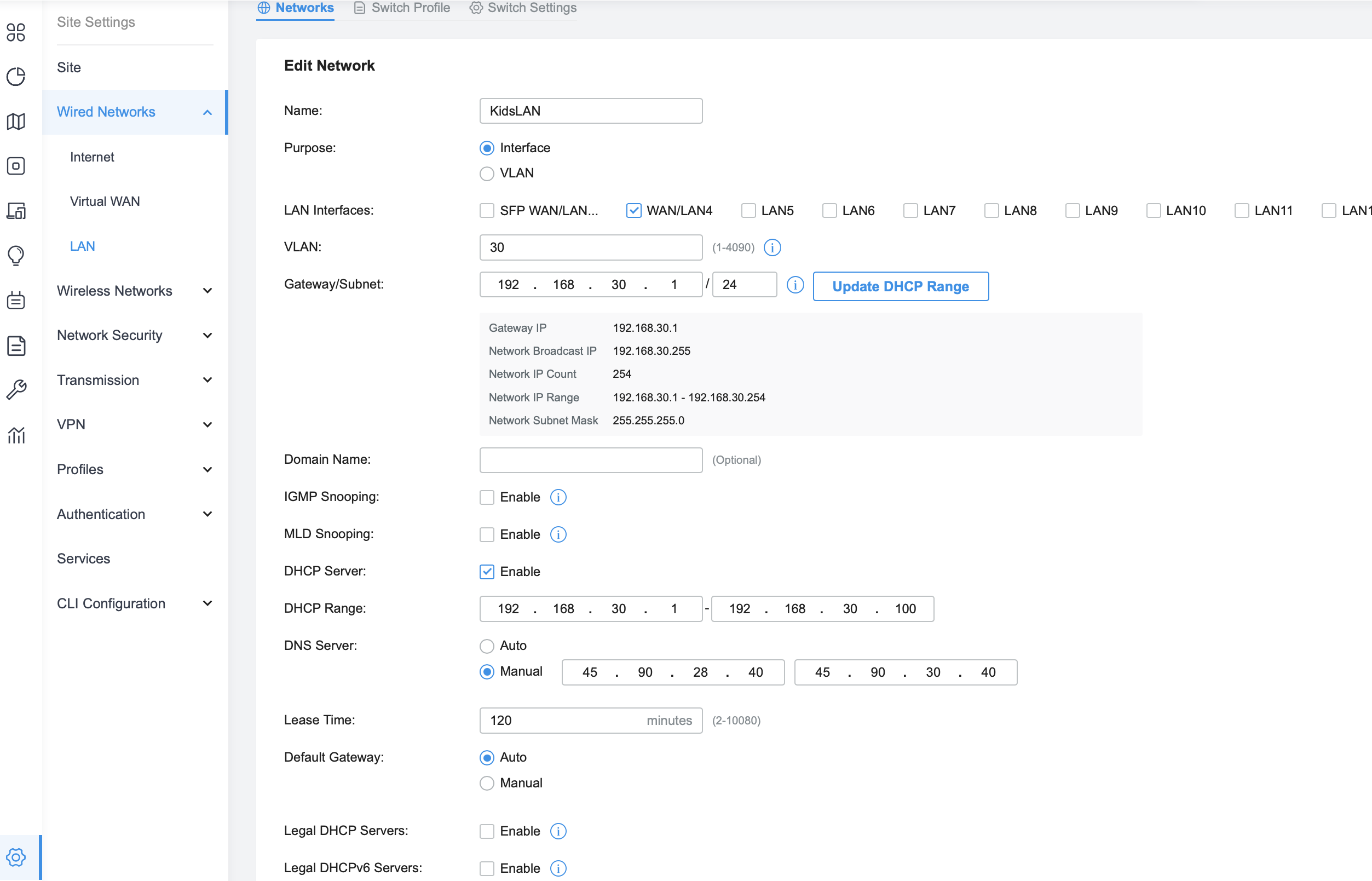
I created a new LAN interface (VLAN 30, 192.168.30.1/24) on my ER7212PC. Devices connect to the SSID but have no internet access. NAT is not disabled, no firewall rules blocking it. Default LAN works fine. What am I missing?


  • Router: ER7212PC
  • Switch: SG2428P
  • APs: EAP653
  • KidsLAN interface VLAN 30 configured correctly
  • Switch profile "All" has KidsLAN(30) tagged
  • Router shows 0 Tx/Rx bytes on KidsLAN interface
  • Default LAN works perfectly
  0      
  0      
#1
Options
3 Reply
Re:R7212PC + SG2428P: VLAN 30 (KidsLAN) configured but 0 traffic reaching router — EAP653 mesh
Yesterday - last edited 14 hours ago

  @sirK83 


It would help if you could post a screenshot of the ER7212PC's LAN configuration page for the Kids LAN.


1x ER7406 1x OC300 4x SG2008 1x EAP610 3x EAP650-Desktop 1x EAP772-Outdoor
  0  
  0  
#2
Options
Re:R7212PC + SG2428P: VLAN 30 (KidsLAN) configured but 0 traffic reaching router — EAP653 mesh
Yesterday - last edited 14 hours ago
  0  
  0  
#3
Options
Re:R7212PC + SG2428P: VLAN 30 (KidsLAN) configured but 0 traffic reaching router — EAP653 mesh
16 hours ago - last edited 14 hours ago

  @sirK83 


It appears your VLAN 30 is configured correctly.  I am assuming the Kids VLAN has its own SSID and that you have associated that SSID with VLAN 30 in the gateway's wireless settings (under Advanced).  If that is OK, then something might be misconfigured in the SG2428P or the EAP653.  If possible, just for testing, I would connect the EAP directly to one of the gateway's PoE ports and bypass the SG2428P.  If everything works, that would confirm the EAP653 configuration is OK and something is misconfigured in the SG2428P.


1x ER7406 1x OC300 4x SG2008 1x EAP610 3x EAP650-Desktop 1x EAP772-Outdoor
  0  
  0  
#4
Options