
TP-LINK-AP-88AE failure

Hi,
We have a TP-LINK-AP-88AE router to provide WiFi in a hall, connected to our main router by Ethernet Cable. It has worked well for over a year.
The Wi-Fi went off yesterday so we rebooted the unit but it still is not functioning. The four green lights are flashing together slowly, about one quick flash every couple of seconds or so.
Can someone please point us in the direction of what might be wrong?
Many thanks.
Stephen Carter
- Copy Link
- Subscribe
- Bookmark
- Report Inappropriate Content

So you have an Access Point model TL-WA901ND v4.
Reset the TL-WA901NDto its factory default settings by pressing the reset button on the back for about 10 seconds:
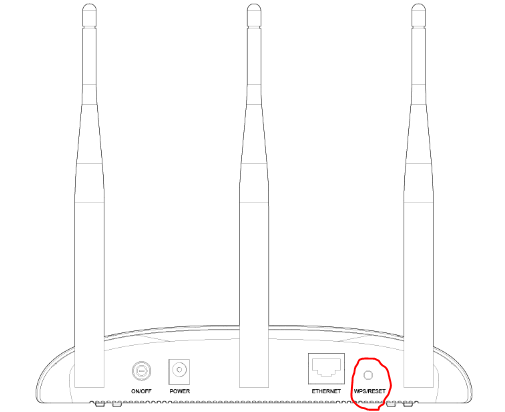
Upon successful reset you may configure the AP following this guide.
Make sure that you're with the latest FW release TL-WA901ND(EU)_V4_201030. - here.
If after reset the AP behaves the same, check its power supply - you may use a standard one 12VDC/1A to exclude any power supply issues.
If that doesn't help, you may contact your local support for further assistance.
- Copy Link
- Report Inappropriate Content
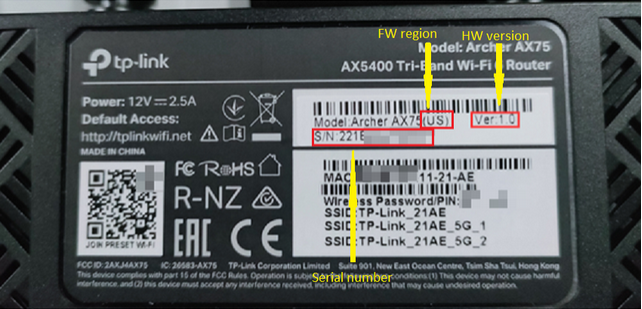
What's exacctly the model of your device ? It should be printed on it's bottom sticker and it looks like that:
- Copy Link
- Report Inappropriate Content
- Copy Link
- Report Inappropriate Content
So you have an Access Point model TL-WA901ND v4.
Reset the TL-WA901NDto its factory default settings by pressing the reset button on the back for about 10 seconds:
Upon successful reset you may configure the AP following this guide.
Make sure that you're with the latest FW release TL-WA901ND(EU)_V4_201030. - here.
If after reset the AP behaves the same, check its power supply - you may use a standard one 12VDC/1A to exclude any power supply issues.
If that doesn't help, you may contact your local support for further assistance.
- Copy Link
- Report Inappropriate Content
@terziyski Thanks for your kind response.
We have discovered that the problem related to the power supply losing its neutral connection (mains power).
Once that was sorted the TP Link works fine again.
Question: I contacted TP by telephone and spoke to an agent. I described the symptoms but no-one, it seems, recognised the flashing of all lights as a possible power supply issue. Need for training here?
Thanks again for your help.
Peace and all good.
Stephen Carter
- Copy Link
- Report Inappropriate Content

- Copy Link
- Report Inappropriate Content

- Copy Link
- Report Inappropriate Content
Information
Helpful: 0
Views: 438
Replies: 6
Voters 0
No one has voted for it yet.