ER605 V2 (FW 2.3.0 and all above) - IPSec disonnected for 2 to 3 seconds severall times per month

ER605 V2 (FW 2.3.0 and all above) - IPSec disonnected for 2 to 3 seconds severall times per month

ER605 V2 (FW 2.3.0 and all above) - IPSec disonnected for 2 to 3 seconds severall times per month
3 weeks ago - last edited a week ago
Tags: #VPN
Model: ER605 (TL-R605)  
Hardware Version: V2
Firmware Version: 2.3.1


Hi,

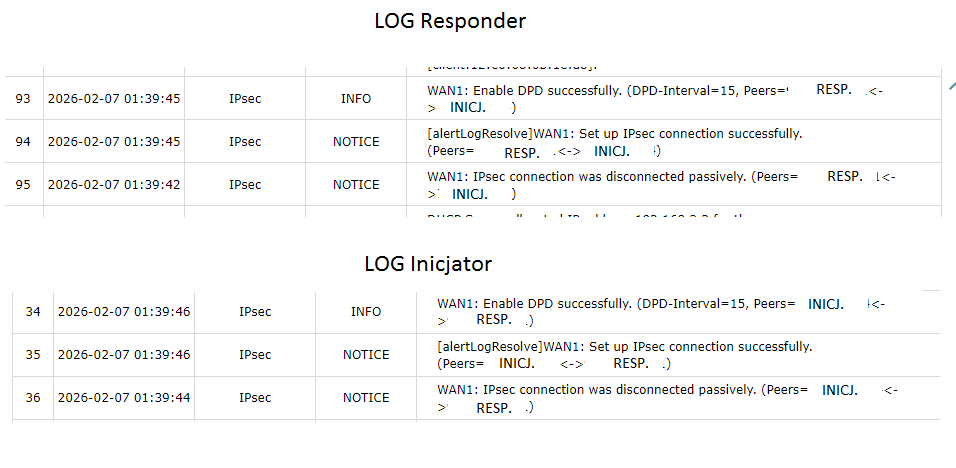
I have issue from the time when I uploaded FW of my routers from 2.2.5 to 2.3.0 and all above versions - 2.3.3 include) I'm trying to find the reason why my tunnel disconnects few times per month only for 2 to 3 seconds.

Both ends are terminated with public and static IP

Logs don't show information aboud Dead Peer Detection - just this what I posted.


Any ideas?

Thanks


  0      
  0      
#1
Options
1 Accepted Solution
Re:ER605 V2 (FW 2.3.0 and all above) - IPSec disonnected for 2 to 3 seconds severall times per month-Solution
3 weeks ago - last edited a week ago

Hi,  @KBC_SEBA 
Thank you for posting on our business forum.  

  • Please first verify that configurations on both ends of the VPN are consistent. For reference, we recommend setting the DPD detection interval to 30 seconds.  
  • Please troubleshoot the stability of your public network link, and confirm there is no intermittent packet loss on your carrier’s network link.  
  • We also suggest you try rolling back your firmware, then monitor the connection for a period of time in the same network environment, to check if the issue is caused by the new firmware.  

Thanks for your cooperation.Please feel free to update the progress.

Recommended Solution
  0  
  0  
#2
Options
1 Reply
Re:ER605 V2 (FW 2.3.0 and all above) - IPSec disonnected for 2 to 3 seconds severall times per month-Solution
3 weeks ago - last edited a week ago

Hi,  @KBC_SEBA 
Thank you for posting on our business forum.  

  • Please first verify that configurations on both ends of the VPN are consistent. For reference, we recommend setting the DPD detection interval to 30 seconds.  
  • Please troubleshoot the stability of your public network link, and confirm there is no intermittent packet loss on your carrier’s network link.  
  • We also suggest you try rolling back your firmware, then monitor the connection for a period of time in the same network environment, to check if the issue is caused by the new firmware.  

Thanks for your cooperation.Please feel free to update the progress.

Recommended Solution
  0  
  0  
#2
Options