PPPOE does not work on TPLINK but works on ASUS

PPPOE does not work on TPLINK but works on ASUS

PPPOE does not work on TPLINK but works on ASUS
11 hours ago - last edited 11 hours ago
Model: Archer AX3000  
Hardware Version: V1
Firmware Version: 1.5.10

Hello, 

I have a very strange problem. Sometime ago my there was a huge outage of ISP due to cabling owner company issue. Since that time, my connection is generally ok, but sometmes, during router reboot it have problems with connetiong with ppoe. 


As I get from the ISP - they are not using vlans (it is termineted on ONT). I have correct ppoe user/pass. ISP is not filtering WAN port MAC. Still there is an issue. I tried different modes from tplink (ie AX53) but simply it not working. After c/a 24h it starts workin again. resseting and disconnecting cables do not help. 


In logs there are:

2026-04-04 17:14:39 PPP INFO [7402] pppoe send PADR Host-Uniq(1cea)

2026-04-04 17:14:39 PPP INFO [7402] pppoe receive PADO form AC-MAC(04:f4:1c:16:89:b3)

2026-04-04 17:14:39 PPP INFO [7402] pppoe receive PADO AC-Name(MikroTik)

2026-04-04 17:14:39 PPP INFO [7402] pppoe send PADI Host-Uniq(1cea)


I googled that PADS message is missing.


now the clue: 

I get from ISP taht ASUS routers do not face this issue. I checked that and simply providin pppoe user/pass make internet back again. 

Connecting tplink - not working. 

Connecting asus - working

conecting tplink  - not wokring. 


After few hours (<24) tplink will be working again. 


@TPlink can you explain this? I've been using tplink since for ever, but this is very disapining. 

  0      
  0      
#1
Options
7 Reply
Re:PPPOE does not work on TPLINK but works on ASUS
10 hours ago

  @5h4dow 


Common troubleshooting steps (if connection fails)
If this log entry is associated with internet disconnection, check the following:
  • MTU Size: Set the Maximum Transmit Unit (MTU) to 1492, which is standard for PPPoE.
  • Check Physical Connection: Ensure the WAN port is properly connected to the ONT

You may try using a different ethernet cable between ONT and the router - the one from the router kit should be fine

If this was helpful click on the arrow pointing upward to make it blue. If this solves your issue, click the star to make it blue as a "Recommended Solution". Tips:149wubkkfoLmNDjDbiTxx4ZU8mpcMA5CJt
  0  
  0  
#2
Options
Re:PPPOE does not work on TPLINK but works on ASUS
10 hours ago

  @terziyski 


Hello,

Thanks for the reply but IMHO it is not good direction. 
 

I have the same mtu (1492) on TP-Link and Asus devices. I am using the same cable on both devices - connecting cable to Asus works, connecting the very same cable to TP-Link doesn't work. 
 

Additionally I checked many different cables, still the same. 
 

please note that after some time the same cable starts working on TP-Link as well. 
 

all in all TP-Link "sometimes" cause outage but it is not the case on asus. 
 

I can provide any other logs or test anything.

  0  
  0  
#3
Options
Re:PPPOE does not work on TPLINK but works on ASUS
9 hours ago

  @5h4dow 


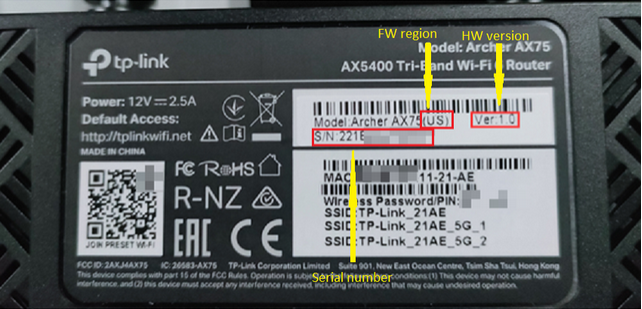
To potentially exclude a FW issue, what is your exact router model, HW version and FW region, refer its bottom sticker:


If this was helpful click on the arrow pointing upward to make it blue. If this solves your issue, click the star to make it blue as a "Recommended Solution". Tips:149wubkkfoLmNDjDbiTxx4ZU8mpcMA5CJt
  0  
  0  
#4
Options
Re:PPPOE does not work on TPLINK but works on ASUS
9 hours ago

  @terziyski 

I dont know why but the sticker is quite unreadable. 
 

i thought that it would be permanently printed under the sticker and I removed it (I think I shouldn't do that crying)


please note that it has the newest available firmware installed. 
 

Is this info available somewhere after logging to web management console? 


  0  
  0  
#5
Options
Re:PPPOE does not work on TPLINK but works on ASUS
8 hours ago - last edited 6 hours ago

  @5h4dow 


The serial number and FW region can be seen only on the router bottom sticker, Store this picture somewhere safe, in case this information is needed in the future.


Disable IPv6 on the AX55 and test again if there's any improvement:


Here is some feedback regarding the latest AX 55 FW v1.5.10.

If nothing helps so far, contact your local support for further assistance.

If this was helpful click on the arrow pointing upward to make it blue. If this solves your issue, click the star to make it blue as a "Recommended Solution". Tips:149wubkkfoLmNDjDbiTxx4ZU8mpcMA5CJt
  0  
  0  
#6
Options
Re:PPPOE does not work on TPLINK but works on ASUS
8 hours ago

  @terziyski 

ipv6 was disabled. 


please note that I patched ax55 to 1.5.10 today as I thought that it would help somehow. It was behaving the same on previous version (not sure which was is it)
 

I am facing the same issue on ax53 1.0.5 (patched today as well) and on previous version as well it had the same issue. Router will somehow login via pppoe automagically over the night. Still works as a charm on Asus. 
 

IMHO something is wrong with pppoe implementation on TP-Link. I was able to login to pppoe with my Linux pc and on Asus.


unfortunatelly I will have access to this location only during Easter, contacting local support on Tuesday might not help :(

  0  
  0  
#7
Options
Re:PPPOE does not work on TPLINK but works on ASUS
7 hours ago

  @5h4dow 


Sorry to hear that, but if it is, as you stated a " wrong pppoe implementation ", that means a FW issue, which has to be addresses by the TP-Link development team.

So, your best bet would be Monday, which is a standard business day in China.

If this was helpful click on the arrow pointing upward to make it blue. If this solves your issue, click the star to make it blue as a "Recommended Solution". Tips:149wubkkfoLmNDjDbiTxx4ZU8mpcMA5CJt
  0  
  0  
#8
Options