
Low speed and power on 2.4GHz

I have five Deco X50s, and on the 2.4GHz frequency, I experience very low speed and power.
The main Deco is set to AP, set to stable mode, with fast roaming and beamforming enabled, channel 11, and High Capacity selected.
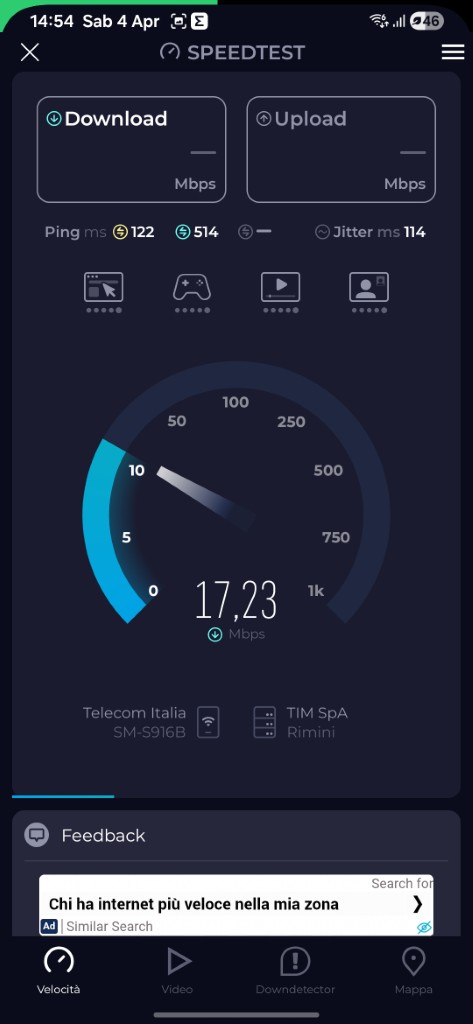
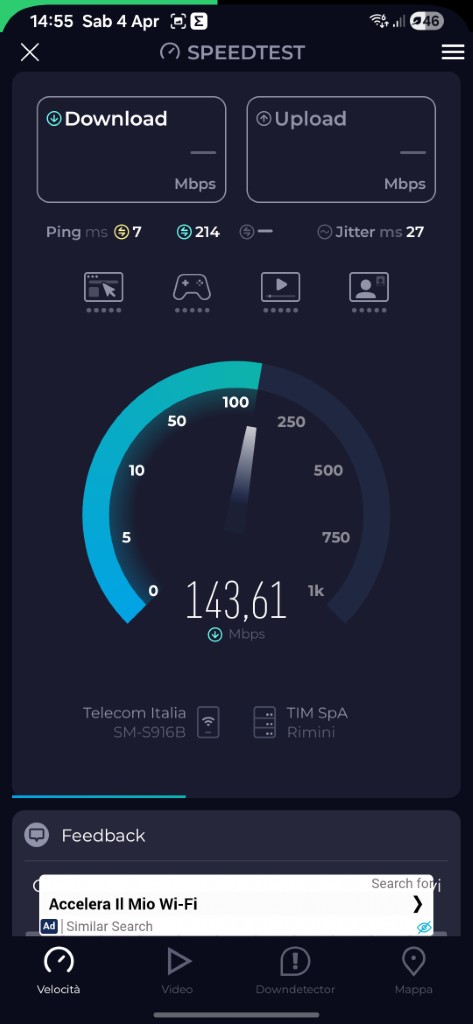
I'm attaching a test I did at one meter with the Deco X50 (AP) and a similar test using the Wi-Fi of my Fritz 5590 router. As you can see, the difference is huge. If I then test the 5ghx, the Deco shows 771 Mbps while the Fritz shows 1,597 Mbps.
Of course, having four more Deco X50s means the satellite speed is even slower, reaching between 3 and 6 Mbps!!!
However, I'm interested in 2.4GHz because I have about 30 smart devices (Shelly, smart lights), and I'm wondering how I can get higher speed and power, otherwise I'll be forced to sell them and use Fritz repeaters.
Thanks
Hispa
- Copy Link
- Subscribe
- Bookmark
- Report Inappropriate Content

Here are some troubleshooting steps and tips to help improve your 2.4GHz performance:
For the Main Deco Unit:
1. Open the Deco app, go to MORE > ECO Mode, and ensure that ECO Mode is disabled, as this can limit performance.
2. Go to MORE > QoS, and ensure QoS is disabled. If you don't see an on/off switch for QoS, set it back to standard and remove all priority devices.
3. Try testing with different channel settings • while you're currently on channel 11, you might want to test channels 1 or 6 to see if there's less interference in your environment.
4. Ensure your Deco units are not placed in enclosed spaces such as cabinets or corners • open areas work better for signal propagation.
For Satellite Units:
1. Check the backhaul signal level of each satellite unit in the Deco app. You should have at least 2-3 bars of signal strength. If signal is weak (1 bar), reposition the satellites closer to the main unit or to other satellites with stronger signals.
2. Consider using Ethernet Backhaul if possible • this will ensure the satellites have the same speed as the main Deco and won't rely on wireless backhaul, which can consume bandwidth.
3. Make sure satellite units are properly placed and not too far from the main Deco. The farther the distance, the slower the speed.
Additional Considerations:
• The 2.4GHz band is inherently slower than 5GHz and more susceptible to interference from other devices, walls, and obstacles. For smart home devices that don't require high bandwidth, the speeds should still be sufficient for their operation, even if speed tests show lower numbers.
• Fast roaming and beamforming being enabled is good, but you might also want to test temporarily disabling fast roaming to see if there are any compatibility issues with your devices.
- Copy Link
- Report Inappropriate Content
Here are some troubleshooting steps and tips to help improve your 2.4GHz performance:
For the Main Deco Unit:
1. Open the Deco app, go to MORE > ECO Mode, and ensure that ECO Mode is disabled, as this can limit performance.
2. Go to MORE > QoS, and ensure QoS is disabled. If you don't see an on/off switch for QoS, set it back to standard and remove all priority devices.
3. Try testing with different channel settings • while you're currently on channel 11, you might want to test channels 1 or 6 to see if there's less interference in your environment.
4. Ensure your Deco units are not placed in enclosed spaces such as cabinets or corners • open areas work better for signal propagation.
For Satellite Units:
1. Check the backhaul signal level of each satellite unit in the Deco app. You should have at least 2-3 bars of signal strength. If signal is weak (1 bar), reposition the satellites closer to the main unit or to other satellites with stronger signals.
2. Consider using Ethernet Backhaul if possible • this will ensure the satellites have the same speed as the main Deco and won't rely on wireless backhaul, which can consume bandwidth.
3. Make sure satellite units are properly placed and not too far from the main Deco. The farther the distance, the slower the speed.
Additional Considerations:
• The 2.4GHz band is inherently slower than 5GHz and more susceptible to interference from other devices, walls, and obstacles. For smart home devices that don't require high bandwidth, the speeds should still be sufficient for their operation, even if speed tests show lower numbers.
• Fast roaming and beamforming being enabled is good, but you might also want to test temporarily disabling fast roaming to see if there are any compatibility issues with your devices.
- Copy Link
- Report Inappropriate Content
Okay, I'll try... but the speed test done at the same point, one meter from the Wi-Fi signal (Deco AP and Fritz Wifi), still shows a very clear difference in strength/speed between the two signals.
Then:
1 - ECo Mode is disabled
2 - Qos is not present in the app, perhaps because the main Deco is set as an AP ?
..i dont understand when you say "If you don't see an on/off switch for QoS, set it back to standard and remove all priority devices"
3 - The backhaul signal level is medium for all Deco Satellites
4 - The Deco units are far from each other and therefore I can't connect them with a network cable between them
5 - i know the 2,4ghz has 3 channels 1, 6, 11 ...so you suggest to try 1 or 6 ...right ?
Hispa
- Copy Link
- Report Inappropriate Content
Information
Helpful: 0
Views: 491
Replies: 2
Voters 0
No one has voted for it yet.