
Disappearing network on 5GHz-only band
Disappearing network on 5GHz-only band

I have an issue that resurfaces from time to time, especially after AP is rebooted (because firmware updates, as I don't reboot them regularly).
There are multiple SSIDs with many VLANs and every single one of them is either set as 2.4G-only or 2.4G+5G. But once I create a network that's supposed to run only on 5GHz, I'm getting a headache, trying to force it to work.
Here, it doesn't matter if it was created some time ago (and AP has been rebooted) or it was added recently.
So, the SSID can pop up, but no device can connect to it. Sometimes the SSID disappears completely. Maybe it'll pop up back again, maybe it won't. There's no rule here.
One might try rebooting AP time after time, hoping it'll come up, will stay visible AND clients can connect to it. But there's no telling when it'll break again (it doesn't always stop working - yesterday I upgraded APs to 1.3.6 and all was fine, but once they've been updated to 1.3.7, thing stopped working again). On previous FW (1.1.1) issue was also present, but after some reboots it started working, so I ignored the issue for the time being.
Any and all issues stop, when I enable 2.4G for that SSID. Thing is, I want to have it as 5GHz for a reason and I want it to work reliably. Once you drop the 2.4G and leave only 5G, thing's broken again. It doesn't affect any other networks/SSIDs - everything else is working perfectly fine.
I'd be grateful if you guys could pinpoint what's the problem here. Is it my specific config, or it's a bug that needs fixing.
- Copy Link
- Subscribe
- Bookmark
- Report Inappropriate Content


Thanks for posting here.
How many EAP670 do you have in total?
Under normal circumstances, it’s highly unlikely that any configuration would cause this issue.
Therefore, I suspect it might be a hardware problem with the individual device.
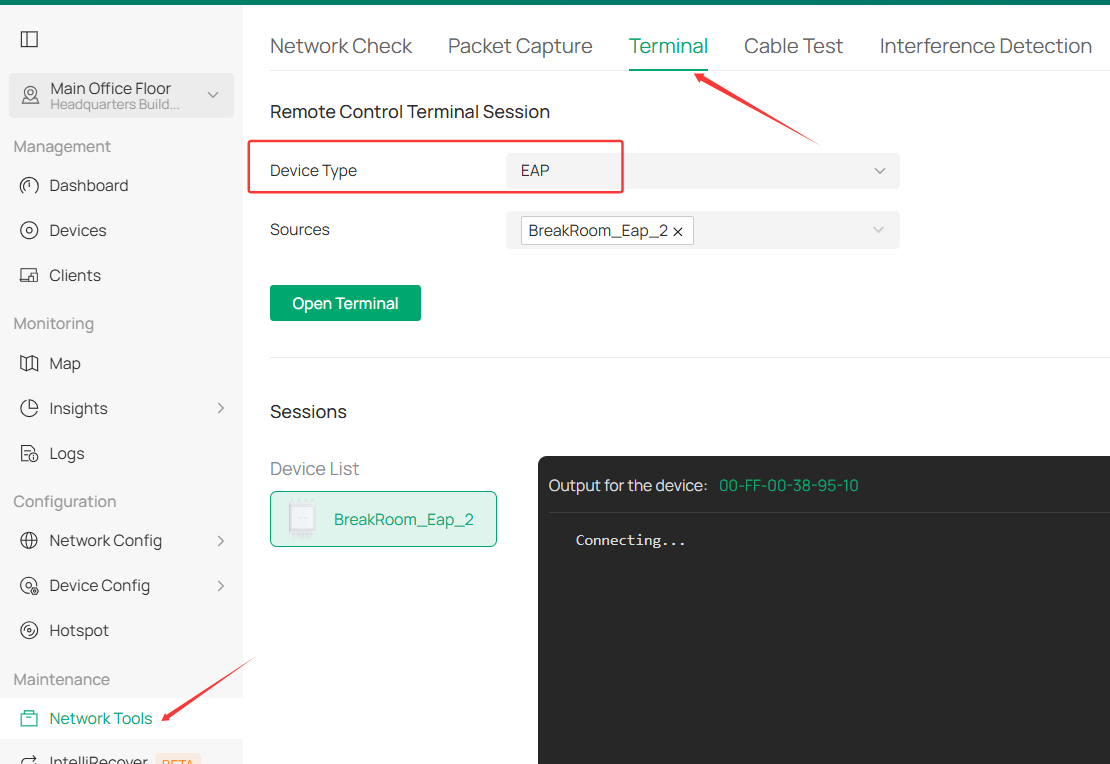
To confirm this, please avoid restarting the device the next time the SSID disappears. Instead, go to the EAP terminal interface, enter “ iwconfig,” and provide a screenshot of the output.
If you got an error, please try "show wifi interfaces".
- Copy Link
- Report Inappropriate Content
Hiya @Vincent-TP
That'd be two.
It's overall weird as I couldn't observe 5GHz dropping for other SSIDs when that happens, so I personally wouldn't bet too much on the HW failure.
I'll be monitoring that and once it happens again, I'll provide the info you're mentioning.
- Copy Link
- Report Inappropriate Content
You have a point.
For more comprehensive information, next time the issue occurs, please download the device info and send it to us for thorough analysis.
I've created a ticket (TKID260432115) for you to send those details. I've also included instructions in the email on how to download it.
- Copy Link
- Report Inappropriate Content
How is the performance these days? Any updates? Please don't hesitate to let us know or reply to that ticket email.
- Copy Link
- Report Inappropriate Content
Hello,
Currently I'm travelling, so it's hard to say. Before that the issue did not reoccur. Once I get back in around 2 weeks, I'll be verifying that daily and if it'll happen again, I'll share the data with you.
By the way - since an additional variable was introduced (i.e., the controller SW was updated, more than once it'd seem), is that something that can affect how APs work or whether this bug (let's call it that way, even if we don't know what had happened exactly) will manifest itself?
- Copy Link
- Report Inappropriate Content
Thanks for your reply.
Recent controller updates haven’t changed anything in this regard, so there should be no impact. Looking forward to your update.
Have a nice trip!
meowing_parrot wrote
Hello,
Currently I'm travelling, so it's hard to say. Before that the issue did not reoccur. Once I get back in around 2 weeks, I'll be verifying that daily and if it'll happen again, I'll share the data with you.
By the way - since an additional variable was introduced (i.e., the controller SW was updated, more than once it'd seem), is that something that can affect how APs work or whether this bug (let's call it that way, even if we don't know what had happened exactly) will manifest itself?
- Copy Link
- Report Inappropriate Content
Hi @Vincent-TP
Since I got back a week ago, I've yet to see this happening again. If possible, I'd leave this topic opened until Q3 and if it doesn't happen again, close it and enjoy the smooth sailing.
- Copy Link
- Report Inappropriate Content
Thanks for the reply. Don't hesitate to let us know if there is any update.
meowing_parrot wrote
Hi @Vincent-TP
Since I got back a week ago, I've yet to see this happening again. If possible, I'd leave this topic opened until Q3 and if it doesn't happen again, close it and enjoy the smooth sailing.
- Copy Link
- Report Inappropriate Content
Hello @Vincent-TP
I've rebooted the AP just now and the network didn't pop up. I had ran the command you've asked me for, but I'm unsure whether I should paste the contents here as they are or can I redact some data (or even upload them somewhere else so only you can view them). Please advise.
Edit: I've also noticed abnormally high CPU usage on the AP - despite 50% usage of 2.4GHz band (just 10 clients) and 1% for 5GHz, the CPU is constantly hitting 99/100%. My laptop can't connect to it on 5GHz band at all, like it's stuck on 2.4 for all SSIDs (what would explain poor performance & heavy usage on 2.4G while there's no usage of 5G at all).
Edit 2: Seems like the other AP (I have 3, but I can only test out the second one now) works just fine. 5GHz band appears after a reboot, everything works fine. The CPU usage is a bit worrying (10 clients - same as the problematic AP), yet it's sitting constantly at over 80%. Currently, at around midnight, the clients aren't even using the AP that much (15% at 2.4 and 1% at 5G). Except for my laptop, these are basically idle connections.
The CPU usage on the problematic AP went down to around 85% around half an hour after the reboot, so it's a bit better, but I'd personally still consider that to be "way too much". Please clarify if those are numbers one's expected to see daily when AP does basically nothing.
- Copy Link
- Report Inappropriate Content
You can send the contencts via the ticket, the ID is TKID260432115. Please search for the ID in your inbox.
Apart from the information in the first email, please also share some screenshots showing the CPU and the wifi utilization.
meowing_parrot wrote
Hello @Vincent-TP
I've rebooted the AP just now and the network didn't pop up. I had ran the command you've asked me for, but I'm unsure whether I should paste the contents here as they are or can I redact some data (or even upload them somewhere else so only you can view them). Please advise.
Edit: I've also noticed abnormally high CPU usage on the AP - despite 50% usage of 2.4GHz band (just 10 clients) and 1% for 5GHz, the CPU is constantly hitting 99/100%. My laptop can't connect to it on 5GHz band at all, like it's stuck on 2.4 for all SSIDs (what would explain poor performance & heavy usage on 2.4G while there's no usage of 5G at all).
Edit 2: Seems like the other AP (I have 3, but I can only test out the second one now) works just fine. 5GHz band appears after a reboot, everything works fine. The CPU usage is a bit worrying (10 clients - same as the problematic AP), yet it's sitting constantly at over 80%. Currently, at around midnight, the clients aren't even using the AP that much (15% at 2.4 and 1% at 5G). Except for my laptop, these are basically idle connections.
The CPU usage on the problematic AP went down to around 85% around half an hour after the reboot, so it's a bit better, but I'd personally still consider that to be "way too much". Please clarify if those are numbers one's expected to see daily when AP does basically nothing.
- Copy Link
- Report Inappropriate Content
Information
Helpful: 1
Views: 599
Replies: 19
Voters 0
No one has voted for it yet.