
Disappearing network on 5GHz-only band
Disappearing network on 5GHz-only band

I have an issue that resurfaces from time to time, especially after AP is rebooted (because firmware updates, as I don't reboot them regularly).
There are multiple SSIDs with many VLANs and every single one of them is either set as 2.4G-only or 2.4G+5G. But once I create a network that's supposed to run only on 5GHz, I'm getting a headache, trying to force it to work.
Here, it doesn't matter if it was created some time ago (and AP has been rebooted) or it was added recently.
So, the SSID can pop up, but no device can connect to it. Sometimes the SSID disappears completely. Maybe it'll pop up back again, maybe it won't. There's no rule here.
One might try rebooting AP time after time, hoping it'll come up, will stay visible AND clients can connect to it. But there's no telling when it'll break again (it doesn't always stop working - yesterday I upgraded APs to 1.3.6 and all was fine, but once they've been updated to 1.3.7, thing stopped working again). On previous FW (1.1.1) issue was also present, but after some reboots it started working, so I ignored the issue for the time being.
Any and all issues stop, when I enable 2.4G for that SSID. Thing is, I want to have it as 5GHz for a reason and I want it to work reliably. Once you drop the 2.4G and leave only 5G, thing's broken again. It doesn't affect any other networks/SSIDs - everything else is working perfectly fine.
I'd be grateful if you guys could pinpoint what's the problem here. Is it my specific config, or it's a bug that needs fixing.
- Copy Link
- Subscribe
- Bookmark
- Report Inappropriate Content
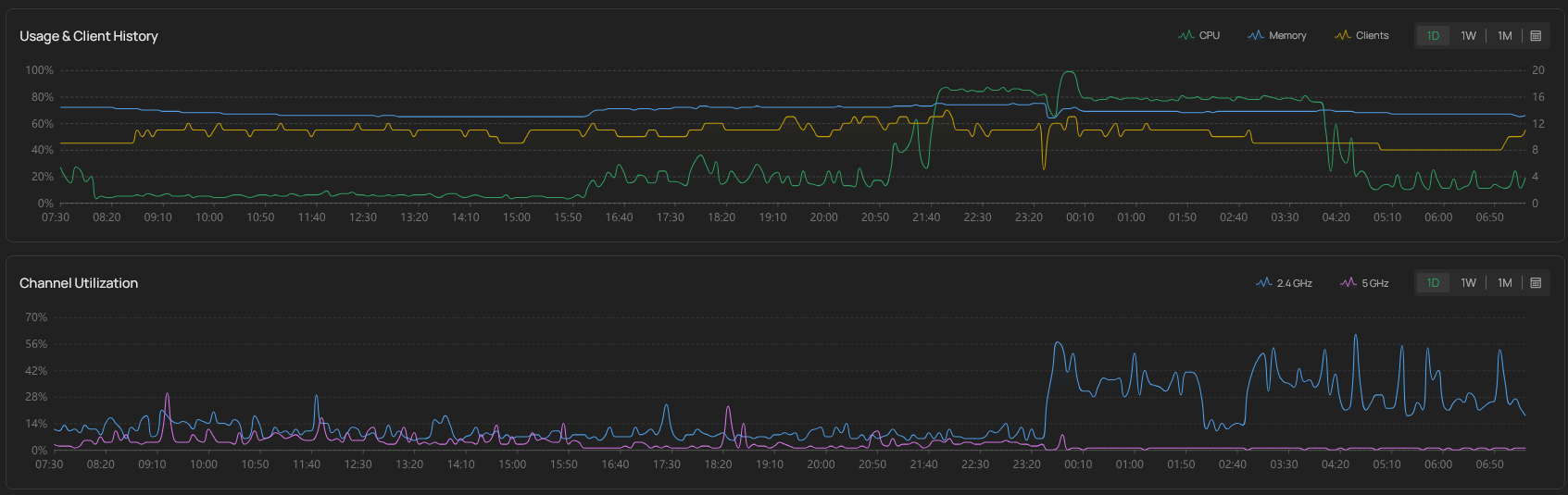
All the required info was sent via e-mail. Currently the AP's CPU usage sits well below any warning threshold (we're talking 10-20%), but you can clearly see on the screencap that it was hitting the ceiling for hours since around 21:40 (this was also sent in the ticket e-mail). What's weirder is that the AP that doesn't "lose" 5G, exhibits similar behaviour (second screencap).
========================================
- Copy Link
- Report Inappropriate Content
Can I reboot the AP to get (hopefully) the full functionality back, or you will need some more data, so I should keep it as is? The transfer speeds are deplorable, so unless it's crucial to wait for something, I'd rather restart it.
Also - the unusually high CPU usage seems to be a pattern, starting at around 21:30 and ending up at around 4:00. It's the same for all 3 APs ( 2x EAP670(EU) v1.0 + EAP650-Outdoor(EU) v1.0 ). Any idea why does that happen?
- Copy Link
- Report Inappropriate Content
Update - I haven't rebooted anything, and today I found out that the 5GHz band is back on the problematic IP. Speeds are also back to normal (device utilizes 80MHz channel instead of just 20) I have gathered the same data as previously, so if you need it to debug further or anything, just let me know.
- Copy Link
- Report Inappropriate Content


Sorry for the late reply.
How is the performance after that? I just checked the case TKID260432115, and we didn't receive any information. Please double-check if the email was sent out successfully.
meowing_parrot wrote
Update - I haven't rebooted anything, and today I found out that the 5GHz band is back on the problematic IP. Speeds are also back to normal (device utilizes 80MHz channel instead of just 20) I have gathered the same data as previously, so if you need it to debug further or anything, just let me know.
- Copy Link
- Report Inappropriate Content
Could it be that the case was closed, and any attachments sent via e-mail were ignored? I was sending the files to < support.forum@tp-link.com > with this subject < Re: [TP-Link Support]-[TKID260432115] [Forum Escalation] [ID 862042] Disappearing network on 5GHz-only band >
Unless there's some other way to share the files with you, or I misunderstood how it should be done?
- Copy Link
- Report Inappropriate Content
I have sent another email to reopen the case. Please check if you received it.
It's possible your email failed to send because the log files are too large. You can delete the older logs and keep only the recent logs (they must cover the period when the issue occurred).
meowing_parrot wrote
Could it be that the case was closed, and any attachments sent via e-mail were ignored? I was sending the files to < support.forum@tp-link.com > with this subject < Re: [TP-Link Support]-[TKID260432115] [Forum Escalation] [ID 862042] Disappearing network on 5GHz-only band >
Unless there's some other way to share the files with you, or I misunderstood how it should be done?
- Copy Link
- Report Inappropriate Content
I've sent those again (2 messages, first with logs just after it failed and second when it returned to normal by itself). If they're too big, I can upload logs somewhere and just share the private link in the e-mail. As long as it's not stripped by some automated system, it should suffice.
- Copy Link
- Report Inappropriate Content
I’m not sure which part is causing the problem. I still haven’t received your email.
I checked again and found that this ticket had never received an email from you.
Please confirm whether your email was sent successfully.
Alternatively, do you have another email address? If yes, please send me a private message. Thanks.
meowing_parrot wrote
I've sent those again (2 messages, first with logs just after it failed and second when it returned to normal by itself). If they're too big, I can upload logs somewhere and just share the private link in the e-mail. As long as it's not stripped by some automated system, it should suffice.
- Copy Link
- Report Inappropriate Content
- Copy Link
- Report Inappropriate Content
Information
Helpful: 1
Views: 608
Replies: 19
Voters 0
No one has voted for it yet.