
Archer C80 WAN to LAN speed issue

Archer C80 WAN to LAN speed issue

Archer C80 WAN to LAN speed issue
13 hours ago
Model: Archer C80  
Hardware Version: V1
Firmware Version: 1.5.7 Build 210308 Rel.60033n(5255)

I’ve been using this router since 2022. Before that, my ISP provided 100 Mbps, and I had no issues. Now that I’ve set up GPON, I’ve noticed that the connection speed drops significantly when using the router compared to a direct connection.

Test directly from the terminal:
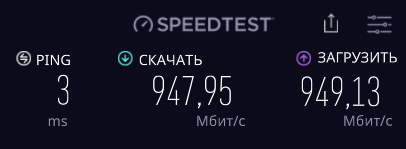
Terminal - Archer C80 - PC:
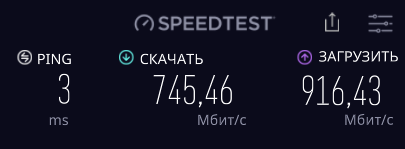
The tests were conducted using the Speedtest desktop application for Windows, connecting to the same server at one-minute intervals. Both patch cords are CAT 5E.
IPTV and QoS are disabled, NAT acceleration is enabled. I even tried disabling SPI for testing - the download speed just won't go any higher.

I ran some synthetic tests using iperf:
1. WAN to LAN
The PC (server) is connected to the router's WAN port (simulating an ISP with a static IP), and the laptop (client) is connected to the router's LAN port

2. LAN to LAN
The PC (server) and laptop (client) are connected to the router's LAN ports

Direct routing over the LAN is 937 Mbps, while routing between the WAN and LAN (which should utilize the router's NAT) is 925 Mbps. The difference with NAT is only 12 Mbps.
 

I don't understand anything at all. Why does the download speed drop so much when using a router in real-world conditions (when running a Speedtest to the same server) compared to a direct connection to the terminal?

P.S. The ISP uses a standard dynamic IP address, not PPPoE

  0      
  0      
#1
Options
3 Reply
Re:Archer C80 WAN to LAN speed issue
7 hours ago

  @MrDratik 


Your second test (with iperf) is the most relevant way to prove how your router can keep up with its advertised bandwidth.

The difference with the speedtest results could be due to an interconnection latency between your ISP and the test server or your ISP bandwidth limits.

If this was helpful click on the arrow pointing upward to make it blue. If this solves your issue, click the star to make it blue as a "Recommended Solution". Tips:149wubkkfoLmNDjDbiTxx4ZU8mpcMA5CJt
  1  
  1  
#2
Options
Re:Archer C80 WAN to LAN speed issue
7 hours ago

terziyski wrote

The difference with the speedtest results could be due to an interconnection latency between your ISP and the test server or your ISP bandwidth limits.

  @terziyski But the point is that the Speedtest tests were conducted on the same server, through the same ISP, at almost the same time. The only difference was that in the first case (where the download speed was ≈950 Mbps), the test was conducted with the PC connected directly to the terminal, while in the second case, the PC was connected to the terminal via an Archer C80. If the issue had been with the ISP, the speed would have been equally low in both tests

  0  
  0  
#3
Options
Re:Archer C80 WAN to LAN speed issue
5 hours ago

  @MrDratik 


Well, the only difference between the synthetic tests and the real-world conditions is your ISP and the test server.

The lower bandwidth of the synthetic tests is because of the NAT between WAN and LAN interface.

If this was helpful click on the arrow pointing upward to make it blue. If this solves your issue, click the star to make it blue as a "Recommended Solution". Tips:149wubkkfoLmNDjDbiTxx4ZU8mpcMA5CJt
  0  
  0  
#4
Options