
ARP binding not working WOL from internet not working on Archer C6

I set up DDNS, assigned a static IP address, and added it to the ARP table. But after leaving it off for a while, I can't turn on my PC via the internet. Restarting the router helps, but after a while, the same thing happens again.
Everything works fine on my other router (Mrcusys AC12).
- Copy Link
- Subscribe
- Bookmark
- Report Inappropriate Content

- Bind IP & MAC Address (Essential): Go to
Advanced > Security > IP & MAC Bindingand bind your PC's IP address to its MAC address. - This prevents the ARP entry from being cleared.
- Set DHCP Address Reservation: Go to
Advanced > Network > DHCP Serverand add a reservation for your PC so it always receives the same IP address. - You may check this solutioin as well.
- If nothing helps so far, contact your local support to be advised further on this issue.
- Copy Link
- Report Inappropriate Content
Basicly to be able to use the WoL feature you should follow this guide.
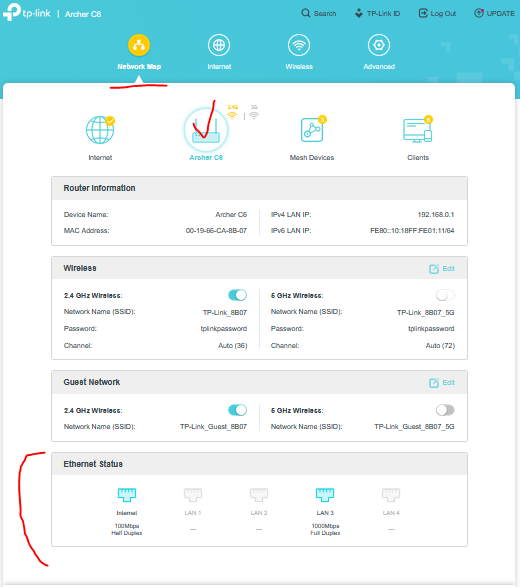
Here is a breakdown of why this happens and how to fix it based on common TP-Link troubleshooting:
Causes
- Low-Power State Negotiation: When the PC shuts down, the network card lowers its power usage, often dropping from 1Gbps to 10Mbps to conserve energy while still listening for the "Magic Packet".
- Driver Settings: The network adapter driver may be configured to maximize power savings over connection speed, as detailed in this Reddit thread.
- Cable/Port Issues: Poor quality or damaged Cat5 cable can cause auto-negotiation to fall back to lower speeds, suggest discussions on the TP-Link Community forum.
Troubleshooting Steps
- Force Speed in Windows: Go to Device Manager > Network Adapters > [Your Adapter] > Advanced. Look for "Speed & Duplex" and set it to "100 Mbps Full Duplex" or "Auto Negotiation". Note: Forcing speed can sometimes disable WoL, so ensure "Wake on Magic Packet" is enabled in the Power Management tab.
- Update/Reinstall Driver: Ensure you have the latest Realtek or Intel network drivers.
- Use a Different Port: If your TP-Link router has multiple LAN ports, try a different one.
- Check Power Saving: Disable "Energy Efficient Ethernet" (EEE) or "Green Ethernet" in the network adapter advanced properties.
If the 10Mbps connection only happens when the computer is off, but WoL works, it is normal behavior for some, particularly 2.5G, adapters. If it happens when the computer is on, the issue is likely a bad cable or a faulty port
- Copy Link
- Report Inappropriate Content
@terziyski I checked the settings, but it didn't help.
- Copy Link
- Report Inappropriate Content
- Bind IP & MAC Address (Essential): Go to
Advanced > Security > IP & MAC Bindingand bind your PC's IP address to its MAC address. - This prevents the ARP entry from being cleared.
- Set DHCP Address Reservation: Go to
Advanced > Network > DHCP Serverand add a reservation for your PC so it always receives the same IP address. - You may check this solutioin as well.
- If nothing helps so far, contact your local support to be advised further on this issue.
- Copy Link
- Report Inappropriate Content
@terziyski I did it all before. ) I think it's router apparat ARP system bug.
- Copy Link
- Report Inappropriate Content
Information
Helpful: 0
Views: 393
Replies: 4
Voters 0
No one has voted for it yet.