

Diody na routeru

Diody na routeru

Diody na routeru
Diody na routeru
3 weeks ago - last edited Friday
Model: Archer AX1800  
Hardware Version:
Firmware Version:

Hello, I would like to ask if there is any way to make the LEDs on my router light up according to the data flowing through the router, as it was with older types, such a fast blinking of the LED, which now only signals that the router is connected to the network. I miss the so-called blinking of the LED terribly!!!

  0      
0
#1
Options
1 Accepted Solution
Re:Diody na routeru-Solution
2 weeks ago - last edited Friday

  @Medik 


Recent home series routers made by TP-link have only this type of LED signaling:
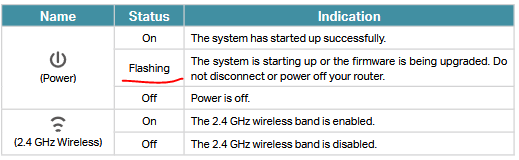
 

There's no way to change the default indicator mode, except turning all LEDs on or off via LED schedule setting.

If this was helpful click on the arrow pointing upward to make it blue. If this solves your issue, click the star to make it blue as a "Recommended Solution". BTC:149wubkkfoLmNDjDbiTxx4ZU8mpcMA5CJt
Recommended Solution
  0  
0
#2
Options
2 Reply
Re:Diody na routeru-Solution
2 weeks ago - last edited Friday

  @Medik 


Recent home series routers made by TP-link have only this type of LED signaling:
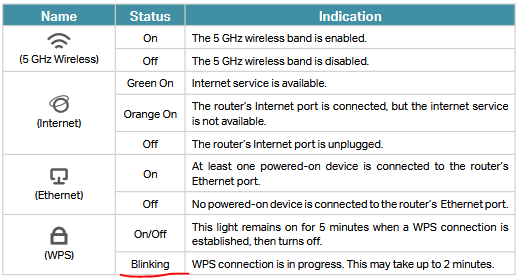
 

There's no way to change the default indicator mode, except turning all LEDs on or off via LED schedule setting.

If this was helpful click on the arrow pointing upward to make it blue. If this solves your issue, click the star to make it blue as a "Recommended Solution". BTC:149wubkkfoLmNDjDbiTxx4ZU8mpcMA5CJt
Recommended Solution
  0  
0
#2
Options
Re:Diody na routeru
Friday

Hi @Medik ,

As terziyski said, on Wi-Fi routers, the indicator lights usually remain solid; flashing lights typically indicate a firmware upload issue or that the device is in pairing mode.

Welcome to Our Community! Get the latest posts: △New Firmware for Archer GE550/GE650 V1 Introduces AI-QoS, EasyMesh IoT Expansion, and More! △New Firmware Releases for Archer BE805 V1/BE450 V1 to Support VPN Merge, New ECO Mode, and More! More posts, please see: △ Get the Ongoing Pre-release Firmware for Wi-Fi Routers Here— Subscribe for Updates! Urgent problems with your Wi-Fi Router, Range Extender, or DSL Modem? Please reach out via private Messages or @Joesph-TP in your new thread directly. Click Or ☆Recommended Solution if the post/answer helps.
  0  
0
#3
Options
