
Event triggered but without preview option

Hello.
After I learned that there is no Nethdd option for this camera I bought MicroSD class10 from Sandisk, 32GB.
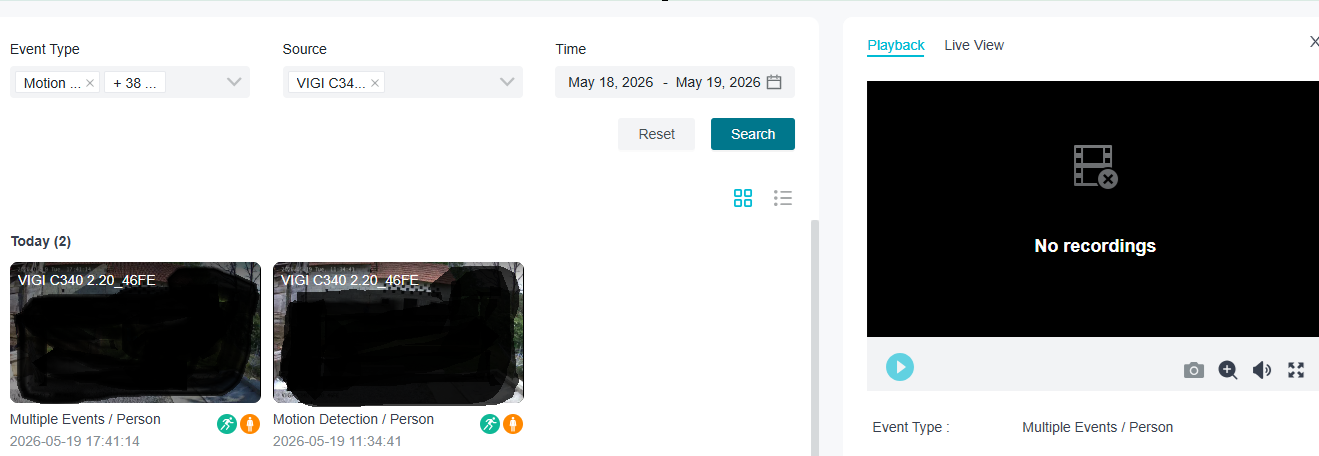
In event viewer I can see that there are triggered events but for some reason I can not see the playback.
When I click on event from today, on right side shows "No recordings"...
Very unusual...
Some advice please ?
- Copy Link
- Subscribe
- Bookmark
- Report Inappropriate Content
I solved it.
I apologize for submitting a problem...
The catch was in camera settings. I connected directly to camera over web and record schedule was set to off.
I was confused because in VIGI Config tool app in "Basic" Event settings schedule is selected 24/7 and for me this looks like settings are overlapped.
Thanks for support!
BR!
- Copy Link
- Report Inappropriate Content


Hi @Peterzweet
Thanks for reaching out to TP-Link Business Forums.
May I know did you set the recording schedule to 24/7 or just a certain period of time?
What's the SD card status shown on the VIGI APP? Does it say Look Good?
Did you format the SD card after inserting it to the camera on VIGI APP? If the remaining space of an SD card is less than 500MB or 5% of the total capacity before the first insertion of the camera, it would be impossible to record.
- Copy Link
- Report Inappropriate Content
I solved it.
I apologize for submitting a problem...
The catch was in camera settings. I connected directly to camera over web and record schedule was set to off.
I was confused because in VIGI Config tool app in "Basic" Event settings schedule is selected 24/7 and for me this looks like settings are overlapped.
Thanks for support!
BR!
- Copy Link
- Report Inappropriate Content
Hi @Peterzweet
Thanks for sharing your solution to here.
I'm glad that you have now fixed the issue now.
Please feel free to come back to us if you encounter any issue again.
- Copy Link
- Report Inappropriate Content
Information
Helpful: 0
Views: 172
Replies: 3
Voters 0
No one has voted for it yet.