
Trigger a PTZ preset via event action

As the name suggests, it would be a good idea to be able to send a trigger via fixed cameras if, for example, motion is detected. That you can control a PTZ to a specific preset.
- Copy Link
- Subscribe
- Bookmark
- Report Inappropriate Content


Hi @Marcel-tp
After further investigation, we have confirmed that S445S does support this feature. Here are the configuration screenshots.
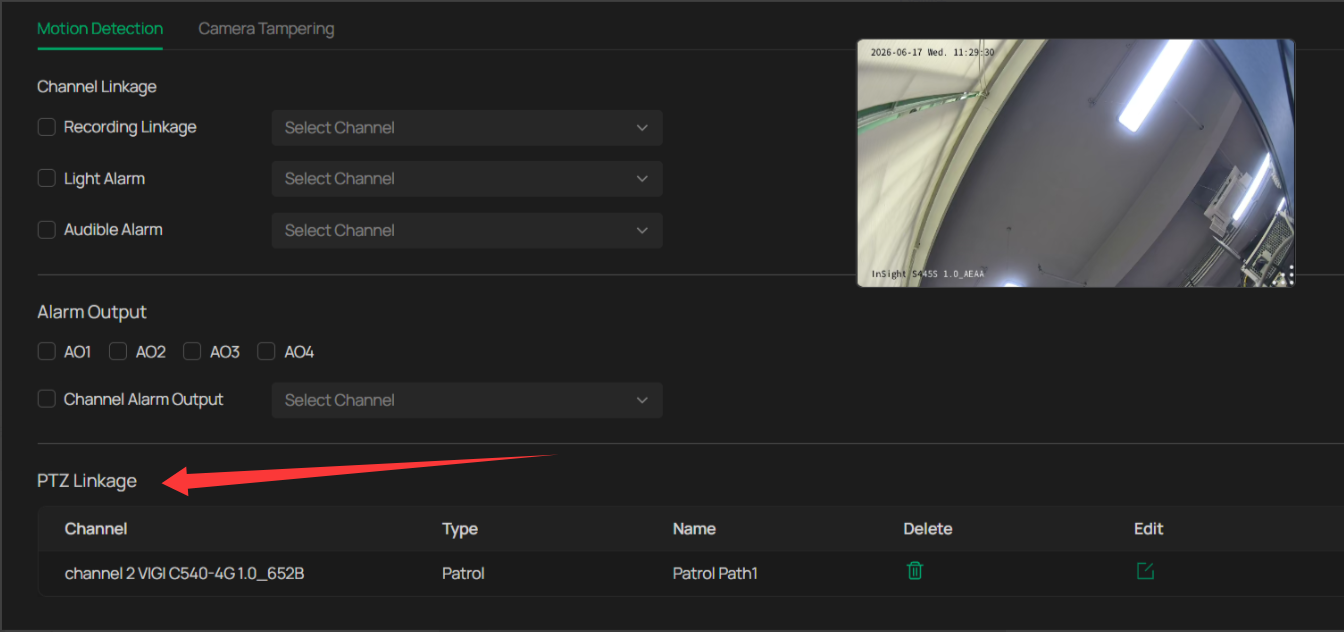
This function requires the NVR to manage the IPC. I apologize for providing incorrect information earlier, which may have misled you.
It's a new feature introduced in NVR 2.0.
- Copy Link
- Report Inappropriate Content
Hello, and thank you for sharing your thoughts on the TP-Link community. We truly value all feedback and feature suggestions posted here.
At the moment, we don’t have specific details regarding whether this feature can be implemented or its potential timeline. I will log your request and pass it along to the relevant team.
If you have any other ideas or suggestions, please feel free to let us know—we’d be happy to forward them as well.
- Copy Link
- Report Inappropriate Content
I understand that it is possible in the new (if I am not mistaken) S445S. I hope so. We are just planning to switch to Vigi, but it is a requirement for us. We currently have two projects running with Vigi cameras as a test, and we are very enthusiastic about the cameras.
- Copy Link
- Report Inappropriate Content
Hi @Marcel-tp
After further investigation, we have confirmed that S445S does support this feature. Here are the configuration screenshots.
This function requires the NVR to manage the IPC. I apologize for providing incorrect information earlier, which may have misled you.
It's a new feature introduced in NVR 2.0.
- Copy Link
- Report Inappropriate Content
Information
Helpful: 0
Views: 191
Replies: 3
Voters 0
No one has voted for it yet.