Bug Report: ER707-M2 / Omada OC200 – Speed Test Fails When IPv6 is Enabled

Bug Report: ER707-M2 / Omada OC200 – Speed Test Fails When IPv6 is Enabled
Tags:
#speed test
Environment
- Router: TP-Link ER707-M2 F/W: 1.4.2 Build 20260509
- Controller: TP-Link Omada OC200 F/W: 1.40.18 Build 20260506 Rel.74003
- WAN Type: PPPoE + SLAAC + Prefix Delegation (IPv6 Dual Stack)
Network Configuration
- IPv4 DNS: Quad9 (DoH enabled initially, later tested with ISP DNS)
- IPv6 DNS: Quad9 IPv6 (also tested with ISP IPv6 DNS in plain mode)
- IPv6 Status: Enabled and fully functional
- Client IPv6 test: 10/10 (confirmed working)
- IPv6 Prefix: Delegated correctly (/64 observed)
Issue Description
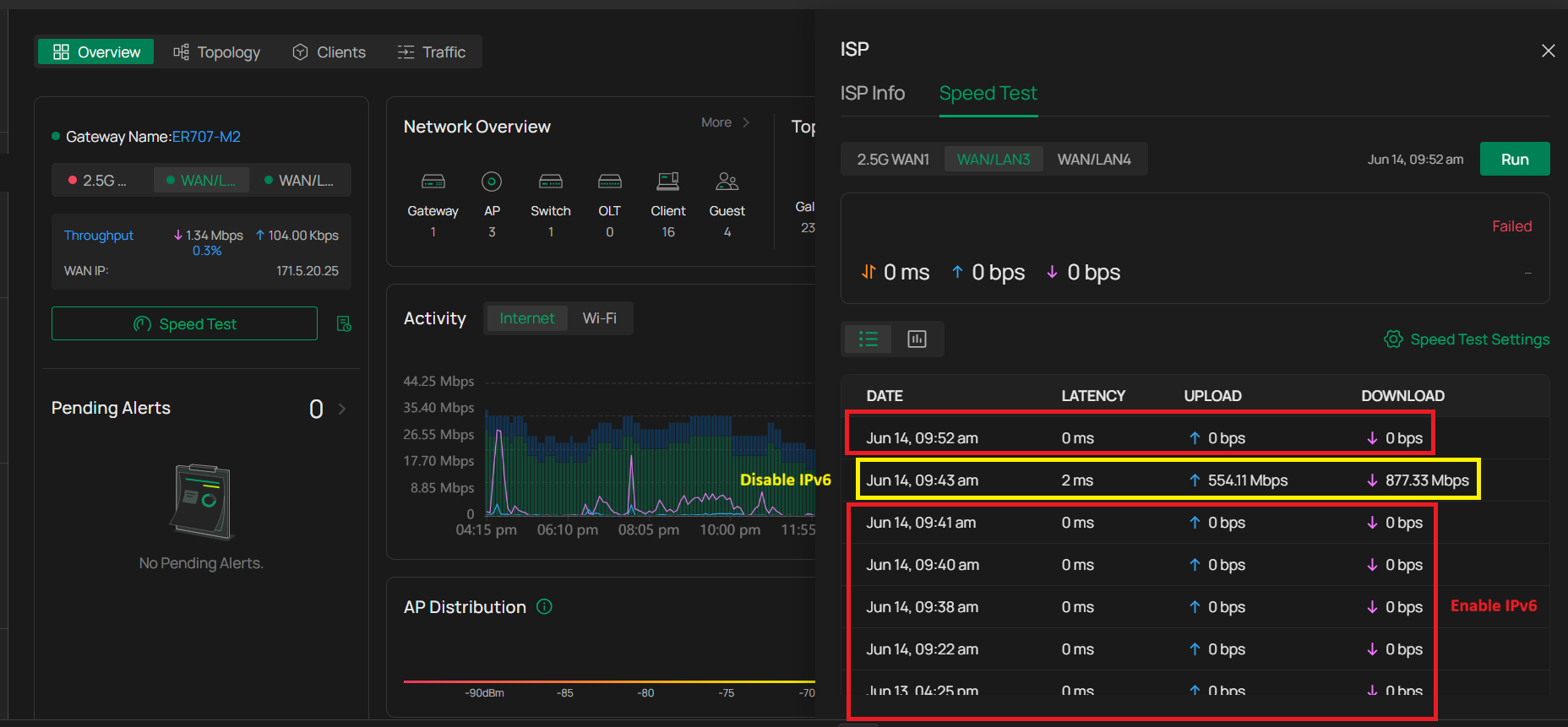
When IPv6 is enabled on the WAN interface, the built-in Omada Speed Test function fails consistently on the ER707-M2 when managed via OC200.
The issue is reproducible and occurs under all tested DNS configurations.
Expected Behavior
- Speed Test should run normally regardless of IPv4/IPv6 configuration
- If IPv6 path fails, system should fallback to IPv4 automatically
- WAN connectivity should not affect internal speed test execution
Actual Behavior
- Speed Test works normally when IPv6 is disabled
- Speed Test fails immediately when IPv6 is enabled on WAN
- Error shown: “Fail” (no additional diagnostic details provided)
- No relevant event/log entries are generated in OC200 or gateway logs
Reproduction Steps
- Configure ER707-M2 with PPPoE WAN (IPv4 only)
- Run Speed Test → Success
- Enable IPv6 (SLAAC + PD)
- Confirm IPv6 is working (client test: 10/10)
- Run Speed Test → Fail
- Disable IPv6
- Run Speed Test again → Success restored
Additional Testing
- Changed DNS configuration:
- Quad9 DoH (IPv4)
- Quad9 IPv6 (plain DNS)
- ISP DNS (IPv6 + IPv4)
- Result: No change, Speed Test still fails when IPv6 is enabled
- Internet connectivity remains fully functional in all cases
- IPv6 routing confirmed stable via external tests
Impact
- Built-in Speed Test becomes unusable when IPv6 is enabled
- Monitoring/diagnostic reliability of Omada controller is affected
- May lead to false assumption of WAN failure despite normal connectivity
Workaround
- Disabling IPv6 immediately restores Speed Test functionality
- However, this is not a viable long-term solution for dual-stack environments
Conclusion
This appears to be a compatibility issue or bug in the Omada Speed Test implementation when IPv6 is enabled on WAN interfaces.
IPv6 connectivity itself is fully functional and verified; the issue is isolated to the Speed Test feature.
This context generate by AI after few hour talking and summary of result. Any body have ever face to a problem same like this please share