
Repeat or Bridge Far WiFi That Requires Browser Login
 This thread has been locked for further replies. You can start a new thread to share your ideas or ask questions.
Repeat or Bridge Far WiFi That Requires Browser Login
Model :
Hardware Version : Not Clear
Firmware Version :
ISP :
Hello everyone! I hope you can help me on this issue.
Firstly, my question is regarding following models:
1. AP: TL-WA801ND
2. Antenna: TL-ANT2424B
The city where I am living is providing a free WiFi. My house situated only a bit outside the city center. Basically I cannot access the WiFi from my house. My idea is to repeat the WiFi into my house.
I bought those components mentioned above. I took out one of the two antennas from the TL-WA801ND and replaced it with TL-ANT2424B. I connected LAN cable between my laptop and the 801ND. I managed to configure 801ND from my laptop. I chose repeater mode. When I click the Survey button, it detected the SSID of the free WiFi from the city center. I continued the configuration. Everything went alright and the free WiFi was repeated in my house.
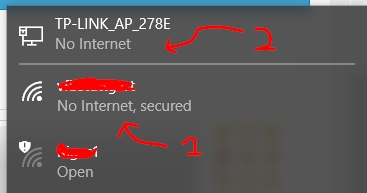
The problem is, when I connect my phone or my laptop to the repeated WiFi, it connected but "No Internet", as shown in the picture (1). It also shows "No Internet" on the 801ND (2).
Note that the free WiFi requires Browser Login. When I open the browser, the login page did not appear, as there is no active internet connection.
What should I do to solve this problem? Do I need to set a static IP? I do not have any idea right now.
Thank you in advance for your help.
Regards,
A. Muhsin
Hardware Version : Not Clear
Firmware Version :
ISP :
Hello everyone! I hope you can help me on this issue.
Firstly, my question is regarding following models:
1. AP: TL-WA801ND
2. Antenna: TL-ANT2424B
The city where I am living is providing a free WiFi. My house situated only a bit outside the city center. Basically I cannot access the WiFi from my house. My idea is to repeat the WiFi into my house.
I bought those components mentioned above. I took out one of the two antennas from the TL-WA801ND and replaced it with TL-ANT2424B. I connected LAN cable between my laptop and the 801ND. I managed to configure 801ND from my laptop. I chose repeater mode. When I click the Survey button, it detected the SSID of the free WiFi from the city center. I continued the configuration. Everything went alright and the free WiFi was repeated in my house.
The problem is, when I connect my phone or my laptop to the repeated WiFi, it connected but "No Internet", as shown in the picture (1). It also shows "No Internet" on the 801ND (2).
Note that the free WiFi requires Browser Login. When I open the browser, the login page did not appear, as there is no active internet connection.
What should I do to solve this problem? Do I need to set a static IP? I do not have any idea right now.
Thank you in advance for your help.
Regards,
A. Muhsin