TL-WR940N Router Password length

This thread has been locked for further replies. You can start a new thread to share your ideas or ask questions.

TL-WR940N Router Password length

This thread has been locked for further replies. You can start a new thread to share your ideas or ask questions.

TL-WR940N Router Password length
2022-06-06 08:13:59 - last edited 2022-06-07 00:45:11
Model: TL-WR940N  
Hardware Version:
Firmware Version:

I can´t login into the Router anymore. I am 1000% sure of my Login Name und Password as it was working 3 weeks ago.

What I now see is that the password length is limited to 1-15 characters. My Password  is 18 characters and again I am sure it was working.

May there was an update which brings this limitation?

Thanks in advance for any help


  0      
  0      
#1
Options
3 Reply
Re:TL-WR940N Router Password length
2022-06-06 14:29:46 - last edited 2022-06-07 00:45:11

  @Mike_Sch 


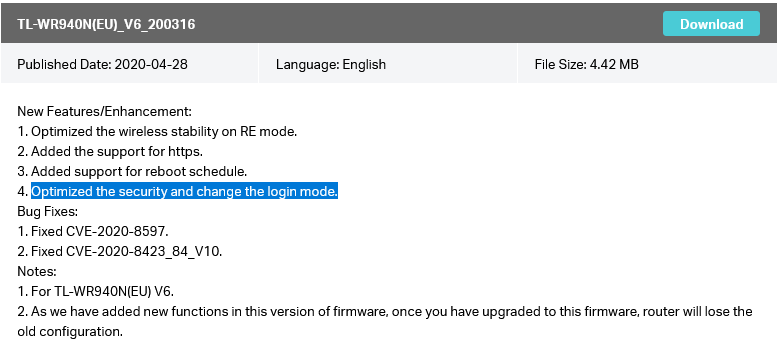
It depends on if you have upgraded you router FW or not and which FW release you use at the moment - one thing related to login mode is mentioned here:


Of course you can always reset to its factory defaults and regain your access to the router.

If this was helpful click on the arrow pointing upward to make it blue. If this solves your issue, click the star to make it blue as a "Recommended Solution". Tips:149wubkkfoLmNDjDbiTxx4ZU8mpcMA5CJt
  0  
  0  
#2
Options
Re:TL-WR940N Router Password length
2022-06-06 15:08:50 - last edited 2022-06-07 00:45:11

  @terziyski 

Yes, I did upgrade the router, however now I cn´t see the actula Firmwareversion as I can´t login or is there a different way?

Is there a possibility to change back the upgrade?


Thanks for you help

  0  
  0  
#3
Options
Re:TL-WR940N Router Password length
2022-06-06 15:21:16 - last edited 2022-06-07 00:45:11

  @Mike_Sch 


There's no other way to re-gain access excxept to reset the router to its factory defaults and re-confgure from scratch:

You could probably downgrade the FW release, but that doesn't make much sense since there are bug fixes and new features introduced in a newer releases.

What I would do is to reset and re-configure the router, staying on the latest FW releaase.

If this was helpful click on the arrow pointing upward to make it blue. If this solves your issue, click the star to make it blue as a "Recommended Solution". Tips:149wubkkfoLmNDjDbiTxx4ZU8mpcMA5CJt
  0  
  0  
#4
Options