
SAML-Login - Unsupported broeser
 This thread has been locked for further replies. You can start a new thread to share your ideas or ask questions.
SAML-Login - Unsupported broeser
This thread has been locked for further replies. You can start a new thread to share your ideas or ask questions.
Hi,
we wanted to set-up SAML-Auth, but are failing with the following screenshots?
We tried on all modern browser, but all are failing.
Thanks for your help in advance!
Lars

- Copy Link
- Subscribe
- Bookmark
- Report Inappropriate Content
We finally found a solution:
there are 3 requierement for it to be working:
- custom attribute: "username" map to Username of IDP
- custom attribute "usergroup_name" map to Group of IDP (Attention: only 1 group per user is supported)
- Relay_State has to be set to base64(ResourceID_OmadaID). The ResourceID / OmadaID, can be found when clicking on the first symbol.
 - create a SAML group in Omada and give the group the necessary right
With that being done, it works for all my instances
- Copy Link
- Report Inappropriate Content

@LarsK1 I tried setting the 3 requirements that you have mentioned and I am still getting the 'Sorry, the browser is not compatible.' error message. I am runing the controller in a docker container and I am wondering if that is the reason why it is failing.
It seems like it is failing to locate the Identity Provider (IdP) config.
ERROR [https-jsse-nio-8043-exec-17] [] c.t.s.o.i.c.a.d(): cannot find idp config,
Are you able to share screenshots of your Authentik config? TIA
- Copy Link
- Report Inappropriate Content
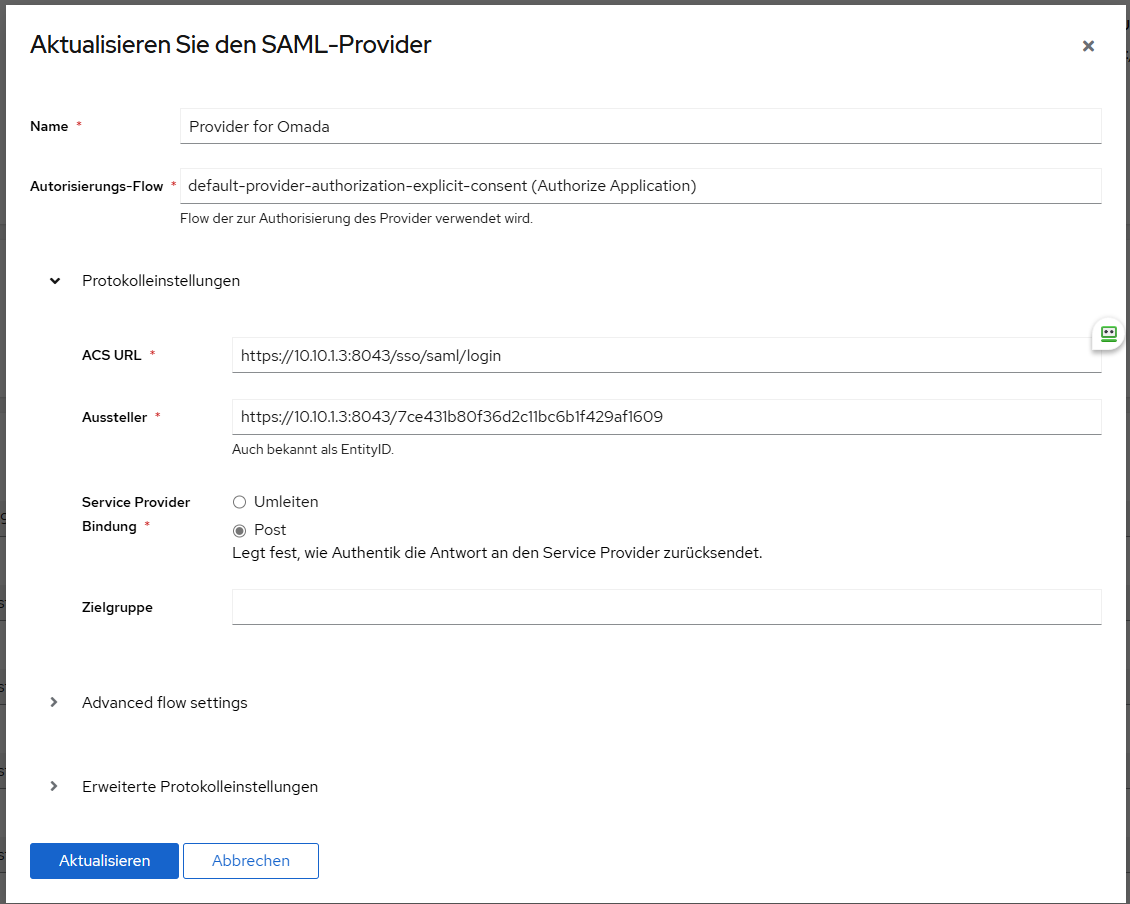
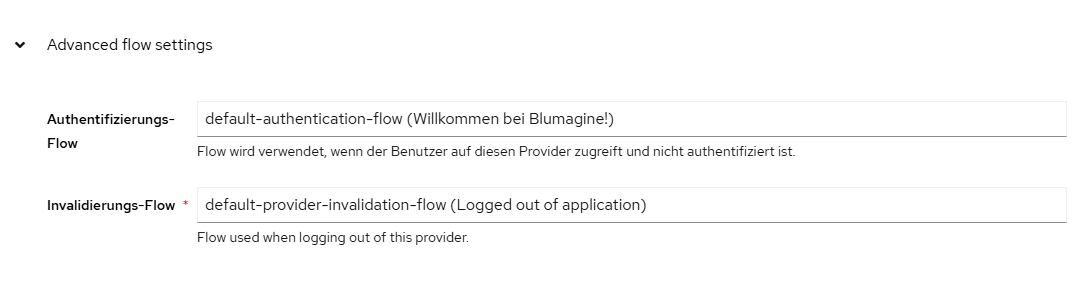
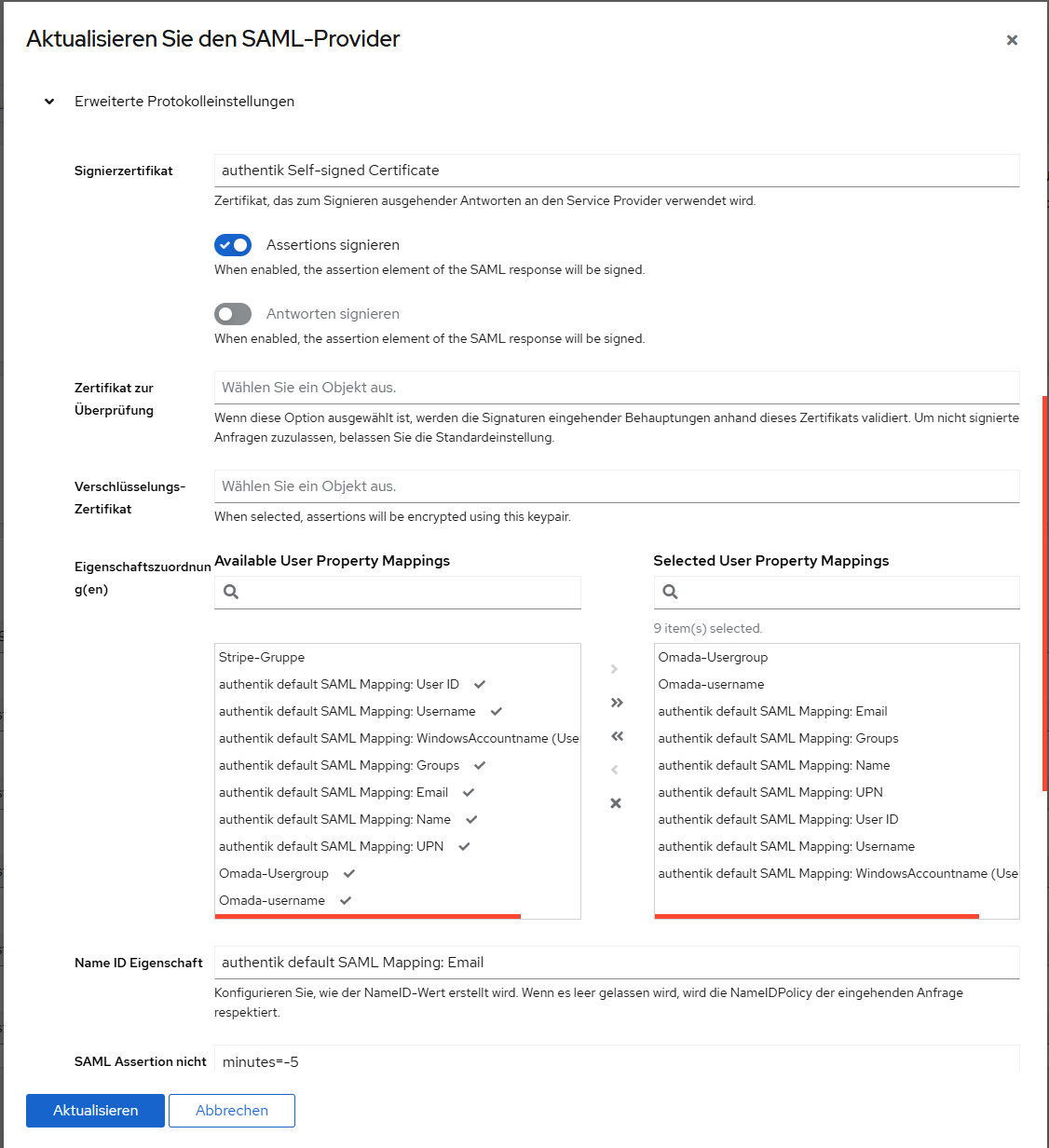
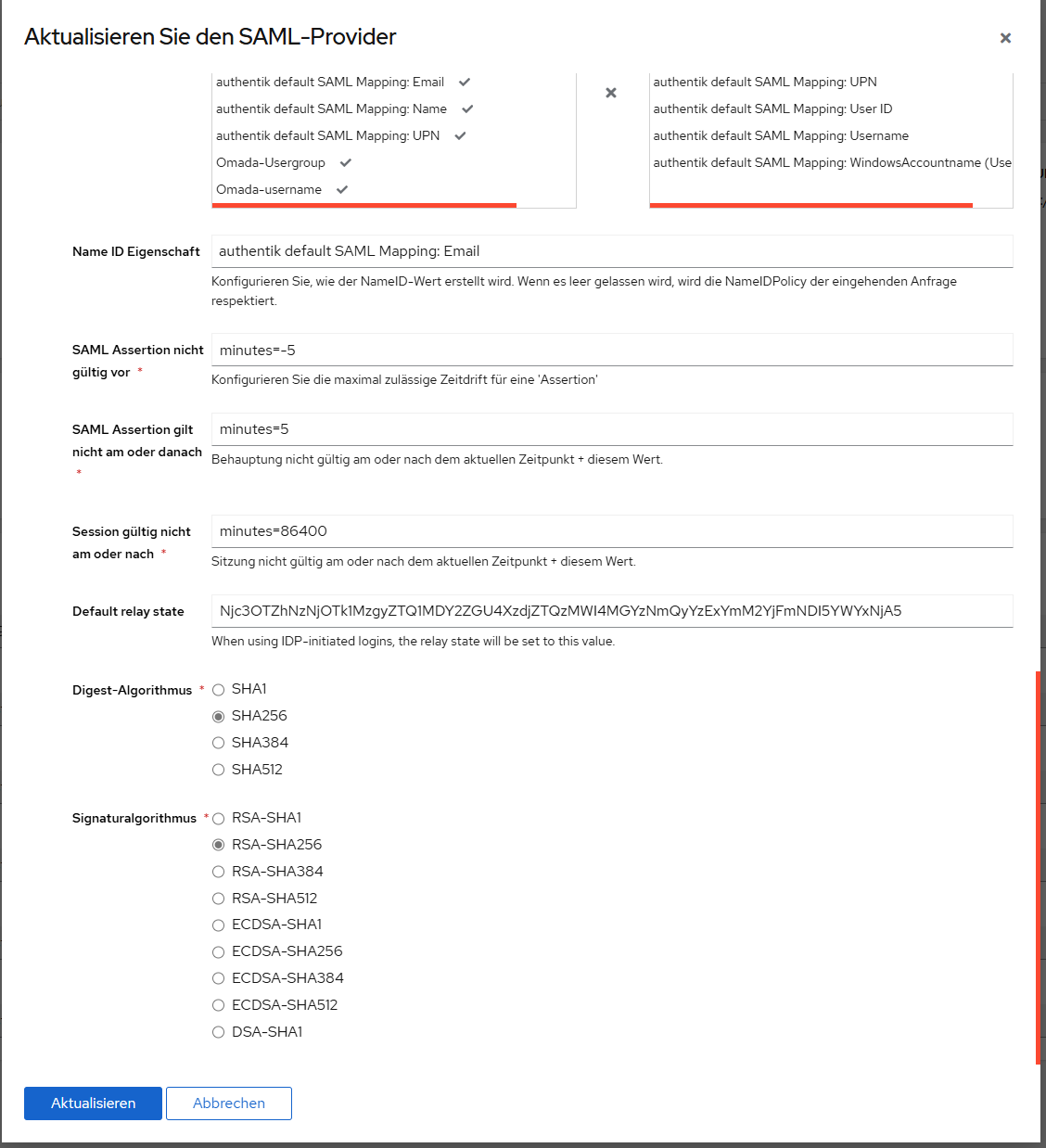
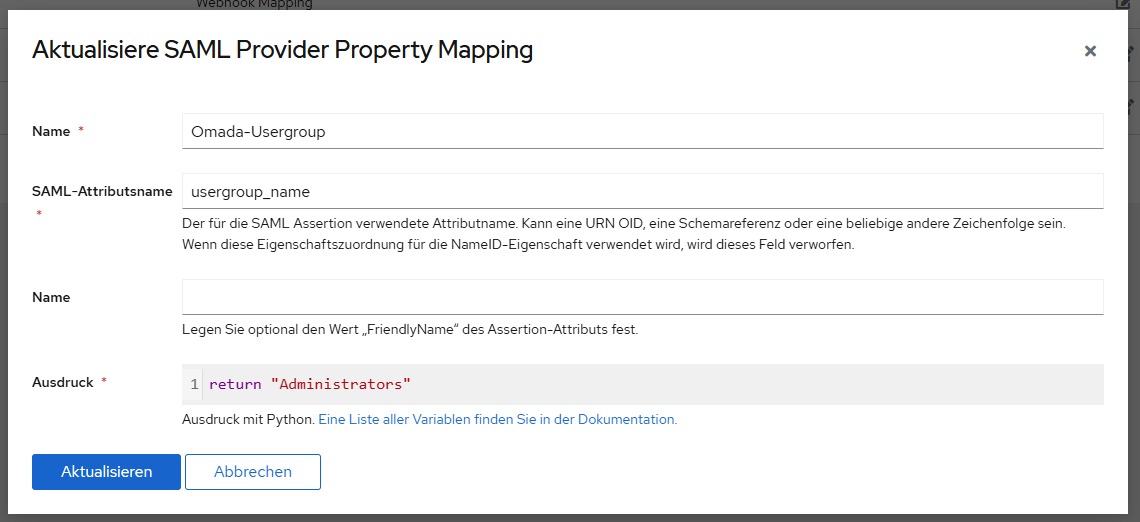
- Copy Link
- Report Inappropriate Content
@LarsK1 iv setup everything as u set it but im still getting the browser thingy, the only part that is still not clear to me is the relay part, which maybe is where im failing? acording to ur comment, the relay is the Resource ID and the Omada ID toguether? so in my case the resource id is 681bcab07a6d8535cf44ef6e and omada id is 891ab0622346c0a6af2cb4be2361193f so the relay should be 681bcab07a6d8535cf44ef6e891ab0622346c0a6af2cb4be2361193f ? im using authentik as well
Edit: i used this website base64encode and did 681bcab07a6d8535cf44ef6e_891ab0622346c0a6af2cb4be2361193f which gave me this NjgxYmNhYjA3YTZkODUzNWNmNDRlZjZlXzg5MWFiMDYyMjM0NmMwYTZhZjJjYjRiZTIzNjExOTNm but im still getting the browser not supported msg
- Copy Link
- Report Inappropriate Content

@LarsK1
Did you get this sorted, Apparently this seems to be an issue also for the hardware controller OC400 in my case.
I am doing this for
- Microsoft Entra/Microsoft Azure Authentication and using the Omada Config Guide provided "How to Configure SAML SSO on Omada Controller | TP-Link"
However I face the same issue of "Sorry, the browser is not compatible.The current browser does not support Omada Controller. Please upgrade to a newer version or use other browsers."
I have tried 3 different browsers and tried in incognito or all relevant modes for other browsers and cant get it to work.
In my case this is still an issue when using a hardware controller as I can only use the IP of the hardware controller which indeed is not going to work when I or any of the support personnel needed to use this out of the business network.
It indeed seems to be a bug or still unsupported feature that was released part of a stable update.
- Copy Link
- Report Inappropriate Content
@Vincent-TP how do i open an issue ticket for this? im using docker controller on Linux and did all the steps that @Larsk1 sugested on his post, but im still getting the Unsuported Browser msg, no mattar which browser i try
- Copy Link
- Report Inappropriate Content


- Copy Link
- Report Inappropriate Content

+1 I also can not get SAML SSO to work with omada and authentik.
Also seeing "Sorry, the browser is not compatible. The current browser does not support Omada Controller. Please upgrade to a newer version or use other browsers."
at https://controller.tld/sso/saml/login [behind reverse proxy ngnix]
or via https://ip:port/sso/saml/login
The instructions for how to set to base64 were unclear so this may be an issue.
I also submitted a ticket ~
running latest SDN 5.15.20.20 on debian LXC in proxmox
- Copy Link
- Report Inappropriate Content
This is only half working...
1) To anyone looking for tidbits ~ the base 64 is simply encoded (for example from this website base64encode) ~ do include the "_"
2) The standard Omada login/sign on page has no option for SSO [other services typically add a button to sign in via SSO], and the SSO page for the html is ignored/not working - again https://[ip or fdqdn]:8043/sso/saml/login WILL NOT WORK
3) The SSO login from within Authentik (clicking the app after logging into authentik) will direct you to log in, partially working.
it will direct you the settings in your Global View -> Settings -> System settings -> [Access config] -> controller hostname/IP & port!!!
Because this is behind a reverse proxy including the port fails (with no way to change the omada setting [HTTPS Port for Controller Management] to 443. The alternative to use IP address and port works ~ but is ugly, and not practical.
This can be seen in the "View SAML Attributes" as either using the IP address or incorrectly tagging on a port for both the Entity ID and Sign-On URL.
If using FQDN [not ip address] no port should be included in the SSO / SAML logins
To login I used
https://authentik.fqdn.tld/application/saml/omada/sso/binding/init/
site setting must be set to IP address (won't work with host name - due to insertion of port)
Note removing the port does work!
https://[omada.fqdn.tld]:8043/longstringtext/login?accessToken=differentlongstring
the
https://[omada]/sso/saml/login doesn't work
leaving controller hostname/ip as an ipaddress is the only way I could get this to work. So close... maybe a redirect with nginx or something...
- Copy Link
- Report Inappropriate Content
Information
Helpful: 0
Views: 4345
Replies: 19
Voters 0
No one has voted for it yet.