
TL-SG1428PE management website temporary not accessible
TL-SG1428PE management website temporary not accessible

Hello.
I have the exact same problem as described in https://community.tp-link.com/en/home/forum/topic/673210
The management interface becomes unavailable from a trunked port after approximately 4-5 mins. If the switches IP is pinged from the L3, the UI becomes available again.
It is not from the arp expiry at the L3 (i'm using a pfsense)
Connecting locally at the TL-SG1428PE, you can navigate to the webui without issue. It's ONLY when the UI is accessed via a trunk.
To replicate..
Switch - Vlan and trunk port to Firewall
Firewall - 2 vlans - one VLAN with the switch subnet / IP, another Vlan for a laptop. Allow access through firewall rules.
Attempt to access web UI IP address - it will fail after approximately 5mins.
The only way it can be restored is to connect to the switch locally / vlan. OR ping from the firewall / L3, this seems to wake the UI up.
Gateway etc all set correctly.
- Copy Link
- Subscribe
- Bookmark
- Report Inappropriate Content


Hi @JoshControl
Since the Laptop and SW1's IP belong to different subnets, when the Laptop accesses SW1, SW1's reply will first be sent to L3. However, the ARP entries related to L3 on SW1 have already aged out. Since the SG1428PE(UN) V3.0 can only proactively send ARP packets from VLAN 1, and because in the topology, the port 25 connecting SW1 to L3 is only in VLAN 10/11, ARP requests within VLAN 1 cannot reach L3. As a result, SW1 cannot learn L3's ARP entries, and the reply packets cannot be sent out, so SW1 cannot respond to the Laptop's access request.
After attempting to ping SW1 from L3 or waiting a few minutes, the situation recovers because L3 proactively sends ARP entries with VLAN ID 10 to SW1. Once SW1 learns L3's ARP entries, it can respond normally to the Laptop's requests.
Our test already involved assigning the switch's IP to a non-default VLAN.
The purpose of adding port 25 of SW1 untagged into VLAN 1 is to allow SW1 to send ARP packets from port 25. L3 does not need to configure a gateway/interface for VLAN 1.
May I know what is the PVID setting of P1 on L3? Would setting the PVID to VLAN 10 help resolve the issue?
- Copy Link
- Report Inappropriate Content
Hi @Gabriel-TP
With your questions, and comments, I've managed to figure out what the issue is.
The switch, even though it's got an ip addresses assigned within the vlan that has access via the trunk, is not registering the arp updates with the L3 device.. as you said "ARP requests within VLAN 1 cannot reach L3." ..
This is the problem.. my configuration drops any untagged packets from that uplink port on the L3 device. Only Tagged packets from the trunk are allowed up (which is good network design)..
I've now enabled untagged packets to pass and assigned a PVID to the uplink on the L3 side.
However, I wish we could assign the switches IP to a VLAN so this could be properly assigned to a management network.
Two questions,
- Does the switch IP / managment UI automatically get assigned to the default VLAN (1), or are the UI packets untagged ?
- Is there any way to assign the switch IP / management internal port, to a dedicated VLAN? (other than the default)
Many many thanks for the response. I'm happy enough with this fix / work around.
- Copy Link
- Report Inappropriate Content
Hi @JoshControl
1. The switch IP will not get assigned to the default VLAN; instead, it depends on the VLAN configuration of its access port.
2. Now you have assigned VLAN10 to the switch. If you want to change it to a dedicated VLAN, you can add a different VLAN interface on the Firewall/L3 device and change the port 1 VLAN setting as well as the corresponding PVID on port 25.
- Copy Link
- Report Inappropriate Content
Hi Gabriel,
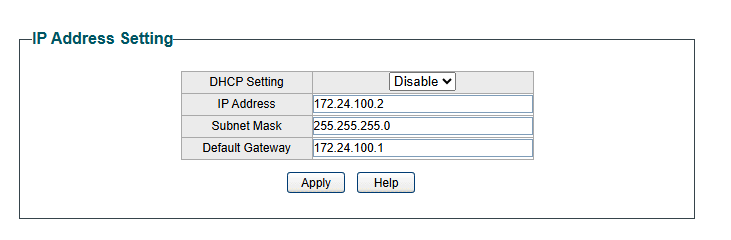
There's no option to assign the switch interface to any VLAN within the configuration. Does it default to VLAN 1? ... or is the UI untagged traffic on the switch, and will get tagged when it hits the L3 PVID.
- Copy Link
- Report Inappropriate Content
Hi @JoshControl
The management traffic is not tagged and is not bound to VLAN 1.
It is always sent untagged, and the VLAN it belongs to is determined by the PVID of the egress port.
The switch itself does not tag management packets.
This model does not support assigning the management interface to a tagged VLAN. There is no option to bind the management IP to a dedicated VLAN.
To make it work, you must allow untagged traffic on the uplink and assign a PVID, or use a native VLAN for management.
- Copy Link
- Report Inappropriate Content
Hi
Many thanks. This clears everything up.
For those who also have this UI drop out issue.
- UI Packets not bound to any vlan and are untagged packets on the L2 switch
- Remote management of the switch requires allowing untagged packets up the trunk, with a PVID set at the uplink port to assign the untagged packets to a VLAN (obviously allow untagged packets to pass at the L3 and don't drop them)
- Unfortunately it's not the best, as it is allowing untagged packets to hit the L3. But you can make a new Vlan for "management" that matches the PVID for that physical trunk port.
- If every other port on your switch is tagged (which it has to be using this VLAN mode / PVID), then the only packets (untagged) hitting the L3 are from these TP-Link switch UI.
- Copy Link
- Report Inappropriate Content
Information
Helpful: 0
Views: 2010
Replies: 16
Voters 0
No one has voted for it yet.