
EAP673 V1 Omada - missing management VLAN

EAP673 V1 Omada - missing management VLAN

EAP673 V1 Omada - missing management VLAN
3 weeks ago - last edited a week ago
Model: EAP673  
Hardware Version: V1
Firmware Version: 1.1.1 Build 20250326

Hello,


I am having an issue with my Access Point, model EAP673.


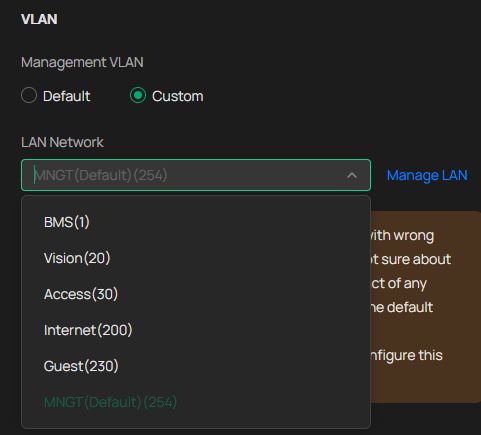
My network uses several VLANs, and one of them (VLAN 254) is used for IT management. In the building, I have ~15 Access Points, model EAP650/653, and when I go to Services → Management VLAN in Omada, the MNGT (254) network is available and can be selected:


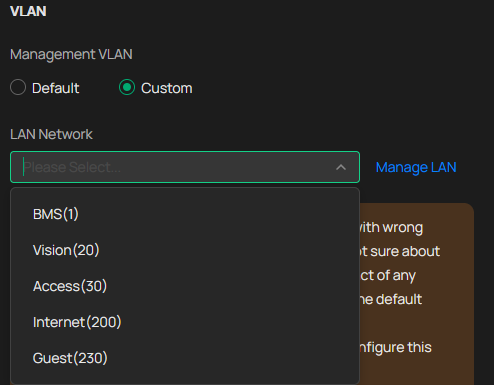
However, when I do the same on the EAP673 (Services → Management VLAN), this network is not visible, and I am unable to select the correct management VLAN:
 

I don’t understand why this works for all other models but not for the EAP673. Do you have any idea what could be causing this?

Thank you in advance for your help.

  0      
  0      
#1
Options
1 Accepted Solution
Re:EAP673 V1 Omada - missing management VLAN-Solution
3 weeks ago - last edited a week ago

Hi  @Markhausen 


Thanks for posting here.

EAP673 supports management VLAN. 

It might be due to the browser or improper VLAN configuration. It is recommended that you try changing browsers or logging out and logging back in. If possible, it is also advisable to delete the VLAN and reconfigure it.


What's the IP address of the EAP673 get? Is it from the management VLAN?

How is the EAP673 connected to the network? To better understand the situation, please show us the topology of your network. 


If plug the EAP673 into the EAP650's port, will the VLAN254 show up?

Recommended Solution
  0  
  0  
#2
Options
2 Reply
Re:EAP673 V1 Omada - missing management VLAN-Solution
3 weeks ago - last edited a week ago

Hi  @Markhausen 


Thanks for posting here.

EAP673 supports management VLAN. 

It might be due to the browser or improper VLAN configuration. It is recommended that you try changing browsers or logging out and logging back in. If possible, it is also advisable to delete the VLAN and reconfigure it.


What's the IP address of the EAP673 get? Is it from the management VLAN?

How is the EAP673 connected to the network? To better understand the situation, please show us the topology of your network. 


If plug the EAP673 into the EAP650's port, will the VLAN254 show up?

Recommended Solution
  0  
  0  
#2
Options
Re:EAP673 V1 Omada - missing management VLAN
2 weeks ago

Hi  @Markhausen 


Any update on this concern?

  0  
  0  
#3
Options
