ER605 Problems and Reset

ER605 Problems and Reset

ER605 Problems and Reset
Yesterday
Model: ER605 (TL-R605)  
Hardware Version: V2
Firmware Version:

I mistakenly disconnected power to my ER605.  When reconnecting power, none of the RJ45 LEDs lit up and I lost internet.  I verified proper 12V from the wall wart and reconnected it again.  No LEDs lit up on the RJ45s.  So I did a hard reset with the reset button on the front panel.  I do get blinking LEDs on the RJ45 ports but I still can't access the internet, nor my OC200.  I tried hard resetting again, but the System light does not blink rapidly (announcing the reset is complete).


I plugged a laptop directly into the LAN port of the ER605 and I get an odd IP address and cannot reach out to the internet.  Is the ER605 broken?

  0      
  0      
#1
Options
2 Reply
Re:ER605 Problems and Reset
21 hours ago

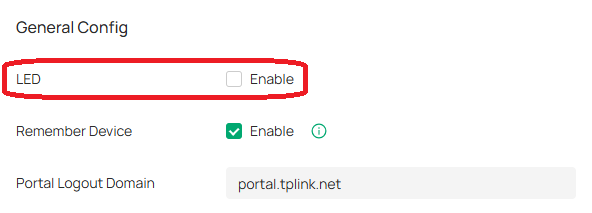
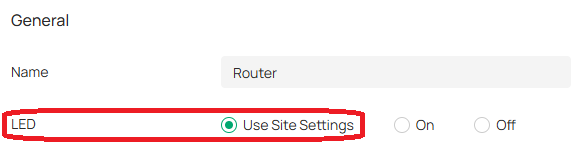
Hi @stanward, did you check your Site Settings and the Config of your ER605 in the controller? I think I had a similar issue in the past that the LEDs of my ER605 did not light up after a hard reset.


If LED in Site Settings is not enabled and in Config of your ER605 it says Use Site Settings, none of the LEDs will light up after the device has been adopted.


Site Settings


General

  0  
  0  
#2
Options
Re:ER605 Problems and Reset
43 minutes ago

Hi  @stanward 


Thanks for posting here.

What IP addresses did you get? Is it  169.254.x.x?


Please refer to the following to troubleshoot:

1. Plug a PC directly into the modem and check Internet access; this is to ensure that the Internet service provider is still functioning.

2. Factory reset(press and hold the reset button for around 5-8 seconds) the router and reconfigure it. Below is the guide:

How to set up your SafeStream router in standalone mode


3. If still no internet, and the system LED is still abnormal, please try firmware recovery:

How to use the Emergency Mode to recover the firmware for Omada Gateways

  0  
  0  
#3
Options