
Add Option to declare one Switch as highest in topology

In the Omada Controller, you can have a topology overview of the managed devices. If there is no Omada Internet Gateway present, just an arbitrary switch is chosen to be highest in topology and the rest is shown relative to that switch.
There have been former requests to define one port in one switch as Internet uplink, but those requests have been either discarded or treated with low priority.
My suggestion for this would be not to define a specific port as uplink, but to make the switch that the Omada controller is connected to the highest role in topology if no omada Gateway is present, which should be pretty easy to do.
- Copy Link
- Subscribe
- Bookmark
- Report Inappropriate Content


Hi @zimbosmurf
Thanks for posting here.
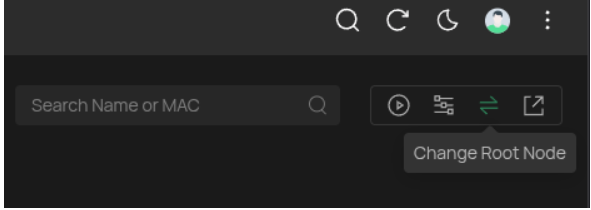
When no gateway is adopted, there will be an option Change Root Node on the topology page. It allows you to select a switch as the uplink switch manually.
The Root Node will be the Switch as the highest in the topology.
- Copy Link
- Report Inappropriate Content
Hi @zimbosmurf
Thanks for posting here.
When no gateway is adopted, there will be an option Change Root Node on the topology page. It allows you to select a switch as the uplink switch manually.
The Root Node will be the Switch as the highest in the topology.
- Copy Link
- Report Inappropriate Content
Awesome, but a little hidden - and multiple google searches only led me to the old discussions.
Thanks for the hint, makes everything so much more overseeable!
Thomas
- Copy Link
- Report Inappropriate Content
Glad that I answered your question.
BTW, I moved this post from the feature request block to the Controllers block.
- Copy Link
- Report Inappropriate Content
Information
Helpful: 0
Views: 292
Replies: 3
Voters 0
No one has voted for it yet.