
BUG: DNS Override ignores 'Apply Networks' filter

BUG: DNS Override ignores 'Apply Networks' filter

BUG: DNS Override ignores 'Apply Networks' filter
Yesterday - last edited Yesterday
Hardware Version:
Firmware Version: 6.2.10.17

Hi,


Simple this one.., the DNS Override feature ignores the 'Apply Network' setting and just overrides DNS (sent to the network Gateway) on every network.


Below I have setup and override and limited it to two networks (IoT and Main), however DNS traffic from every network gateway is redirected.


Unless I'm missing something here, this is not the behaviour I expect.
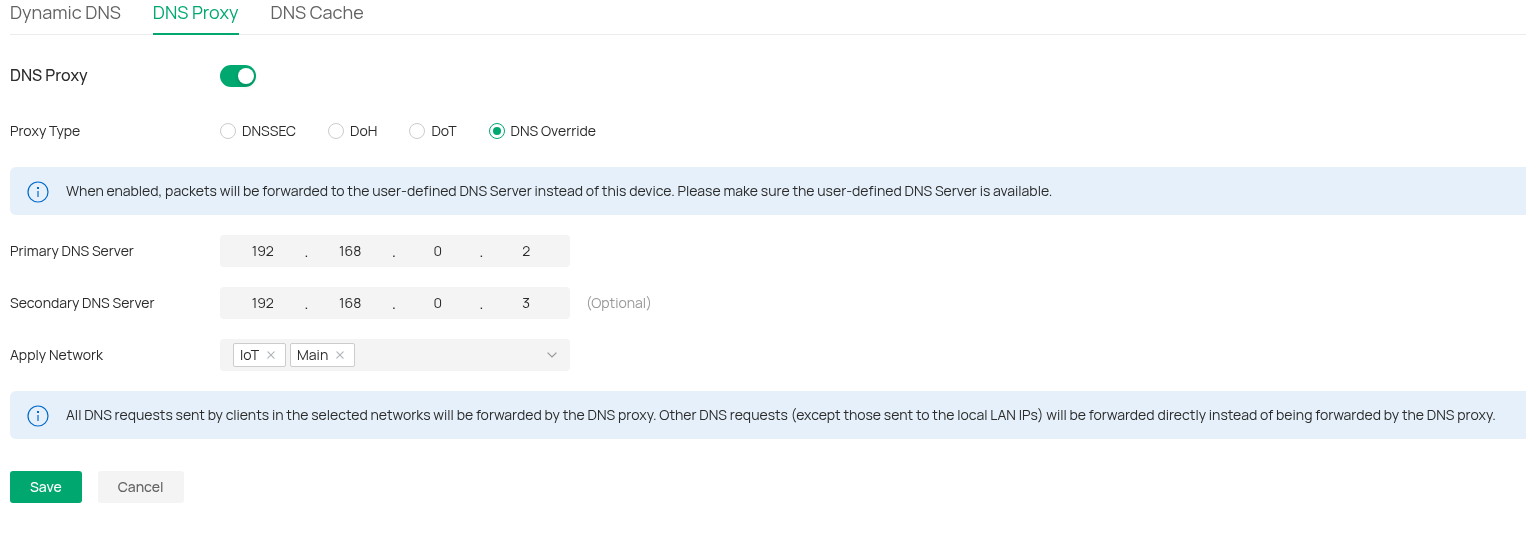


To be more specific, if I send a DNS request from a device on a different subnet (eg the Management or Guest VLANS) to, say, 8.8.8.8 then this request IS NOT overridden and is sent out as expected, however if I sent a request to the gateway of that subnet, then it IS redirected..., this is not what I expect. I expect the gateway to respond to the DNS request as normal.


Also, requests that originate on the router itself, eg. a URL for a dynamic DNS update service are also redirected (which is not the expected behaviour)


So, to summarise, please FIX so the override function does what it says on the tin, and only overrides requests from the network specified in the filter.

  0      
0
#1
Options
2 Reply
Re:BUG: DNS Override ignores 'Apply Networks' filter
54 minutes ago

Hello @Tescophil 


Thanks for reaching out to TP-Link Business Forums.


May I confirm if you have configured any other ACLs or Policy Routing rules on this software controller that might direct the traffic to the server?

When does the issue occur? Does it appear in V5.15 controller before?

What's the model of your Omada gateway, along with its hardware & firmware version?

  0  
0
#2
Options
Re:BUG: DNS Override ignores 'Apply Networks' filter
31 minutes ago - last edited 26 minutes ago

  @Tescophil 


Hi,


I have no policy routing set and the only ACL's I have are Switch-ACL's to allow DoT (Port 853) traffic only to my local DNS server and to block all other outgoing DoT traffic on port 853 on just two of my four VLANS.


I've only just tried this, so I dont know if this happened on previous versions.


My router is an ER605 v2.0 running the latest release firmware 2.3.3 Build 20251029 Rel.18054


To confirm the issue, DNS requests sent to ANY VLAN network gateway will be overridden, regardless of the network filter setting. Also DNS requests that origonate on the router itself (eg. stun.l.google.com) are also overridden. 


The behaviour I expect is that for networks selected in the DNS override filter, ANY DNS request sent to the VLAN gateway (eg. 192.168.0.1) or any external DNS server (eg. 8.8.8.8) is overridden, and this is exactly what happens. For networks not in the filter, external requests (eg. 8.8.8.8) are not overridden (as expected), however DNS requests sent directly to the VLAN gateway (eg. 192.168.0.1) are. I would expect these requests not to be overridden and processed as normal using the DNS settings of the router. I also would expect that DNS requested origonating on the router would not be overridden (unless the network VLAN that the router is part of is in the network filter)

  0  
0
#3
Options