
Internet phone does not recognize the network
 This thread has been locked for further replies. You can start a new thread to share your ideas or ask questions.
Hi. I am new to the forum and in the process of setiingup a new router. Wireless setup is fine, but have internet phone which is hard wire connected (lan) with the router and it can not recognize the network. Did anyone have a similar problem? what should I do to get the phone worked.
Thanks.
- Copy Link
- Subscribe
- Bookmark
- Report Inappropriate Content

Hi,
Has the VoIP provider you've signed up with given you some generic instructions on how to setup the phone and the router?
Could you please let us know the model name of your Internet phone?
- Copy Link
- Report Inappropriate Content
@spodek TP-Link router support told me that IP address range of devices connected to the router is: 192.168.0.1 to 192.168.0.254. My "nettalk duo" device has IP 192.168.2.2 so it can't work with the router. I asked the rep about manualy asigning in router setup my phone IP address, but he said it would affect all the other devices. Have not talk with VOIP "nettalk" people yet.
- Copy Link
- Report Inappropriate Content
Since you wrote that you are in the process of setting up the C80 as a new router anyway, there shouldn't be anything existing that would be affected negatively. It would be a different matter if this was an existing setup you have grown for some time already.
Given that, I suggest you just change the C80's LAN network to a subnet that works with the fixed IP address of your VoIP phone. (you could always revert back to the original setting if necessary)
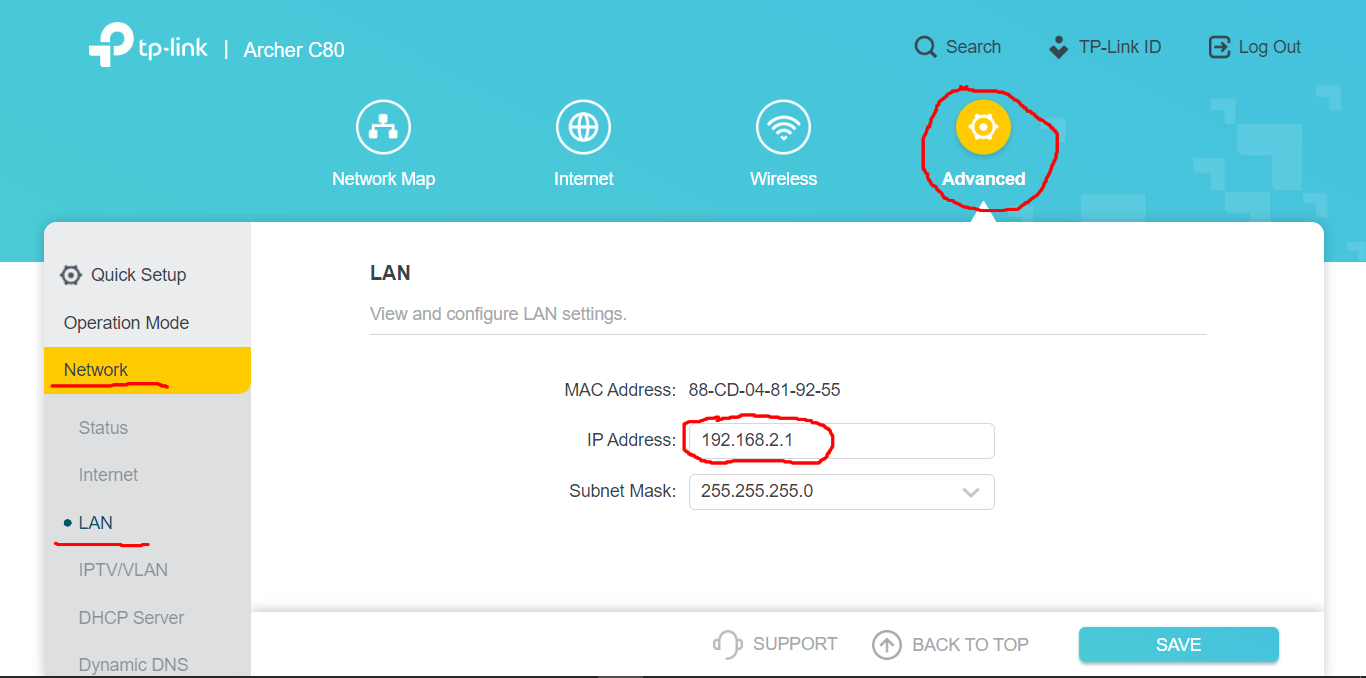
Go to the menu within the router's admin webpage that is shown in the first picture below. I guess currently the "IP Address" will be 192.168.0.1.
Change that number to 192.168.2.1, click "SAVE" and then reboot the router.
Your phone with the fixed IP address 192.168.2.2 should now be able to connect to the network.
Whether the phone will actually work now is another matter, though. There will likely be further settings need to be made, for example in the menu you see in the second picture. Perhaps you should look up all the VoIP-related settings that existed in the router to which the phone was connected previously, before you got the C80. Or alternatively consult your VoIP provider.

- Copy Link
- Report Inappropriate Content
@woozle Hi. I talked to my internet provider and it apeared like in my router advance - security - ALG settings SIP ALG is not there. It is needed in for VOIP phone to work.
Thanks
- Copy Link
- Report Inappropriate Content
Maybe someone from TP-Link has more information about that.
The fact that there is no ON/OFF switch for SIP ALG in the admin webpage doesn't necessarily mean that this feature is missing.
It could also be that internally SIP ALG is set to "always ON" by TP-Link, with no way for the user to switch it OFF.
- Copy Link
- Report Inappropriate Content
Information
Helpful: 0
Views: 699
Replies: 5
Voters 0
No one has voted for it yet.