
Firmware Issue
 This thread has been locked for further replies. You can start a new thread to share your ideas or ask questions.
I have an Archer C2 V1 and have accidentally upgraded the wrong firmware which is a US version.
The label on my router reads as an EU version.
I am trying to reinstall the previous firmware 141119 which worked fine as I am on Unifi but I am getting an Error 4506 code. Is there a way to reset or rollback the firmware and can anyone please assist?
I believe I need a beta firmware or something along those lines to fix this?
Many thanks in advance.
- Copy Link
- Subscribe
- Bookmark
- Report Inappropriate Content
Hi terziyski, thank you. I can confirm that the US firmware works as well on my router. I had to contact my ISP for my PPPoE password and after the password reset was done and setup completed, the router is working and I have internet connection back on now.
Thanks very much again for your help.
- Copy Link
- Report Inappropriate Content

Make sure that you're using the correct HW version of the FW release.
"Error code:4506
The uploaded file does not match the device's current hardware version. "
Both HW version and FW region are printed on the device bottom sticker - details.
Apart from that why not using the US region FW release on your device - it should cover wireless channels used in EU region FW release.
- Copy Link
- Report Inappropriate Content
Hi terziyski,
Thanks for your prompt response. This is what appears behind my router.
Unfortunately, I have already downloaded and installed the Archer C2 (US) V1_160921_MY & SG firmware. But I am having difficulties connecting to the internet now. It was from this site:
https://www.tp-link.com/my/support/download/archer-c2/v1/
Sorry, but are you saying that this US firmware should still also work for the Archer C2 model of mine? Thanks again.
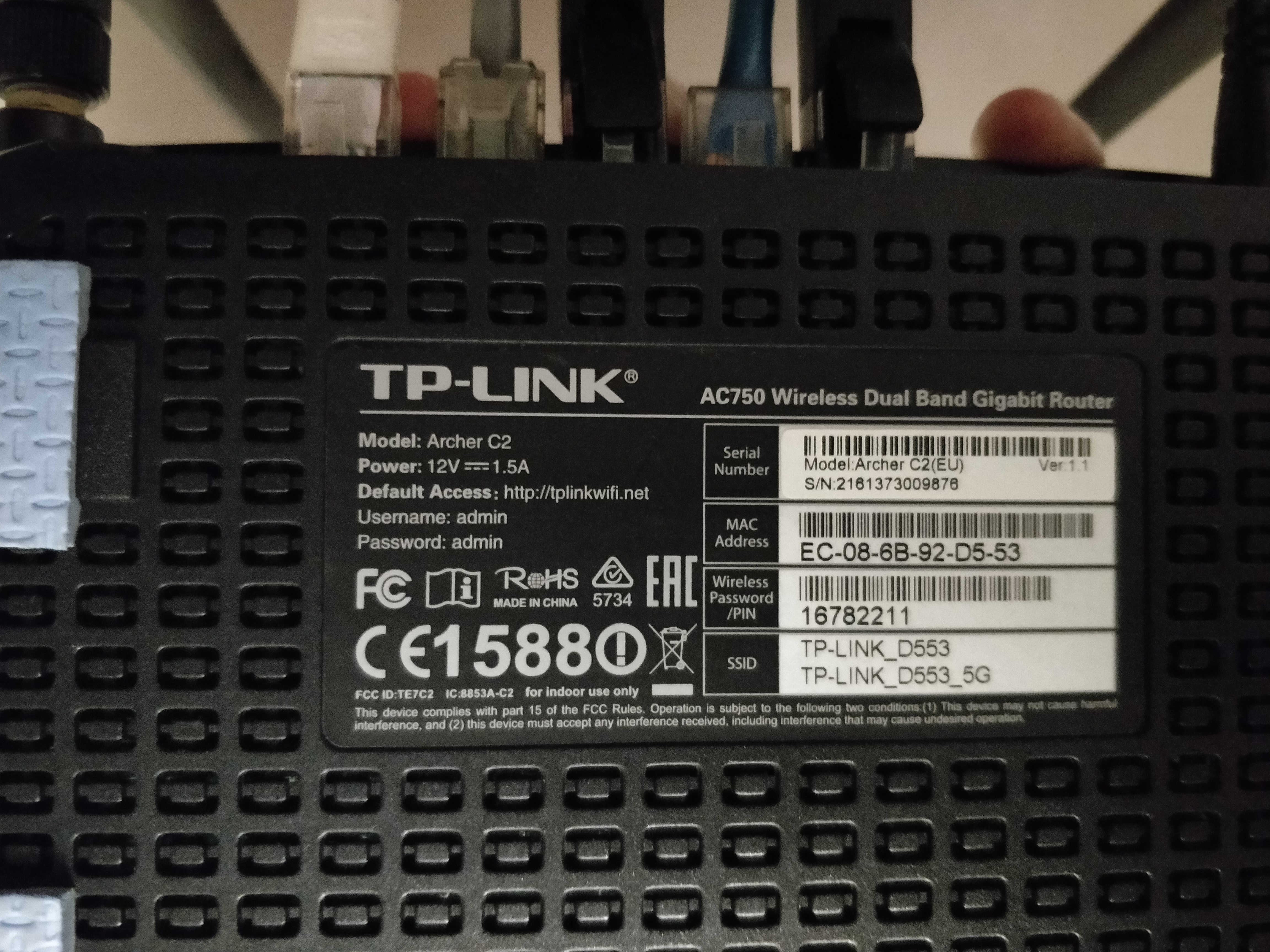
- Copy Link
- Report Inappropriate Content
You've put the US version for Malaysia and Singapore, but previously you have had the universal version for Unifi_and_Maxis_Fiber.
How do you connect to your ISP - were you using a special Unifi profile during the configuration ? What are the problems connecting to your ISP ?
If you know what type of connection your ISP is using and its parameters, I believe you can configure these manually and connect to your ISP successfuly with the US version as well.
- Copy Link
- Report Inappropriate Content
Hi terziyski, thank you. I can confirm that the US firmware works as well on my router. I had to contact my ISP for my PPPoE password and after the password reset was done and setup completed, the router is working and I have internet connection back on now.
Thanks very much again for your help.
- Copy Link
- Report Inappropriate Content
Information
Helpful: 0
Views: 870
Replies: 4
Voters 0
No one has voted for it yet.