
Instabil Wireless LAN

This thread has been locked for further replies. You can start a new thread to share your ideas or ask questions.

Instabil Wireless LAN

This thread has been locked for further replies. You can start a new thread to share your ideas or ask questions.

Instabil Wireless LAN
2025-04-29 19:26:21 - last edited 2025-05-14 02:10:04
Model: OC200  
Hardware Version: V1
Firmware Version: 1.35.5 Build 20250326 Rel.41966

Hello,


I have a TPLink Omada Network at home.
With an OC200 controller to control the whole thing.
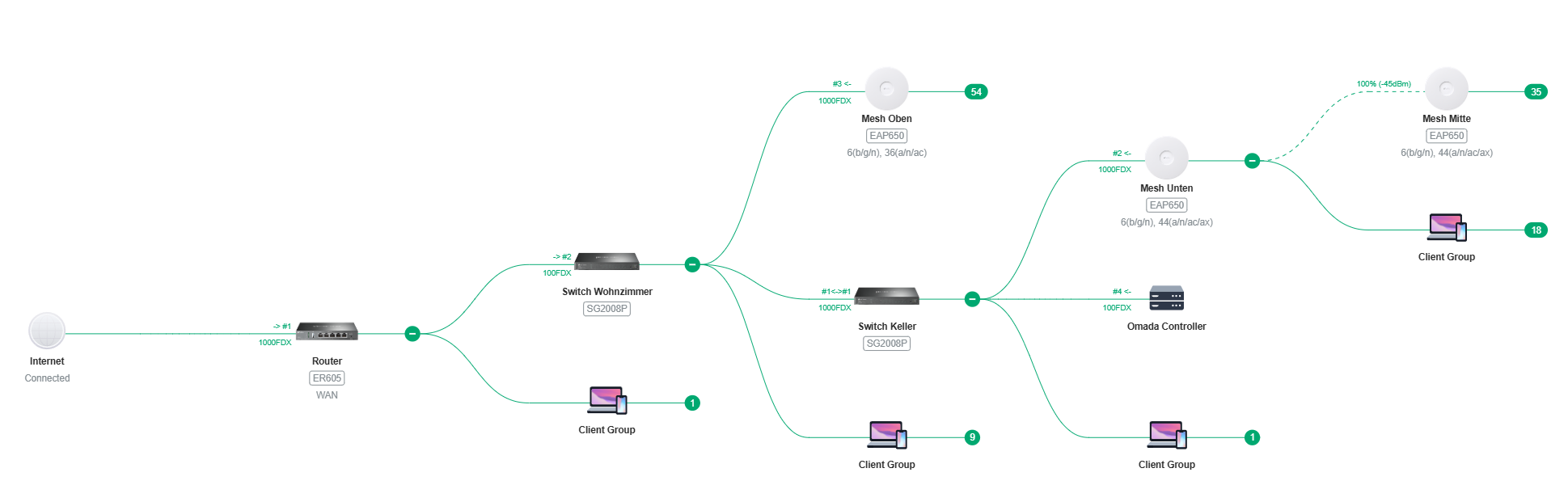


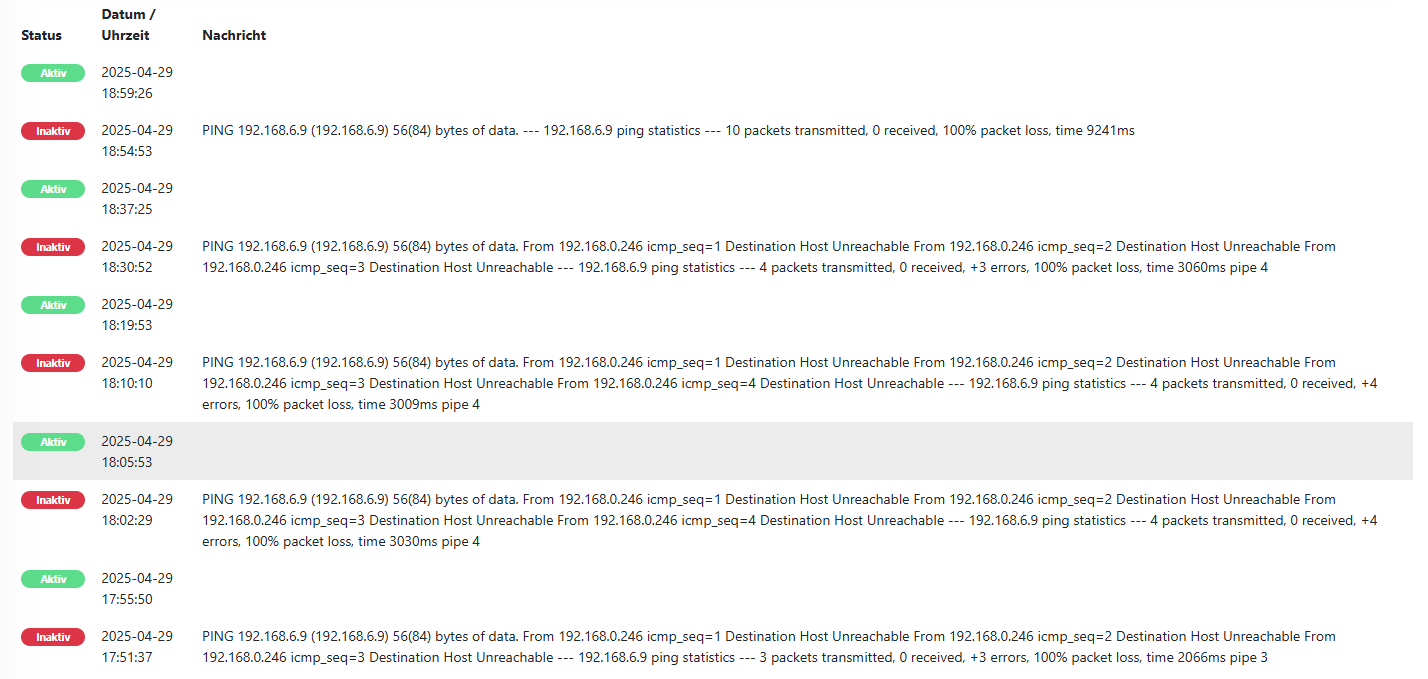
My monitoring keeps reporting that many WLAN devices are not accessible at short notice.
This happens again and again, then I have problems with many WLAN devices and then the problem is simply gone.


Example:
 

Do I have any way of finding out what the problem is with the OC200?
For example, statistics on which access point the device was logged on to, how strong the signal was, etc.


Note:
I have various wireless networks with different settings (IOT only with 2.4 GHz) etc.
Devices from all wireless networks fail.

How do I get the WLAN stable?


Thx, Christian

  0      
  0      
#1
Options
1 Accepted Solution
Re:Instabil Wireless LAN-Solution
2025-05-13 19:48:53 - last edited 2025-05-14 02:10:04

@Vincent-TP 


ad1) daily

ad2) is still show on the wifi list

ad3) all automatic

ad4) I have over 100 wifi devices. 10 lose the connections

ad5) the clients receive a 192.168.0.x address via dhcp reservation (omada also takes over)


I had two EAP650s connected directly to the switch and one EAP650 via mesh. They had a 100% connection.
Since I now have all three EAP650s on the switch, the problem is gone


BR, Chris

Recommended Solution
  0  
  0  
#3
Options
4 Reply
Re:Instabil Wireless LAN
2025-05-07 03:30:31 - last edited 2025-05-14 02:07:36

Hi  @Neki_AT 

Thanks for your posting. To understand the issue better, please let us know the following info:
1. How often will the disconnection issue happen?
2. When the issue happened, will the SSID disappear, or still show on the wifi list?
3. How will the connection be recovered? Will it be recovered automatically, or will a reboot be required?
4. When the issue happened, would all wireless clients lose internet connection simultaneously, or would some clients still be working?
5. What's the IP address of the clients when the issue happened? Still correct IP, or 169.254.x.x?


In the meantime, you may refer to the following guide to do some optimization:

How to optimize wireless performance of EAP products

  0  
  0  
#2
Options
Re:Instabil Wireless LAN-Solution
2025-05-13 19:48:53 - last edited 2025-05-14 02:10:04

@Vincent-TP 


ad1) daily

ad2) is still show on the wifi list

ad3) all automatic

ad4) I have over 100 wifi devices. 10 lose the connections

ad5) the clients receive a 192.168.0.x address via dhcp reservation (omada also takes over)


I had two EAP650s connected directly to the switch and one EAP650 via mesh. They had a 100% connection.
Since I now have all three EAP650s on the switch, the problem is gone


BR, Chris

Recommended Solution
  0  
  0  
#3
Options
Re:Instabil Wireless LAN
2025-05-14 02:10:16

  @Neki_AT 


Thank you for sharing the details. It appears the network issue was caused by instability in the mesh network. We’re glad to hear the problem has been resolved!

  0  
  0  
#4
Options
Re:Instabil Wireless LAN
2025-05-14 19:26:51

thx  @Vincent-TP 

I am only surprised that the mesh system is unstable when both access points were connected at 100%


thx, Chris

  0  
  0  
#5
Options