
Problem with adapter UE300 Windows 24h2
 This thread has been locked for further replies. You can start a new thread to share your ideas or ask questions.
Prezados, bom dia!
Após a atualização 24H2 estamos tendo problema de conexão utilizando DHCP e IP estático, não mantendo configuração e apresentando erro de DNS no aparelho, testando em outras versões do Windows como a 22H2 conseguimos utilizar normalmente o adaptador, fiz a atualização do driver conforme a TP-Link solicita com o último de 2022, porém funciona por um tempo e retorna a dar erro, a conexão só funciona se reconectar fisicamente o adaptador.
- Copy Link
- Subscribe
- Bookmark
- Report Inappropriate Content
Hello, i haven't tried with this one yet, just with this one:
| UE300(UN)_V4_20220722_Windows |
Download | |
|---|---|---|
| Data de Publicação: 2022-08-15 | ||
I downloaded the last one from Realtek and made the change in some machines, apparently solved, i will keep watching in the next few days.
But i have one question:
Do the UE300 change the MAC everytime i change the port or it keeps?
Thanks for answering and helping to solve this issue.
- Copy Link
- Report Inappropriate Content


Hi@mthxuz,
Thank you for contacting our community.
According to the translation of Google Translate, I think that your question is UE300_V4 cannot work normally under window 24H2. If there is any discrepancy, please describe it in English.
Could you please take screenshots with error message and send here?
If possible, please compare as many different USB ports and different PCs as possible. If the problem is indeed only in Win 24H2, it is likely caused by compatibility and we need to collect further information for analysis.
Best Regards~
- Copy Link
- Report Inappropriate Content
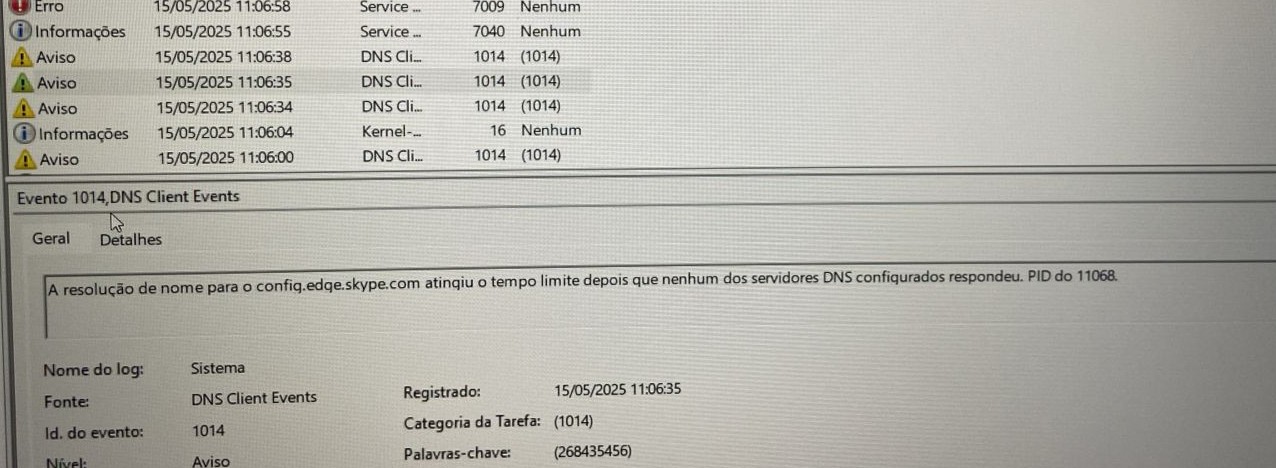
Hello Joseph, i'm getting this error 1014 DNS Client Events on Event Viewer, after this the desktop gets disconnected and just get connected while connecting againg, we're using DNS intern.
Tried with static IP and configs and with DHCP connection, getting the same error, it happened after the Windows 24H2 update.
- Copy Link
- Report Inappropriate Content
Hi@mthxuz,
Thank you for your reply.
Could you please download the "Windows 11 Auto Installation Program (NetAdapterCx)" driver from https://www.realtek.com/Download/List?cate_id=585 and then check if the issue still exists after installation?
- Copy Link
- Report Inappropriate Content
Hello, i haven't tried with this one yet, just with this one:
| UE300(UN)_V4_20220722_Windows |
Download | |
|---|---|---|
| Data de Publicação: 2022-08-15 | ||
I downloaded the last one from Realtek and made the change in some machines, apparently solved, i will keep watching in the next few days.
But i have one question:
Do the UE300 change the MAC everytime i change the port or it keeps?
Thanks for answering and helping to solve this issue.
- Copy Link
- Report Inappropriate Content
Hi@mthxuz,
It depends on the operating system. In Windows settings, you can configure whether the network adapter's address is static or random.
- Copy Link
- Report Inappropriate Content
Information
Helpful: 0
Views: 463
Replies: 5
Voters 0
No one has voted for it yet.