
Prohibit Wi-Fi Sharing, Omada Essential 5.15.24.100

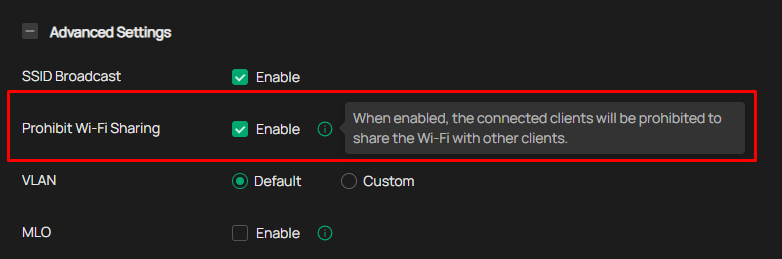
Prohibit Wi-Fi Sharing is now available on OMADA Cloud. I'm running some tests whit EAP225 Outdoor, and I don't think this new advance settings is working.
I have around 33 Sites and 38 Devices, I'm using EAP110 Outdoor, EAP225 Outdoor and EAP610 Outdoor, I hope we soon have a Firmware update for these devices so that this new advanced settings work.
- Copy Link
- Subscribe
- Bookmark
- Report Inappropriate Content


Hi @ludbarri
Just in case, you may go to this post to cast your vote:
Feature Request: Include "Prohibit WiFi Sharing" in EAP225-Outdoor Firmware Update
- Copy Link
- Report Inappropriate Content
Hi @ludbarri
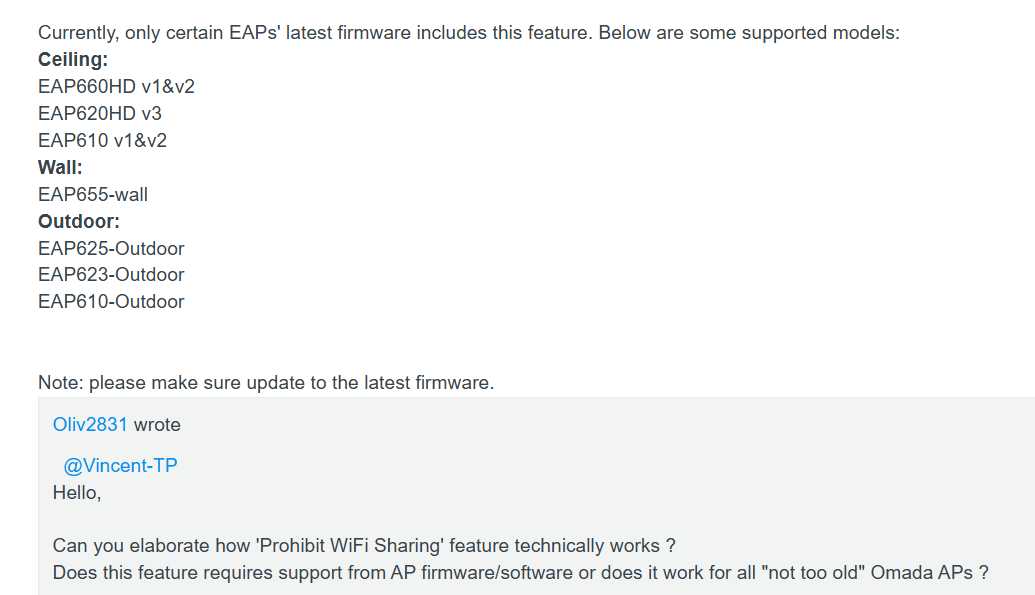
We've added this feature to some WiFi 6 models. Unfortunately, we're not planning to bring it to WiFi 5 devices. If you really need this feature, you might want to upgrade your EAP access points.
Side Note: I had moved this post to Requests & Suggestions block to gather more voters.
- Copy Link
- Report Inappropriate Content
Hi @ludbarri
Just in case, you may go to this post to cast your vote:
Feature Request: Include "Prohibit WiFi Sharing" in EAP225-Outdoor Firmware Update
- Copy Link
- Report Inappropriate Content
- Copy Link
- Report Inappropriate Content
- Copy Link
- Report Inappropriate Content
I'm using EAP610(US) v.4.0 and my omada controller is 5.15.24.18, but the "Prohibited Wi-Fi Sharing" is not working.
- Copy Link
- Report Inappropriate Content
HI @Mister_Ace
Thanks for the feedback.
Please start a new thread under Wireless Block specifically to discuss your case.
In the thread, please include the following:
1. Your testing process and how you discovered that this feature is not working;
2. A screenshot of the controller configuration;
3. A screenshot of the controller device page;
4. Whether IPv6 addresses are being used;
5. A screenshot of the controller topology.
Mister_Ace wrote
I'm using EAP610(US) v.4.0 and my omada controller is 5.15.24.18, but the "Prohibited Wi-Fi Sharing" is not working.
- Copy Link
- Report Inappropriate Content
@Vincent-TP I'm using EAP610 and i test it in omada controller version 5.15.24.18 but its not working, i found out that the EAP610 firmware version is the First firmware released. Meaning there's no other firmware available in download center of tplink. Maybe that the "Prohibited Wi-Fi Sharing" features in omada is there but in EAP's (wifi6) hardware is not yet available for their firmware version, maybe this is for the future update for all wifi6 AP's devices. If there's anyone who tested it and its working please share your thoughts. This is only my opinion. Thank you
- Copy Link
- Report Inappropriate Content
Hi @Mister_Ace
The factory firmware for EAP610 V4 already supported this feature.
What firmware version of the EAP are you using? please share with us a screenshot.
How did you test the feature? Please give us more details to understand the situation. Thanks.
Mister_Ace wrote
@Vincent-TP I'm using EAP610 and i test it in omada controller version 5.15.24.18 but its not working, i found out that the EAP610 firmware version is the First firmware released. Meaning there's no other firmware available in download center of tplink. Maybe that the "Prohibited Wi-Fi Sharing" features in omada is there but in EAP's (wifi6) hardware is not yet available for their firmware version, maybe this is for the future update for all wifi6 AP's devices. If there's anyone who tested it and its working please share your thoughts. This is only my opinion. Thank you
- Copy Link
- Report Inappropriate Content
@Vincent-TP good morning, i'm using EAP610 V4. i actually don't have any screenshot for this matter because i already returned it to the supplier. I tested it in 2 mobile devices. the 1 is connected in omada controller the other one is not. I open mobile hotspot in connected mobile device then i try to scan it using the another mobile that is not connected in omada, then the mobile (not connected in omada) connects in wi-fi. That's the scenario.
- Copy Link
- Report Inappropriate Content
Hi @Mister_Ace
Thank you for the information. Prohibit wifi sharing feature can only restrict internet access but cannot restrict WiFi connections.
then the mobile (not connected in omada) connects in wi-fi
>>>May I ask if you tested whether this device could access the internet at the time? And was the mobile data on this phone turned off at that time?
Mister_Ace wrote
@Vincent-TP good morning, i'm using EAP610 V4. i actually don't have any screenshot for this matter because i already returned it to the supplier. I tested it in 2 mobile devices. the 1 is connected in omada controller the other one is not. I open mobile hotspot in connected mobile device then i try to scan it using the another mobile that is not connected in omada, then the mobile (not connected in omada) connects in wi-fi. That's the scenario.
- Copy Link
- Report Inappropriate Content
Information
Helpful: 5
Views: 6780
Replies: 10
Voters 5



