
Early Access Hardware Controller (Built-in Omada SDN Controller V6.0.0) Pre-release (Closed on 12 Nov)


This Article Applies to
OC200(UN)_V1_1.37.9_pre-release (Built-in Omada SDN Controller 6.0.0)
OC200(UN)_V2_2.22.9_pre-release (Built-in Omada SDN Controller 6.0.0)
OC220(UN)_V1_1.2.9_pre-release (Built-in Omada SDN Controller 6.0.0)
OC300(UN)_V1_1.31.9_pre-release (Built-in Omada SDN Controller 6.0.0)
OC400(UN)_V1_1.9.9_pre-release (Built-in Omada SDN Controller 6.0.0)
Overview
We hope to offer you a chance to experience the new features added in the Controller v6.0.0.x in advance, and also give us TP-Link the opportunity to fully test the firmware in your real network environment and scenarios before the official release. All feedback is welcome, including letting us know about successful upgrades.
Release Notes
1) Version Info
The version of the Controller is fully applied to the Omada APP of version 5.0.x.
2) Supported Device Models
- Added support for Access Points: EAP 787 v1.0.
- Added support for Gateway: ER701-5G-Outdoor v1.0, DR3650v(EU)1.20、ER706W-4G(EU)2.20、ER706WP-4G(EU) 1.20、ER706WP-4G(US)1.26、ER8411(UN)1.20、DR3220v-4G(EU)1.20、DR3650v-4G(EU)1.20、ER7206(UN)2.30、ER7406(UN)1.20、ER706W(EU/US)1.30、ER706W-4G(US)1.30、ER605(UN)2.30、ER707-M2(UN)1.30、ER7412-M2(UN)1.30
- Added support for OLTs: ( DS-MCUA ) 1.1.0
3) New Features
- Added support for displaying VLAN information, offline devices, and isolated devices in the topology view in Site View > Dashboard > Topology.
- Added support for offline clients, a unified export button, and advanced search for both online and offline clients in the Client list, and removed the Past Connection and Known Client pages from Insights.
- Optimized Client detail layout with new Overview, Statistics, Connection Logs, Tools, and Config tabs in Site > Clients > Client Details.
- Added support for a client online-timeline in the Client detail view in Site view > Client > Overview.
- Added support for a Connection Logs timeline in Site view > Client > Connection Logs.
- Optimized wireless client on/off-line detection for AP6.0 firmware, reducing controller notification latency to 0–5 seconds . OC200 is excluded. (TCP port 29817 required).
- Added support for wireless client device-type, vendor, model, OS, and version identification in Global > Settings > Controller Settings > Services, with results shown in Clients list and detail pages (AP 6.0 firmware, Cloud Access and TCP port 29817 required).
- Added support for LAN Isolation configuration, a new VLAN setting designed for networks where Omada Gateway serves as the DHCP Server Device, enabling segment isolation and editable based on this configuration in Site > Network Config > LAN > Isolation Settings and in Site > Network Config > LAN > VLAN > Add/Edit for Gateway devices running firmware version 5.15.
- Added support for a topology link diagram in Device > Device Details > Overview.
- Added support for an online/offline timeline in Device > Device Details > Overview.
- Optimized device detail layout with new log and tools modules in Device > Device Details.
- Optimized EAP/Bridge AP detail layout with updated config and statistics modules in Device > AP Details, and fixed mesh traffic chart accuracy in Device > AP Details > Statistics.
- Optimized Switch detail layout with expanded statistics and streamlined config access in Device > Switch Details.
- Optimized Gateway detail layout with new network view and config modules, plus added SIM and Transmission settings, in Device > Gateway Details.
- Optimized OLT detail layout with additional data charts in Device > OLT Details; added Management System Interface configuration under Device > OLT Details > Config > System > Central Management and streamlined config entries for ARP table and interface.
- Added support for OUI-Based VLAN on Switch 6.0 firmware in Site > Network Config > Transmission > OUI Based VLAN.
- Added support for custom DHCP Option on Switch 6.0 firmware in Device > Switch Details > Config > VLAN Interface > DHCP Server and Site > Network Config > LAN > VLAN > Add/Edit.
- Added support for advanced Multicast configuration on Switch 6.0 firmware, integrating VLAN, switch, and port associations and enabling IGMP/MLD Snooping options, in Global > Network Config > Network Settings > LAN > Multicast and Device > Ports > Config > Multicast Fast Leave / Device Config > Switch > Switch Ports > Port Profile > Multicast Fast Leave.
- Added support for STP Security on Switch 6.0 firmware in Site > Switch Details > Port Config and Device Config > Switch Ports > Port Settings / Port Profile.
- Added support for /31 subnet masks on VLAN interfaces on Switch 6.0 firmware in Site > Switch Details > VLAN Interface and Site > Network Config > LAN > VLAN > Add/Edit.
- Added support for Storm-Control with ratio configuration on Switch 6.0 firmware in Site > Switch Details > Port Config > Bandwidth Control and Device Config > Switch Ports > Port Profile > Bandwidth Control.
- Added support for Controller hot-standby redundancy in Global > Settings > Cluster > Hot-Standby Backup.
- Optimized LACP behavior so member ports remain blocked until aggregation succeeds, shown in Device > Details > Ports List.
- Added support for adopting and managing the OLT-X2 model in Device > OLT Details > Config > System > Board Control, including board-level upgrade, reboot, and configuration (firmware DS-MCUA1.1.0).
- Added support for multi-channel OLT configuration, removing the restriction that prevented standalone UI access while under Controller management (supported on DS-P7001-04, DS-P7001-08, DS-P8000-X2 with DS-MCUA ≥ 1.1.0).
- Added support for OLT adoption and management in Controller cluster mode (all models, production firmware scheduled for 2025-Q3). OC200 is excluded.
- Added support for Network Check Tools—ping and traceroute—on OLT devices in Site > Network Tools > Network Check and Device > OLT Details > Tools > Network Check (all models and firmware versions).
- Added support for Device Management to configure OLT devices in Global View > Settings > System Settings, compatible with models DS-P7001-04, DS-P7001-08, and DS-P8000-X2 (DS-MCUA) firmware version 1.1.0.
- Added support for spectrum scan in Device > AP Details > Statistics > Environment. (TCP port 29817 required)
- Added support for interference detection in Device > AP Details > Statistics > Interference Detection and Site > Network Tools > Interference Detection. Currently, only EAP787 devices will display the corresponding rectangular chart of Wi-Fi interference results. (TCP port 29817 required)
- Added support for configuring Enhanced Open MLO SSID in Site > Network Config > Network Settings > WLAN, allowing MLO to be enabled when the encryption is set to None, effective for WiFi 7 devices.
- Added support for stream-mode packet capture, also known as remote real-time packet capture, in AP Details > Tools > Packet Capture and in Site > Network Tools > Packet Capture. This feature allows users to remotely monitor AP device packet capture interfaces via Wireshark, displaying captured packets in real-time to meet the needs of scenarios requiring live traffic analysis.
- Added support for adopting the Gateway 5G ODU model ER701-5G-Outdoor v1.0; configurations for IP-Passthrough mode reside in Device > Details, while standard routing mode settings are in Site View and Device > Device Details.
- Added support for EoGRE Tunnel in Device Config > EAP > EoGRE Tunnel to enable SSID extension across physical locations.
- Added support for custom logo upload in voucher printing in Configuration > Hotspot > Voucher Groups > Create/Edit Voucher Pattern and Voucher Group > Edit Voucher.
- Added support for the “Apply to all portals” option and daily usage limit for local users in Configuration > Hotspot > Local User.
- Added support for overriding default LAN DHCP settings during adoption in Network Config > Network Settings > LAN > Default.
- Added support for 23-language user-invitation emails aligned with user locale.
4) Enhancements
- Optimized Settings menu structure by dividing the Settings menu into Network Config and Device Config and supporting for configuring site-level configuration in the device details page.
- Optimized UI with refreshed theme colors, tables, forms, icons, and charts
- Optimized VLAN configuration process in Network Config > Network Setting > LAN. a) Streamlining the setup into three steps: Network Parameter, Port Binding, and Confirm/Apply. b) Adjusting the modification process to align with the new setup steps. c) Enhancing the network display interface with UI improvements.
- Optimized Switch Port configuration by replacing Profile-based Native/Tag/Untag settings with per-port private configuration and introduced cross-device bulk management of Tag, Network, and Profile settings in Device Config > Switch Ports > Port Settings.
- Optimized Dashboard chart library with new Overview, Topology, Client, and Traffic tabs including AP Density & Activity charts in Site View > Dashboard.
- Optimized Statistics menu to retain only Application Analytics in Site View > Insights > Application Analytics, moving other metrics to Dashboard, Reports, and detail pages.The position changes of the original content are as follows.
Original Location
New Location
Performance
Device Detail
Switch Statistics
Switch Detail > Port
Application Analytics
Dashboard > Traffic, Insight > Application Analytics
- Optimized Insights menu by: a. Adjusting the menu structure to separate operational data from statistical chart data. b. Merging statistical charts for a unified display. c. Placing configuration records on their respective setting pages.The position changes of the original content are as follows.
Original Location
New Location
Session Limit
Gateway Detail > Network View > Session Limit
Known Clients
Clients
Past Connections
Clients
Past Portal Authorizations
Hotspot > Authorized Clients
Switch Status
Configuration > Device Config > Switch > Switch port
Port Forwarding Status
Gateway Detail > Network View > Port Forwarding Status
VPN Status
Configuration > Network Config > VPN > VPN Status
Routing Table
Gateway/Switch Detail > Network View > Routing Table
Dynamic DNS
Gateway Detail > Config > Advanced > DNS
Rogue APs
Network Tools > Interference Detection
Threat Management
Gateway Detail > Config > Network Security > IDS/IPS
QoS Data
Gateway Detail > Network View > QoS Data
- Optimized Reports framework with customizable tabs, card visibility/sort order in Site View > Insights > Reports.
- Optimized Logs by adding 30-day historical data filters in Logs > Alerts and Logs > Events, and relocating Audit Logs in Logs > Audit Logs, device-type filters in Logs > Settings > Alerts/Events > Content Settings, and Remote Logging in Logs > Settings > Advanced.
- Optimized Rogue AP into Network-wide Interference Detection for batch scans and per-device results in Site > Network Tools > Interference Detection.
- Optimized wireless routing by displaying accurate maximum associated clients in Device > Wireless Router Details > Config > Wireless > Advanced and adding PPSK scaling in Network Config > Profile > PPSK.
- Optimized table persistence to save user-defined pagination across sessions in Devices, Logs, Clients, and Device Config > Switch Ports > Port Settings.
- Added inline explanations for each permission item via tooltip in Role Permission Configuration.
- Added display of the public IP for pending devices in Device list > Controller Connection IP.
- Added Device Reconnected log type and offline-duration tracking in Site > Logs > Events > Device.
- Added support for Switch syslog forwarding in Logs > Settings > Advanced when Client Detail Logs is enabled.
- Optimized default RSTP and loopback-detection settings in Device > Switch Details > Config > Services > Loopback Control.
- Added edge-port risk warning on STP configuration in Device > Switch Details > Port Config, Device Config > Switch Ports > Port Settings, and Device Config > Switch Ports > Port Profile.
- Optimized Switch onboarding by enabling adoption via custom management VLAN and auto-syncing related VLAN Interface, Port, and Static Route configurations in Device > Switch Details.
- Added Remember Device support for switch stacks in Device > Stack Details > General.
- Added routing table and OSPF neighbor display in Device > Switch Details > Network View.
- Optimized VLAN Interface capacity beyond 16 entries, device-dependent, in Device > Switch Details > VLAN Interface.
- Added support for gateway capability warnings in Network Config > VPN, in Network Config > Security > URL Filtering > Gateway Rules, in Network Config > Security > Firewall > Attack Defense, in Device > Gateway > MAC Filtering, in Device > Gateway > Dynamic DNS, and in Device > Gateway > IPTV.
- Optimized Portal IP auto-refresh behavior with manual input box in Global > Settings > System Settings > Access Config and in Site > Network Config > Authentication > Portal.
- Added support for batch-adopt result pop-ups in Global > Device List > Add Device > Auto Find and in Site > Device List > Batch Action > Batch Adopt.
- Optimized VLAN range expansion to 1–4094 for Switch/third-party devices and restricted to 1–4090 when Gateway or its LAN port is selected in Network Config > Network Settings > LAN.
- Added support for site search in Global > Settings > Export Data.
- Optimized temporary user permissions with risk warning in Accounts > User and in Accounts > SAML Role.
- Optimized performance by removing support for Built-in RADIUS in Global View > Settings > Server Settings > Built-in RADIUS on OC200 .
5) Bug Fixed
- Fixed load-balance ratio anomalies by auto-recommending optimal weights on WAN port changes in Network Config > Network Settings > Internet.
- Fixed wired/wireless traffic statistics inaccuracy and added Internet WAN-traffic charts in Reports > Summary > Traffic > All Network, in Dashboard > Traffic > Traffic (All Network), Reports > Summary > Traffic > Internet, and in Dashboard > Activity.
- Fixed SSID Summary Report missing traffic data for some APs in Report > Wireless > Top 20 SSIDs (Traffic).
- Fixed Dashboard traffic chart inconsistency between “yesterday” and “last 24 h” selections in Report.
- Fixed search functionality for specific module tabs.
- Fixed SSL VPN certificate export failure when site name contains special characters in Settings > VPN > VPN Settings > VPN > SSL VPN.
- Fixed duplicate descriptions on the ALG introduction page in Transmission > NAT > ALG.
- Fixed iOS Omada App overwriting Local User name and phone fields in Hotspot > Local User.
- Fixed Open API documentation mismatch for Get site switch 802.1x setting by removing the “switches” parameter in Online Open API Document > Authentication > Get site switch 802.1x setting.
- Fixed CVE-2025-25193 by upgrading Netty version to mitigate DoS attack risk.
Notes
- The Omada SDN Controller can only manage certain devices running the supported firmware. Please confirm that your device is compatible with the SDN Controller.
- To strengthen overall security, we recommend upgrading all devices to the latest firmware.
- Added a new port 29817 for device management. Please ensure that this port is open in your firewall settings.
Firmware Download
Before the Upgrade
(1) Please be sure you have read the Beta Test Agreement before upgrading the Pre-release firmware!
(2) For the sake of insurance, it's always recommended to save a copy of the controller Backup Config file before upgrading or downgrading.
(3) You may follow the following guide to upgrade your Omada Controller. How to Upgrade or Downgrade Omada SDN Controller.
Firmware Download Link
-
Direct Download
OC200(UN)_V1_1.37.9_pre-release > Built-in Omada SDN Controller 6.0.0
OC200(UN)_V2_2.22.9_pre-release > Built-in Omada SDN Controller 6.0.0
OC220(UN)_V1_1.2.9_pre-release > Built-in Omada SDN Controller 6.0.0
OC300(UN)_V1_1.31.9_pre-release > Built-in Omada SDN Controller 6.0.0
OC400(UN)_V1_1.9.9_pre-release > Built-in Omada SDN Controller 6.0.0
OC200(UN)_V1_1.37.7_pre-release > Built-in Omada SDN Controller 6.0.0
OC200(UN)_V2_2.22.7_pre-release > Built-in Omada SDN Controller 6.0.0
OC220(UN)_V1_1.2.7_pre-release > Built-in Omada SDN Controller 6.0.0
OC300(UN)_V1_1.31.7_pre-release > Built-in Omada SDN Controller 6.0.0
OC400(UN)_V1_1.9.7_pre-release > Built-in Omada SDN Controller 6.0.0
OC200(UN)_V1_1.37.6_pre-release > Built-in Omada SDN Controller 6.0.0
OC200(UN)_V2_2.22.6_pre-release > Built-in Omada SDN Controller 6.0.0
OC220(UN)_V1_1.2.6_pre-release > Built-in Omada SDN Controller 6.0.0
OC300(UN)_V1_1.31.6_pre-release > Built-in Omada SDN Controller 6.0.0
OC400(UN)_V1_1.9.6_pre-release > Built-in Omada SDN Controller 6.0.0
Additional Information
If somehow you encounter an issue during or after the controller upgrade, it's suggested to contact us with the following info:
- Omada Controller version (previous and current)
- Device Model(s), Hardware and Firmware versions
- (if possible) A copy of the Log file and Backup Config file
If you decide to downgrade the controller before reporting the issue to TP-Link, it's suggested to save a copy of the current Log file and Backup Config file before you do that, which could help to investigate and address the issue quickly.
>> How to get the Log file and Backup Config file for Omada SDN Controller:
-
If your Windows software controller failed to get launched, please locate the controller installation path for the Log file.
-
If it's not a launch issue, you can export the Log file and Backup Config file in the local network.
-
For Omada Controller v5.8 or later version,
In the Global View, go to Settings > Maintenance > Backup & Restore > Retained Data Backup, select Settings Only, then click Export for the Backup Config file. On the same page, scroll down for Export for Support, click Export Running Logs for desensitized Log file.
-
For Omada Controller v5.6 or v5.7,
Go to Settings > Maintenance > Backup & Restore > Retained Data Backup, select Settings Only, then click Export for the Backup Config file. On the same page, scroll down for Export for Support, click Export Running Logs for desensitized Log file.
-
For Omada Controller v5.5 or previous version,
Go to Settings > Maintenance > Backup & Restore > Retained Data Backup, select Settings Only, then click Export for the Backup Config file . Go to Settings > Services > Export Data > Running Log to export the Log file.
-
Update Log
Nov 12, 2025
Remove the download links. To download the latest version, please go to official website.
Oct 31th, 2025:
Update the controller firmware:
OC200(UN)_V1_1.37.9_pre-release > Built-in Omada SDN Controller 6.0.0
OC200(UN)_V2_2.22.9_pre-release > Built-in Omada SDN Controller 6.0.0
OC220(UN)_V1_1.2.9_pre-release > Built-in Omada SDN Controller 6.0.0
OC300(UN)_V1_1.31.9_pre-release > Built-in Omada SDN Controller 6.0.0
OC400(UN)_V1_1.9.9_pre-release > Built-in Omada SDN Controller 6.0.0
Sep 28th, 2025:
Update the controller firmware:
OC200(UN)_V1_1.37.7_pre-release > Built-in Omada SDN Controller 6.0.0
OC200(UN)_V2_2.22.7_pre-release > Built-in Omada SDN Controller 6.0.0
OC220(UN)_V1_1.2.7_pre-release > Built-in Omada SDN Controller 6.0.0
OC300(UN)_V1_1.31.7_pre-release > Built-in Omada SDN Controller 6.0.0
OC400(UN)_V1_1.9.7_pre-release > Built-in Omada SDN Controller 6.0.0
Sep 16th, 2025:
Provide the following controller firmware for early access.
-
OC200(UN)_V1_1.37.6_pre-release > Built-in Omada SDN Controller 6.0.0
OC200(UN)_V2_2.22.6_pre-release > Built-in Omada SDN Controller 6.0.0
OC220(UN)_V1_1.2.6_pre-release > Built-in Omada SDN Controller 6.0.0
OC300(UN)_V1_1.31.6_pre-release > Built-in Omada SDN Controller 6.0.0
OC400(UN)_V1_1.9.6_pre-release > Built-in Omada SDN Controller 6.0.0
Recommended Threads
TP-Link Early Access Program Is Now Available!
Get the Latest Omada SDN Controller Releases Here - Subscribe for Updates
Experience the Latest Omada EAP Firmware - Trial Available Here, Subscribe for Updates!
Get the Latest Firmware Releases for Omada Routers Here - Subscribe for Updates
- Copy Link
- Subscribe
- Bookmark
- Report Inappropriate Content

I meaning number appear on AP show only number 1 not match in real client it should be the same number.
- Copy Link
- Report Inappropriate Content
I meaning number appear on AP show only number 1 not match in real client it should be the same number.
- Copy Link
- Report Inappropriate Content

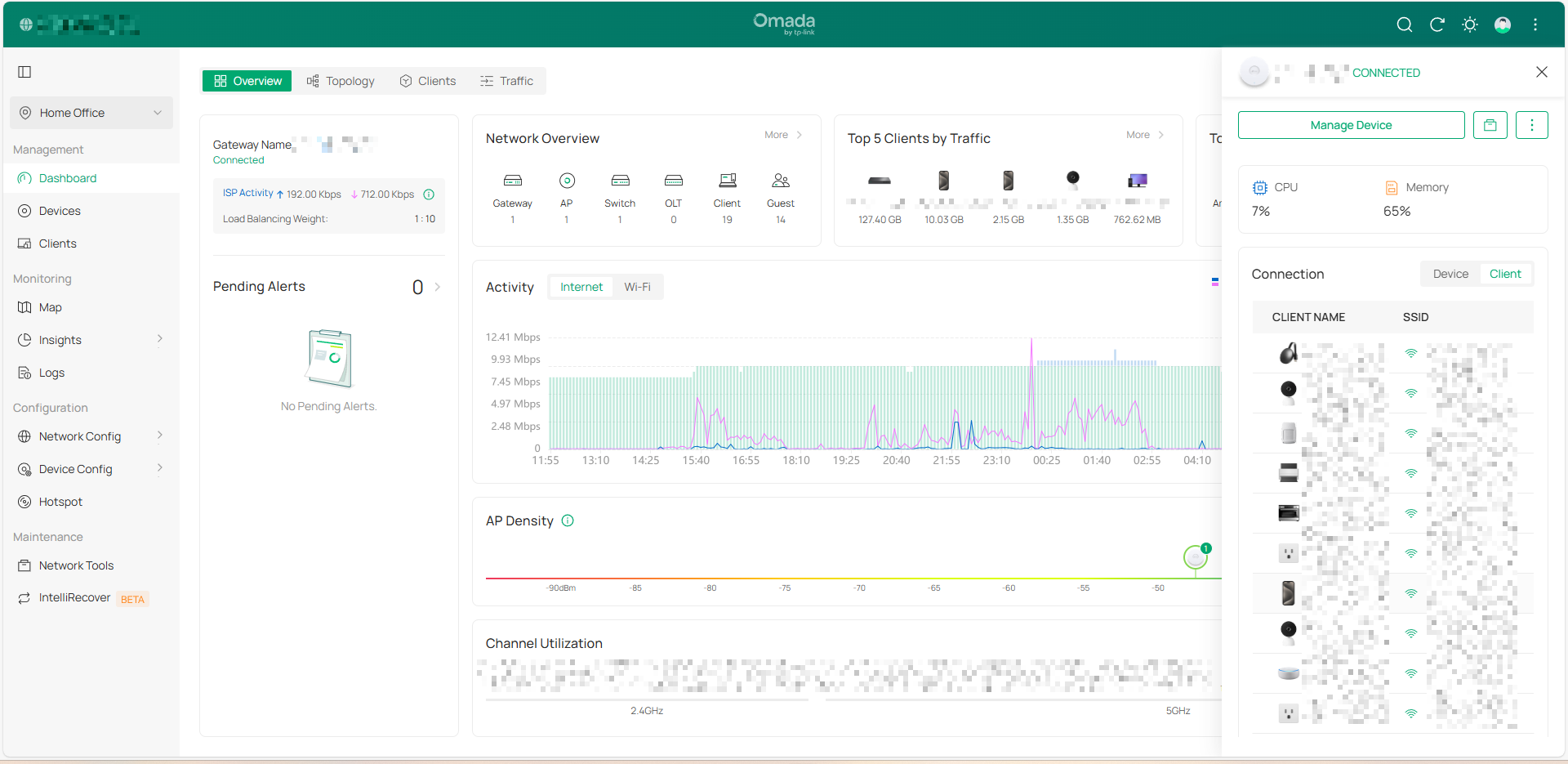
I checked this here too.
The information displayed in client accounts is accurate, even matching the clients available in the AP.
One suggestion I have is to have a counter for the total number of clients in this tab. I think this would help people better understand the actual total number of connected clients. Just a suggestion, really.
In my opinion, everything is working properly.
- Copy Link
- Report Inappropriate Content

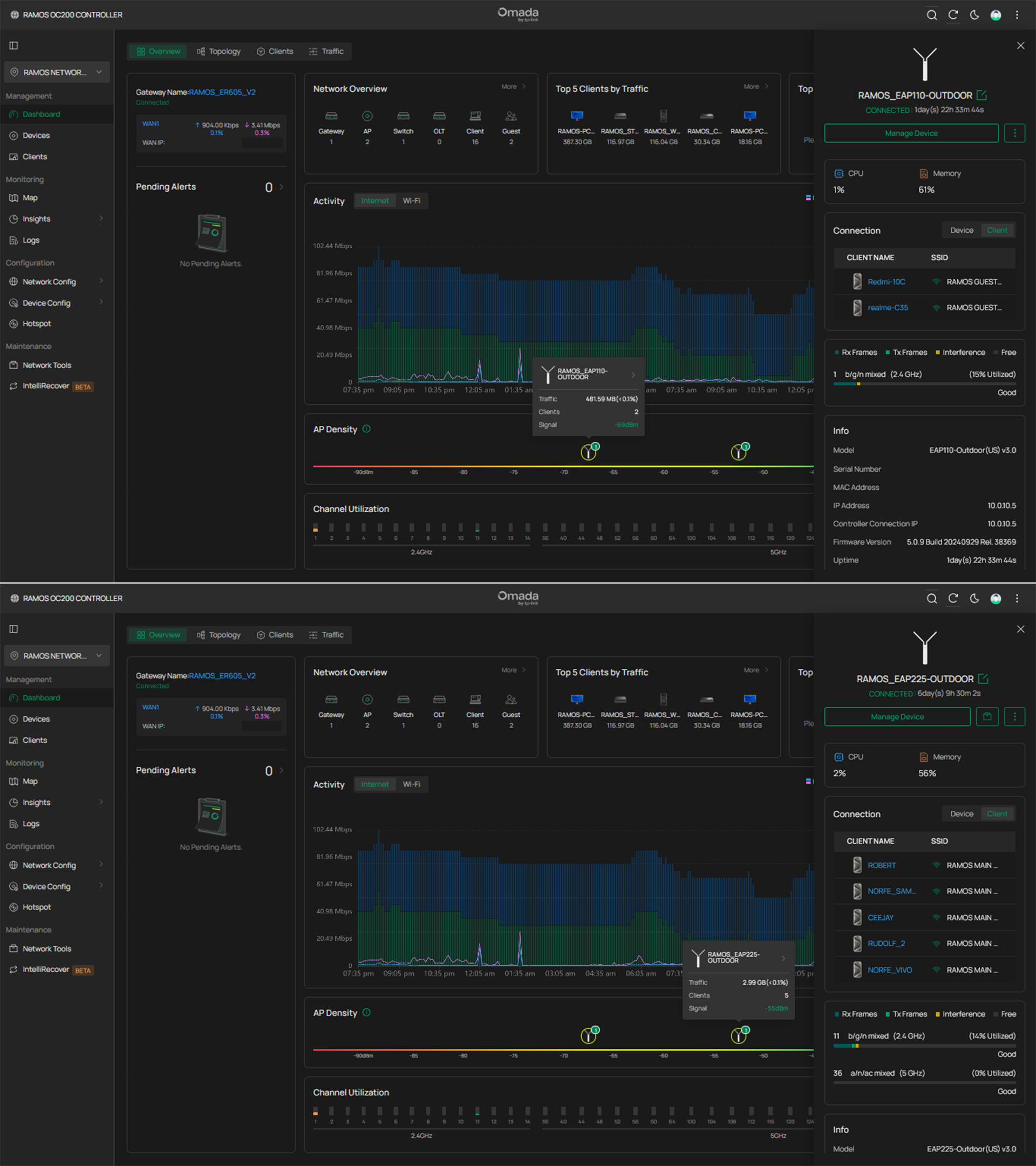
Mine's displaying the correct number of clients.
I think the numbers indicated in these icons in AP density correspond to the number(s) of APs, and not the clients. The number of clients will show when you hover the mouse cursor to it.
I've got some instance when my two APs have only one icon in there but is showing "2", meaning the clients of my 2 APs have the same signal strength, so they somehow overlapped.
- Copy Link
- Report Inappropriate Content
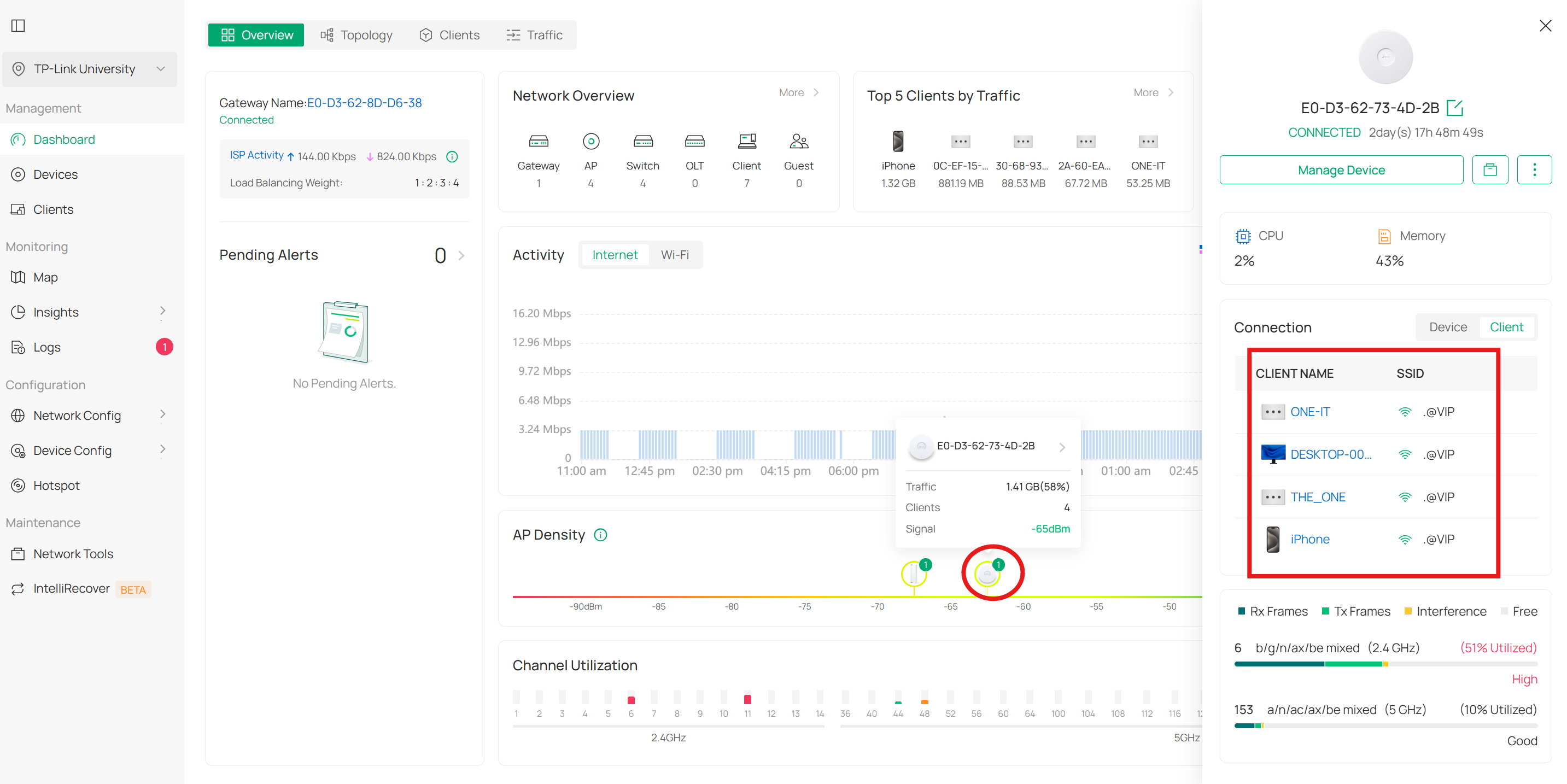
Hi
I found an incorrect display in the AD Density tab. The AP shows only one connected client, while in reality there are a total of four clients connected.
- Copy Link
- Report Inappropriate Content
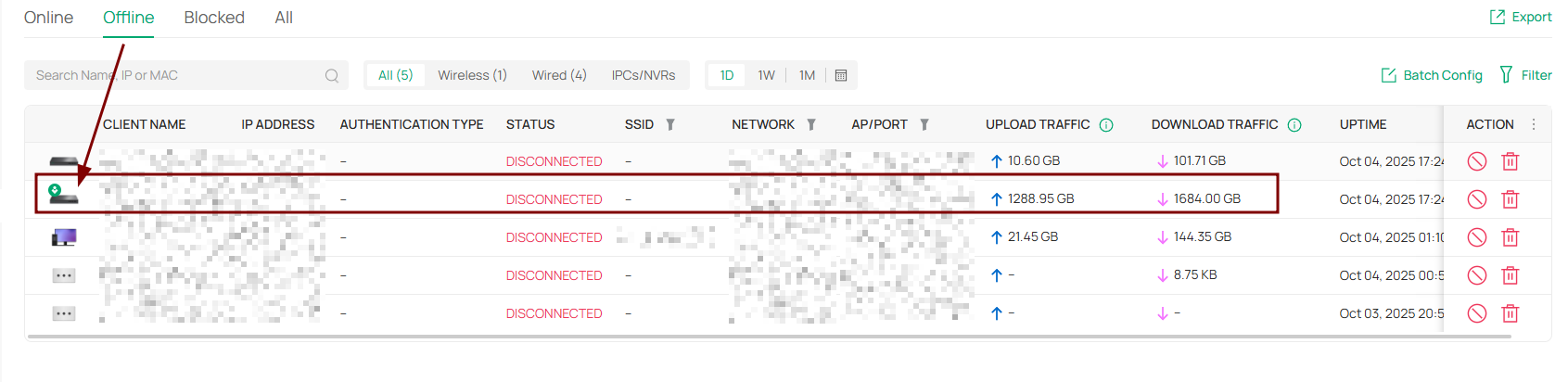
I noticed something very peculiar.
It's probably a bug.
The OC200 is being identified as offline, but that's not what appears in the following image.
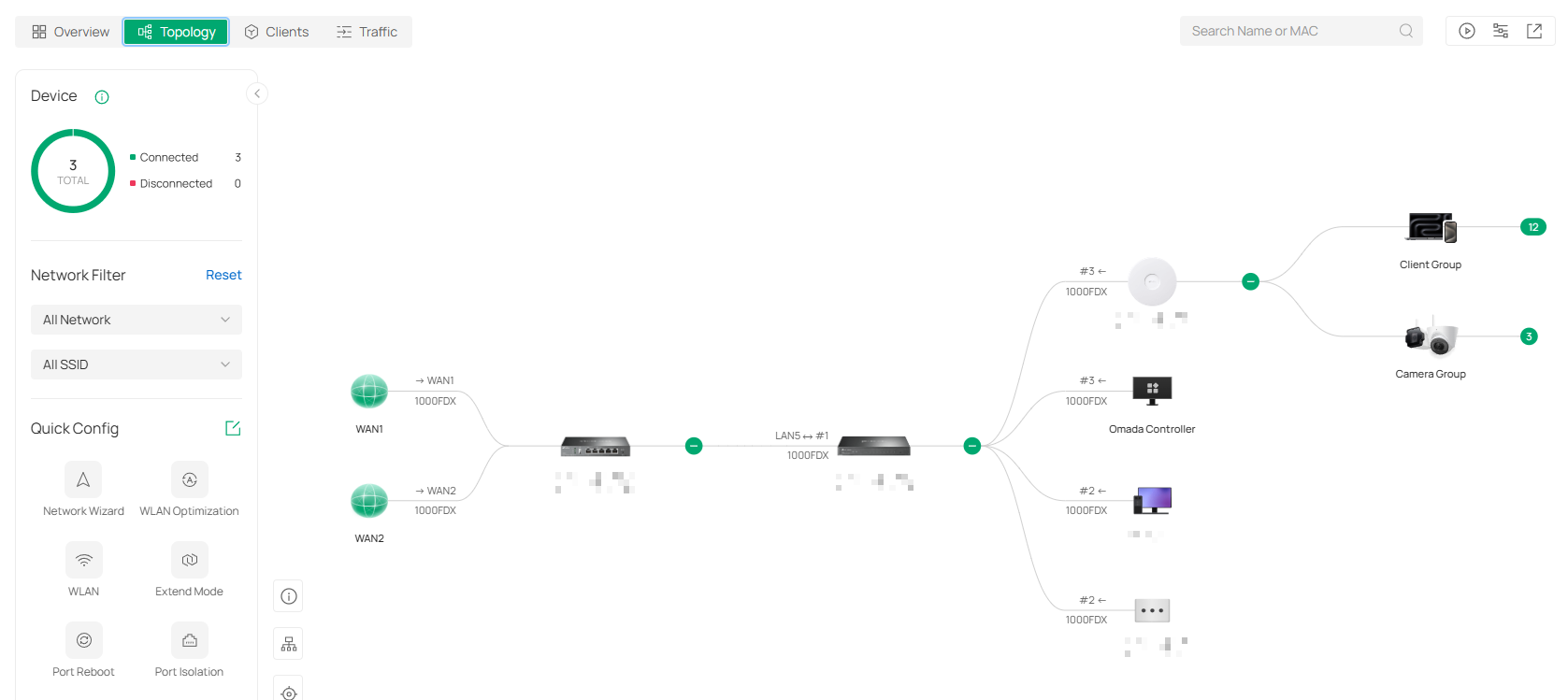
It's listed as offline here. Do you think this is a bug?
- Copy Link
- Report Inappropriate Content

@Vincent-TP OC-300 with FW 6.0.0.31 App fails to access will this be addressed soon or should i look to downgrading back to older FW. When i was notified of new FW i just hit the accept and installed not thinking it was a pre-release.......
- Copy Link
- Report Inappropriate Content

- Copy Link
- Report Inappropriate Content

- Copy Link
- Report Inappropriate Content
This has been brought up many times. A solution is underway - as far as i know - based on a discussion i had with tech support on a ticket i raised some time ago
- Copy Link
- Report Inappropriate Content
Information
Helpful: 0
Views: 28446
Replies: 144
Voters 0
No one has voted for it yet.