
IP-Port Group limit of 16 groups.
IP-Port Group limit of 16 groups.

Is there any work around when hitting the limit of 16 allowed IP-Port Groups?
It seems a serious limitation for any product aimed at the business market.
If there is a not a workaround are there any plans to increase this limit? why does it exist at such a low number?
- Copy Link
- Subscribe
- Bookmark
- Report Inappropriate Content
Yup, it's a real shame that rather than taking this and many other requests on board and admitting there is an issue that could/should be addressed, tp-link support would rather spend time trying to blame the customer for tying to do things that do not fit within their limited field of view.
Especially frustrating that they cannot explain _why_ the limit is so low, it appears artificial given that in standalone there is a lot more flexibility. I really cannot fathom the reasoning behind this, I suspect we may never know as the questions got too hard and they go radio silent whilst marking the query as resolved, ignoring the inconvenient fact that it is not.
Seems time is better spent reorganising the SDN dashboard again(yey!) to provide a load of pretty graphs that the majority of folks will look at once and move on rather than focusing on issues or improving the real experience - domain groups simply do not work, there is _still_no way to see per interface dropped packets on the controller without digging around on the switch CLI, why in Gods name is there no ACL logging..... to name a few.
Anyone else who comes across this limitation and would like to highlight to tp-link please to take moment to add your vote here Feature Request one day they may run out of pretty aesthetic improvement options and want to fix something that would actually be beneficial to more technical community.
/meh
- Copy Link
- Report Inappropriate Content

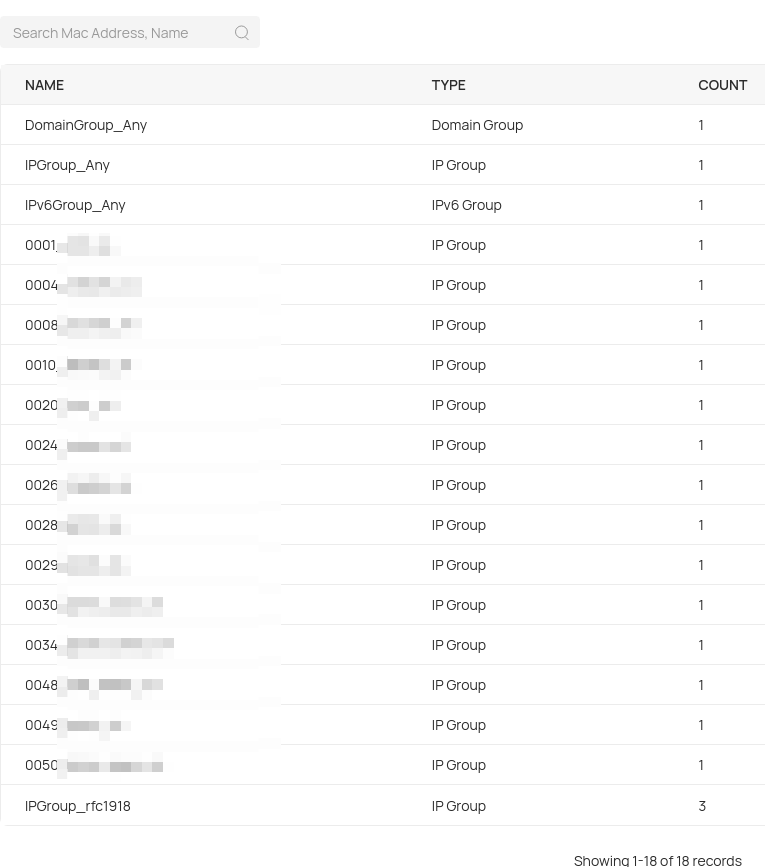
@Sc0th @Ethan-TP I am also surprised by this limit (to be clear: I am talking about https://<controller>/#profilesGroups ) and found no workaround yet.

Hitting after Group 16 / when I wanted to add one IP group per VLAN (which is essential for sane ACLs):
> Especially frustrating that they cannot explain _why_ the limit is so low, it appears artificial given that in standalone there is a lot more flexibility.
There was the same situation with VLAN IP interfaces (where a 16-Limit existed until Omada V6 Controller and V6-ready Firmwares on target devices), no matter how many Interfaces and routes the target device supported stand-alone. I hope the limit will at least be raised to the point where the smallest common name of the currently adopted devices can be used.
- Copy Link
- Report Inappropriate Content
- Copy Link
- Report Inappropriate Content

I use esp8266 Wi-Fi Microcontrollers to automate my Air Conditioning and to automate my Garage Doors. I have 10 different VLANS set up for different purposes. Default, Trusted, IP Cams, IoT, Kids, Guest, Microcontrollers, and MGMT VLANS for my switches, APs and Gateway.
My Omada L3 distro switch acts as the DHCP server and the DNS for my network, not my Gateway. I need this configuration for easier plug and play onboarding of new equipment.
I need groups for individual IP addresses, along with groups for whole subnets. What if I only want one IP address to access a certain microcontroller? Or what if I want Ping only for 2 devices activating said controller? What if I need Port 80 disabled for a couple of the client devices accessing said Microcontroller? This requires the use of many IP Group entries.
A max of 16 is nothing for my needs. There has to be a way to expand the number via some firmware update... I saw in someone's previous post saying that 128 would be ideal, 64 would be acceptable, and 32 would be barely workable. I am inclined to agree.
- Copy Link
- Report Inappropriate Content
Information
Helpful: 0
Views: 1574
Replies: 14
Voters 0
No one has voted for it yet.