
DHCP Static Reservation Comment

I have an Archer AX20 that I am updating the DHCP Reservations on - I can't see any way to add a descriptive comment as to the device - just the MAC and the IP, and it automatically generates the name of the device, using (I assume) the hostname. Is there any way to set a descriptive name, especially for when I change hardware and want to see which version it is?
Thanks,
Brian
- Copy Link
- Subscribe
- Bookmark
- Report Inappropriate Content

Hi,
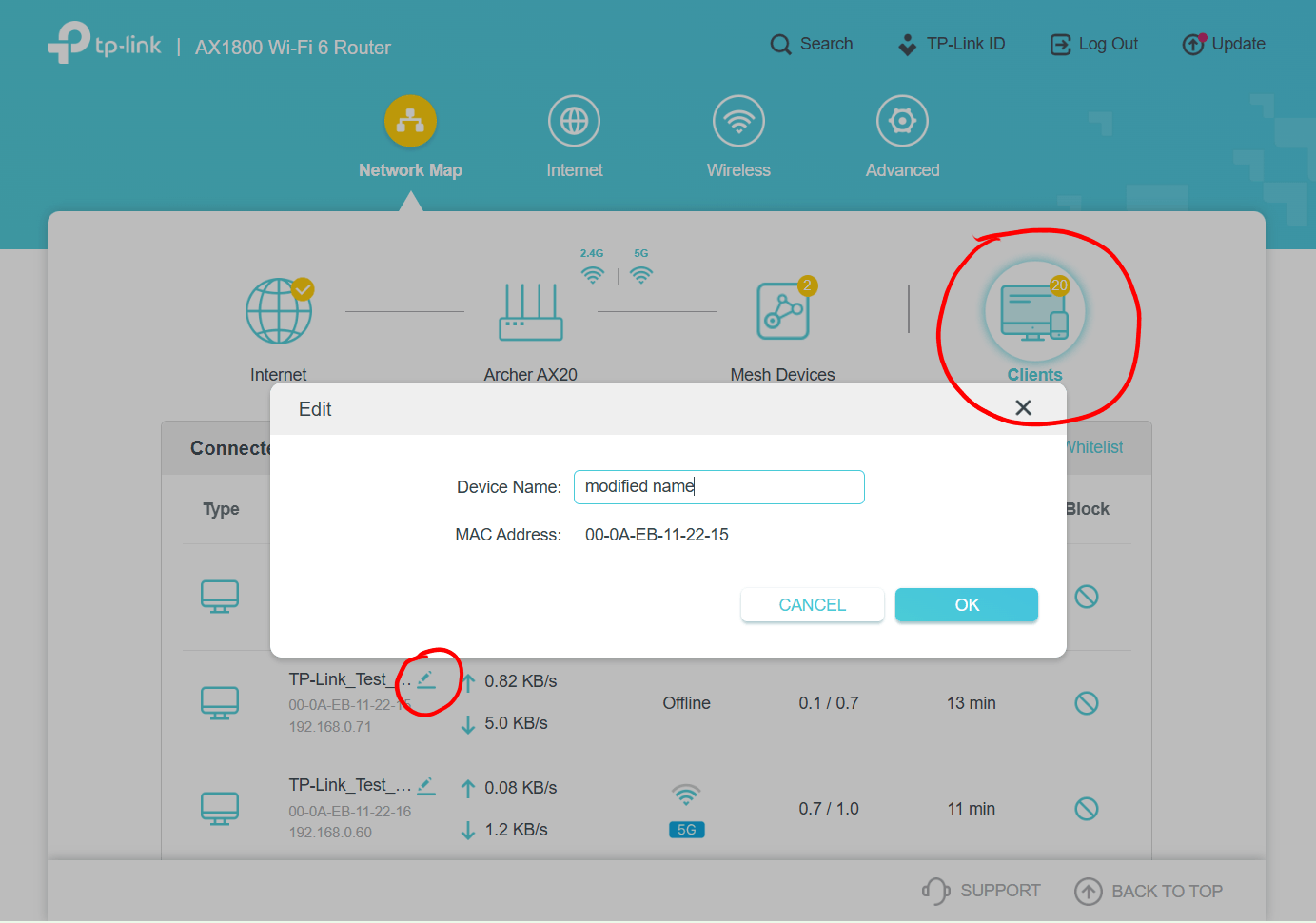
TP-Link decided that the users shall only be able to edit the names of the devices via the "Clients" menu. (see screenshot below)
The problem with this is that some router models only show clients that are actively connected (i.e. online), while some router models also show "offline" devices, like the example in the screenshot.
- Copy Link
- Report Inappropriate Content
Hi,
TP-Link decided that the users shall only be able to edit the names of the devices via the "Clients" menu. (see screenshot below)
The problem with this is that some router models only show clients that are actively connected (i.e. online), while some router models also show "offline" devices, like the example in the screenshot.
- Copy Link
- Report Inappropriate Content
- Copy Link
- Report Inappropriate Content

Hi! From my experience with the Archer AX20, unfortunately, the DHCP reservation interface is pretty limited—you can only assign the IP to a MAC address, and it automatically uses the device’s hostname for the name. There isn’t currently a way to add a custom descriptive note or label directly in the router settings. A common workaround is to rename the device’s hostname itself to something more descriptive, or keep a separate log or spreadsheet noting which device corresponds to which MAC/IP, especially if you swap hardware often.
- Copy Link
- Report Inappropriate Content

Hi there! I’ve looked into this on the Archer AX20 as well, and it seems the firmware doesn’t allow adding custom descriptive comments to DHCP reservations. The router just shows the MAC, IP, and automatically generated device name based on the hostname. A practical approach is to rename the device’s hostname to something meaningful before connecting it, or maintain a separate list of MAC addresses with notes about the device and hardware version. It’s not ideal, but it helps keep track of multiple devices.
- Copy Link
- Report Inappropriate Content

Do it the way Woozle shows above, you have to rename them there before you allocate them a slot.
- Copy Link
- Report Inappropriate Content
Information
Helpful: 0
Views: 791
Replies: 5
Voters 0
No one has voted for it yet.