Problem with DHCP over VLAN and WiFi

Problem with DHCP over VLAN and WiFi

Problem with DHCP over VLAN and WiFi
Tuesday
Model: ER707-M2   EAP225   SG2210P  
Hardware Version:
Firmware Version: Latest

I have come across a problem with DHCP on my Omada system, when the DHCP Server Service is provided by External Equipment. A diagram of the scenario is shown here
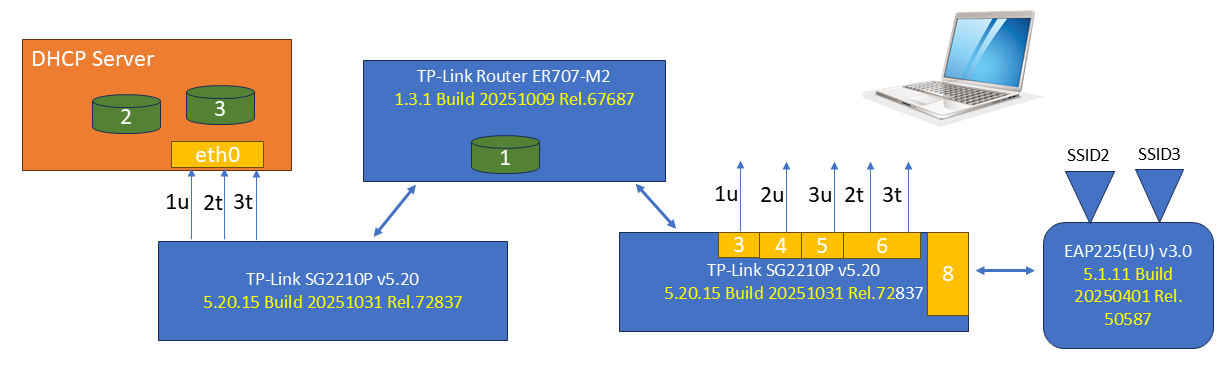
Diagram


The Omada system handles the DHCP duties for the default subnet (VLAN 1), while a seperate DHCP server (from pfSense here but other Linux variants have also been tested) provides the IP address pools for VLANS 2 and 3. Each VLAN is configured with Legal DHCP Server address set to the eth0.2 or eth0.3 of the DHCP Server


If the computer connect to ports 3, 4 or 5 of the switch, it gets an IP address.

If the computer connects to port 6 and sets the VLAN tag to 2 or 3, it gets an IP address for the corresponding subnet.


If the computer connects to either SSID2 or SSID3 on the access point, no IP address is provided. Some further analysis is provided.

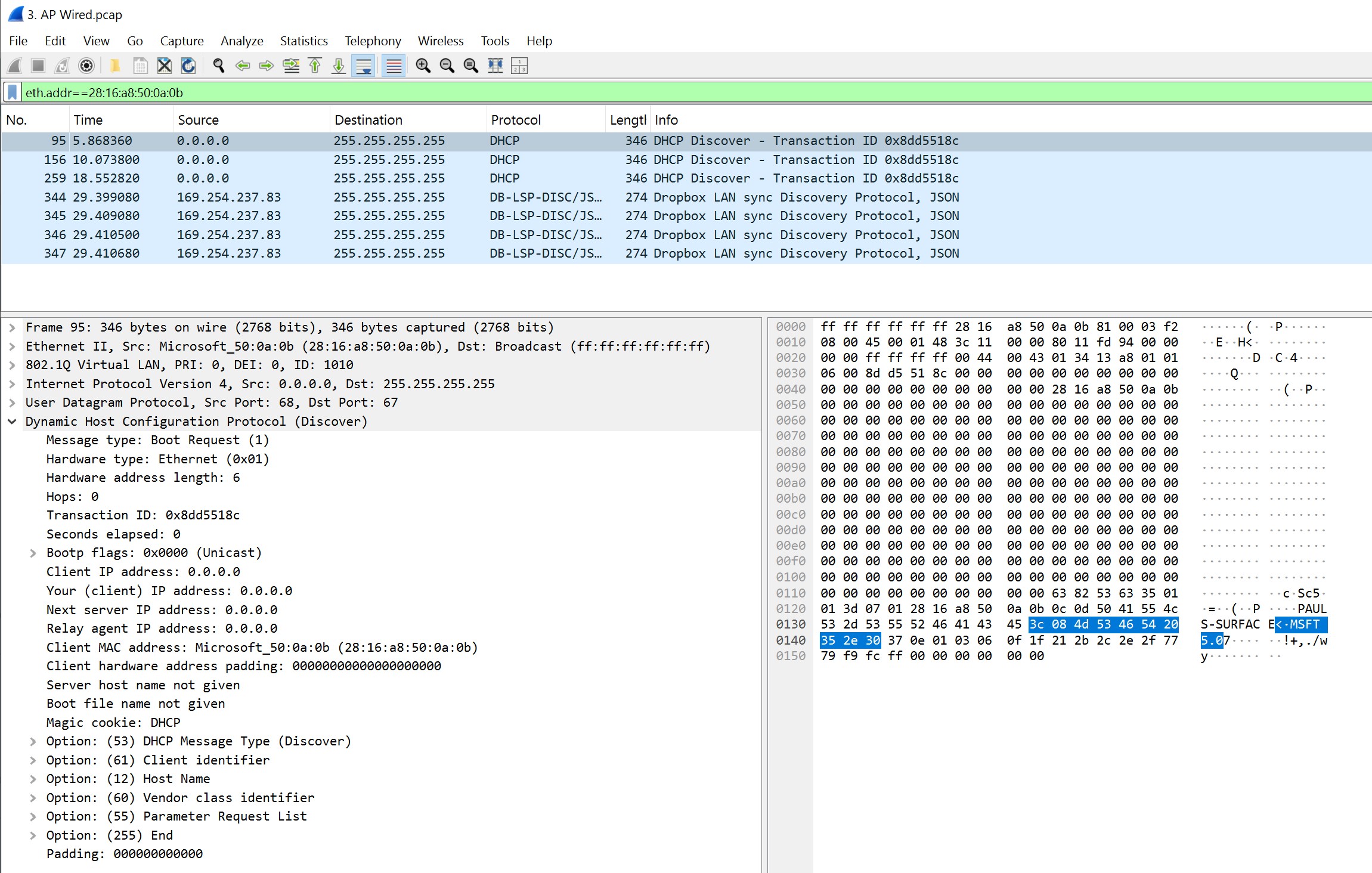
  1. With SSID connection, using the packet tracing function on the EAP, we see the DHCPDISCOVER being received from the computer, but no DHCPOFFER - somewhere the offer is lost. 

EAP Wireless side
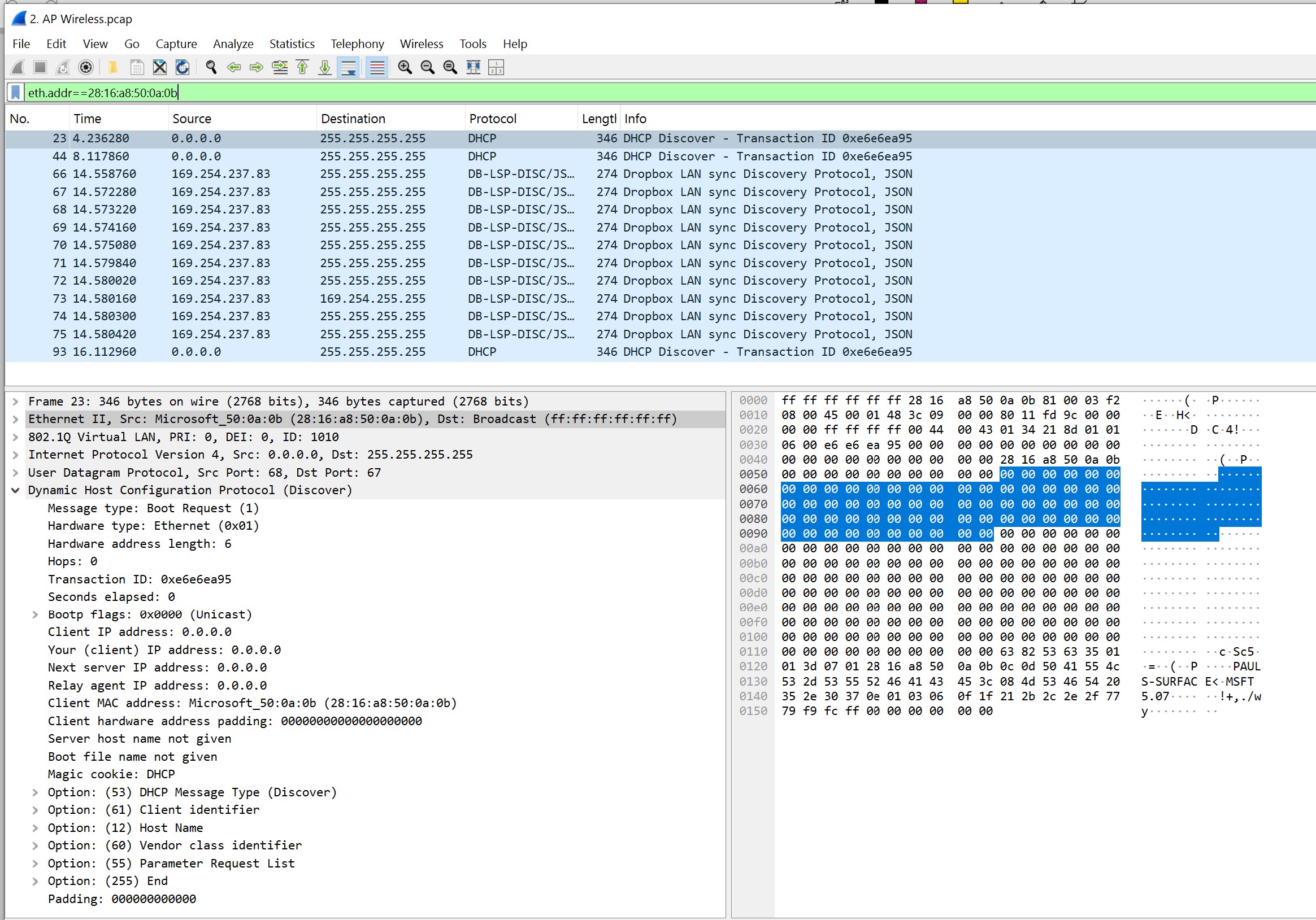
Wirless capture


EAP Wired side

EAP Wired capture


2. When connected to the the Tagged Ethernet switch port we see all the right things (VLANID 1010)
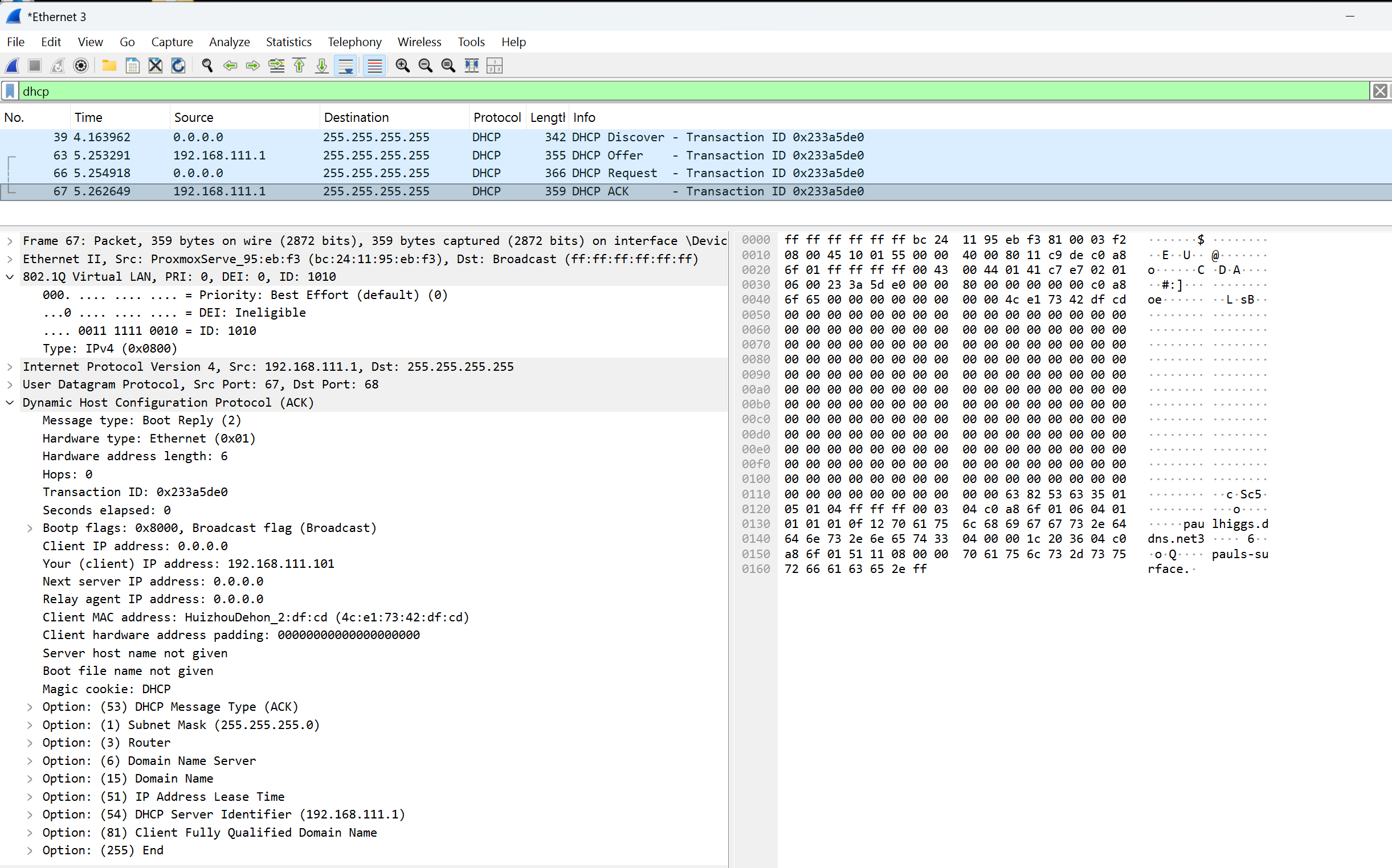
Wirded DHCP on VLAN 1010 OK


Does anyone know why DHCP over WiFi is failing when the DHCP Server is on a VLAN, but DHCP over Ethernet to the same DHCP Server is OK??

  0      
  0      
#1
Options
9 Reply
Re:Problem with DHCP over VLAN and WiFi
Tuesday

Hi @Paul_Higgs,


  • Am I correct to assume that SSID2/3 are mapped to use VLAN2/3 respectivly?
  • Are VLAN 2/3 are both tagged members on port 8?


  0  
  0  
#2
Options
Re:Problem with DHCP over VLAN and WiFi
Yesterday

  @D-C 


Yes, SSID 2/3 are mapped to VLAN 2/3 respectively.

Yes, VLAN 2/3 are both tagged members on port 8.

  0  
  0  
#3
Options
Re:Problem with DHCP over VLAN and WiFi
Yesterday

  @Paul_Higgs 


Do you have DHCP relay configured on the gateway or any switches for any of the vlans?

Have you enable "Legal DHCP Servers" on the gateway, possibly with incorrect entries?

  0  
  0  
#4
Options
Re:Problem with DHCP over VLAN and WiFi
Yesterday

  @GRL 


I don't have DHCP relay configured. The Omada domain doesn't even have an IP address for VLANS 2 or 3 since it should only operate in the switching domain.


I tried both with and without "Legal DHCP Servers" being defined for VLANS 2 and 3, however it makes no difference.


The main consideration here is that wired Ethernet functions OK in both tagged and untagged access to VLANs 2 and 3, however WiFI/SSID access to the VLANs does not.

  0  
  0  
#5
Options
Re:Problem with DHCP over VLAN and WiFi
Yesterday

@Paul_Higgs, I don't have the TPLink router, but I do use the switches and APs with pfSense and have not had any issues. Can you plug the AP into port 6 and try?

  0  
  0  
#6
Options
Re:Problem with DHCP over VLAN and WiFi
9 hours ago

  @D-C  the VLAN configurations of port 8 and port 6 are the same, so there was no change when moving the AP to port 6.

I tried adding another AP with just those two VLANS to the same switch that has the DHCP server but same result, the DHCPDISCOVER is seen on the wireless and wired ports of the AP, but the DHCP server (on a  pfSense VLAN) does not get it.


A laptop (with its ethernet configured with the VLAN id) plugged in to another similarity configured port on the switch with pfSense gets an address just fine

  0  
  0  
#7
Options
Re:Problem with DHCP over VLAN and WiFi
5 hours ago

  @Paul_Higgs 


Do you have guest mode enabled on the SSIDs ?


Otherwise, i have never experienced this other than accidental misconfiguration


The EAP isnt doing much to SSID traffic, it just inserts the vlan tag to the traffic on any SSID when it hits the switch port, other than that it doesnt have much involvement except for things like guest mode and EAP ACLs


Check you arent blocking anything with an EAP, Switch or Gateway ACL on your router 

  0  
  0  
#8
Options
Re:Problem with DHCP over VLAN and WiFi
5 hours ago

  @GRL 

I agree that this is very strange.

I decomissioned the VLANS and SSIDs and built up completely new ones with different VLAN tags, SSIDs and IP addresses (in the DHCP server - there is no IP subnet address for the VLAN) and still get the same problem.


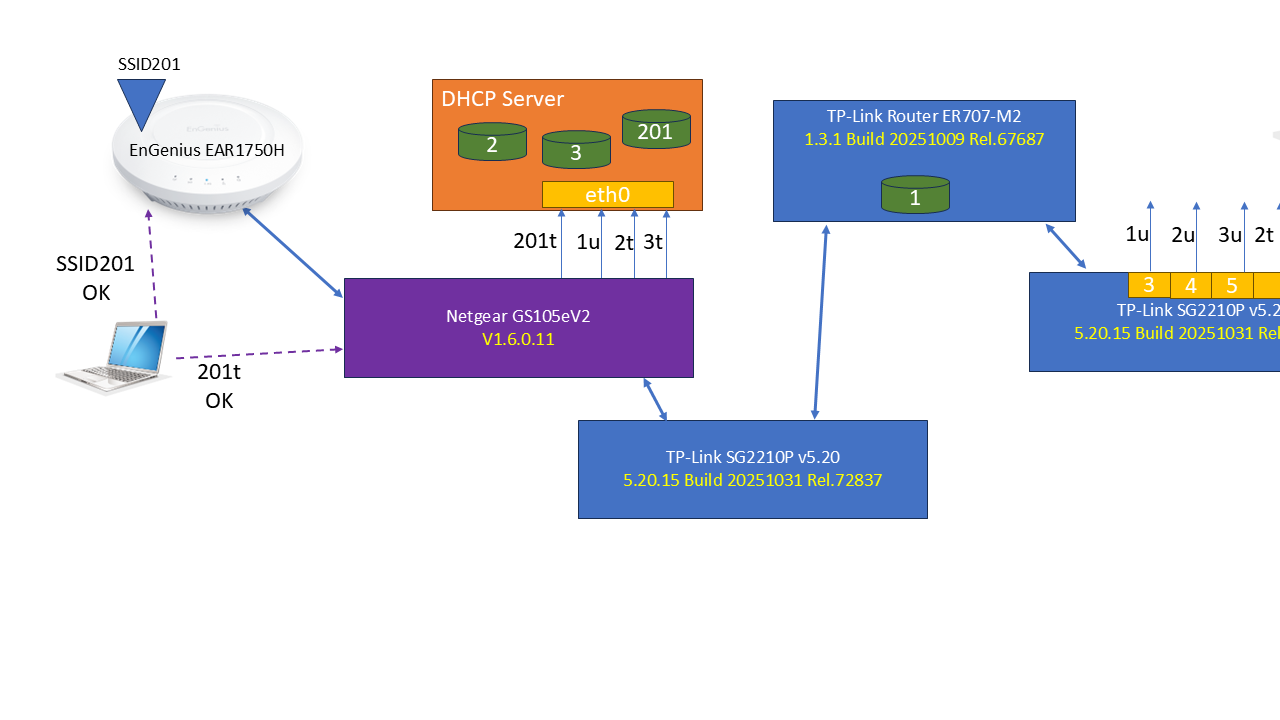
Then, I found an older Engenius EAP1750H AP that I used many years ago - it is also VLAN aware and after configuring it with the new VLANS and different SSIDs, my Laptop was able to retrieve an IP address.


So NOK with TP-Link EAP, but OK with Engenuis AP.

  0  
  0  
#9
Options
Re:Problem with DHCP over VLAN and WiFi
an hour ago

@Paul_Higgs, I have used several TP Link AP models with pfSense and never had any issues like this.


Few other thing to try...

- Plug the AP directly into eth0 on the pfSense host

- Set up a VLAN4/DHCP on the ER707 and SSID4 on the AP


It's sounding like the AP is just flaky especially if the above also doesn't work.


  0  
  0  
#10
Options