
Early Access Omada_Network_Application_V6.1.x.x Pre-Release Firmware (Closed on 21st Jan, 2026)


This Article Applies to
Omada_Network_Application_v6.1.0.19_Windows (Windows 10/11/Server, 64-bit Recommended)
Omada_Network_Application_v6.1.0.19_linux_x64.tar.gz
Omada_Network_Application_v6.1.0.19_linux_x64.deb
Overview
We hope to offer you the opportunity to experience the new features added in Controller v6.1.0.17 in advance, and to allow TP-Link to thoroughly test the firmware in your real network environment and across scenarios before the official release. All feedback is welcome, including reports of successful upgrades.
Release Notes
Version Info
This version of the Controller is fully compatible with the Omada App version 5.0.x or later.
Supported Device Models
For device models Omada Software Controller supports, refer to the Omada Cloud SDN Platform Compatibility List.
Added support for Access Points: EAP 725-Outdoor v1.0.
New Features
- Added support for site-level health dashboards: 24 h site-health trend & radar score in Dashboard Overview, Device Health badges on the topology map, plus Wi-Fi Experience and Client Health charts in their respective Dashboard tabs in Site view > Dashboard.
- Added support for device health timelines: hourly Device Health timeline with sub-dimension raw values inside every AP, Switch and Gateway detail page in Site view > Devices > device Details.
- Added support for health reports: Site Health Score radar, Device Health Trend, Client Health Trend, WAN Health Trend, Switch Health Trend, Wi-Fi Health and AP Health Trend charts in Site view > Insights > Reports.
- Added support for a “Client Health” toggle in Global/MSP view > Settings > History Data Retention > Client Data that controls whether client-level health scores (client health and Client Access Time & RSSI Dimensions for Wi-Fi health) are calculated; when disabled, all client-health charts are hidden across the site list, Dashboard, client list and report pages.
- Added support for automatic RF optimization through spectrum scanning and RRM: APs continuously report interference, the Controller applies user-defined optimization settings, and all changes are logged in History in Site > Network Config > WLAN > WLAN Optimization > Auto WLAN Optimization > Adaptive Mode(requires device firmware upgrade).
- Added support for RadSec (RADIUS over TLS) to secure SSID, MAC-Based, and 802.1X authentications on both APs and Switches in Site > Network Config > Profile > RADIUS Profile (requires the latest AP/Switch firmware; not yet available for Built-in RADIUS, RADIUS Proxy, Portal, or SSL-VPN)
- Added support for expiration and bandwidth controls on PPSK-without-RADIUS profiles, letting administrators set time-based validity (permanent, calendar range, post-creation interval, or daily window) and rate-limit or custom-speed restrictions in Site > Network Config > Profile > PPSK (requires device firmware upgrade).
- Added support for Auto VLAN assignment when bulk-generating PPSKs, automatically allocating VLANs across a user-defined range and step in Site > Network Config > Profile > PPSK.
- Added support for EAP 802.1X authentication (moved from Pro), establishing port-based 802.1X between clients and switches in Site > Network Config > Authentication > 802.1X (requires device firmware upgrade).
- Added support for DHCP Option 82 configuration on SSIDs (moved from Pro), allowing relay-agent information to be inserted in DHCP packets in Site > Network Config > WLAN > SSID (requires device firmware upgrade).
- Added support for Bluetooth Console, enabling APP-based Bluetooth serial access and unifying Aging Time & Transmit Power settings in a new Radio Setting page, while extending IoT Transport Stream with WebSocket/MQTT/AMQP and SSL/TLS security in Site > Device Config > EAP > Bluetooth(requires device firmware upgrade).
- Added support for 802.11r fast roaming under WPA3-Enterprise encryption on SSIDs in Site > Network Config > WLAN > SSID (requires device firmware upgrade).
- Added support for automatic IP address update on switches after a gateway change in Site > Network Config > Site Settings > General Config > Automatic Gateway Detection. This global setting takes effect when the Controller is offline (ECS is not managed). With this feature enabled, all DHCP client VLANs on switches will periodically probe the routing gateway. If the probe fails, the VLAN will re-authenticate to obtain a valid IP address, preventing service disruption due to IP lease expiration and facilitating immediate IP updates after the routing gateway changes or subnet modifications(requires device firmware upgrade).
- Added support for domain-name input in switch ping and traceroute troubleshooting tools in Site > Network Tools > Network Check and in Device > Switch Details > Tools > Network Check (requires device firmware upgrade).
- Added support for switch diagnostic tools—Packet Capture, ARP Table, and DNS Lookup—in Site > Network Tools and in Device > Switch Details > Tools > Network Check (requires device firmware upgrade).
- Added support for VRF (Virtual Routing and Forwarding) on L3 switches, allowing multiple isolated routing instances with overlapping IP addresses in Device Details > Config > VRF (requires device firmware upgrade).
- Added support for FEC (Forward Error Correction) on switches, allowing users to enable or disable error-recovery to balance signal quality and latency in Device > Ports > FEC (requires device firmware upgrade).
- Added support for displaying LLDP and OSPF neighbor tables directly on the switch detail page to speed up troubleshooting in Device > Switch Details > Network View (requires device firmware upgrade).
- Added support for a global LLDP toggle that controls advertisement on gateways, switches and APs to improve topology accuracy in Site > Network Config > Site Settings > General Config (requires device firmware upgrade).
- Added support for a new UI that sets Network, Port and Custom QoS policies on any managed switch to mitigate congestion in Site > Network Config > Transmission > Switch QoS (requires device firmware upgrade).
- Added support for redundant RADIUS servers in Switch 802.1X: if the primary server times out, the switch automatically falls back to the configured backup servers in Site > Network Config > Authentication > Switch 802.1X > RADIUS Profile(requires device firmware upgrade).
- Added support for domain-name-based RADIUS servers for both authentication and accounting in Switch 802.1X in Site > Network Config > Authentication > Switch 802.1X > RADIUS Profile (requires device firmware upgrade).
- Added support for RADIUS CoA & DM in Switch 802.1X, enabling re-authentication and forced disconnect in Site > Network Config > Authentication > Switch 802.1X > RADIUS Profile (requires device firmware upgrade).
- Added support for preserving management VLAN, port and static-route settings when adopting Agile Series switches through a user-defined management VLAN in Device > Switch Details > Port Config and Device > Switch Details > Management VLAN (requires device firmware upgrade).
- Added support for dynamic SDM templates that re-allocate hardware resources per feature (e.g. enlarge ACL scale) and a single-port mode for higher ACL utilization in Device > Config > General > Advanced (requires device firmware upgrade).
- Added support for DHCP Snooping in Controller mode, classifying interfaces as trusted or untrusted to ensure clients receive IP addresses only from authorized DHCP servers and to block DHCP-based attacks in Network Config > Security > IMPB (requires device firmware upgrade).
- Added support for an untagged Voice Network mode on switch ports with configurable DSCP priority to maintain voice-packet precedence across the network in Device > Switch Details > Port > Voice Network (requires device firmware upgrade).
- Added support for bulk license-unbind on Omada CBC controllers, allowing multiple devices to be released at once in Devices > Device List > Batch Action > Batch Unbind.
- Added support for simultaneous firmware upgrades on multiple stack groups that share the same master model in Devices > Device Group > Stack Group (multi-select) > Config.
- Added support for simultaneous reboot of multiple stack groups in Devices > Device Group > Stack Group (multi-select) > Config.
- Added support for model-based CLI configuration, letting administrators push different command sets per switch model in Site > CLI Configuration > Model CLI.
- Added support for a free-text Description field on device and stack detail pages so users can record location or other notes in Device/Stack Details > General > Description.
- Added support for pre-configuring Ethernet port settings on offline-added EAPs in Devices > EAP Details > Port.
- Added support for email-based two-factor authentication for cloud users during Controller login.
- Added support for user-selectable MAC-address delimiters (colon, hyphen, or none) and case formatting throughout the Controller UI in Global/MSP view > UI-Interaction > MAC Display Format.
- Added support for persistent user preferences—chart filters, table page size, and similar settings are saved and restored automatically across visits to Dashboard, Reports, and other core pages.
- Added support for a dedicated HTTPS port for firmware upgrades, separate from the main Controller web port, configurable in Global System Setting > Access Config > HTTPS Port for Upgrade.
- Added support for Disable NAT on a per-WAN basis while allowing multiple WANs to share the same LAN subnet, available in Site > Network Config > Transmission > NAT > Disable NAT (requires device firmware upgrade).
- Added support for IP-Group-based ACLs on gateways: when direction is LAN→LAN, source and destination types can now be IP group, IP-port group, IPv6 group, or IPv6-port group in Site > Network Config > ACL.
- Added support for Client Recognition on switches, and moved the toggle for Client Recognition to Global - Settings - History Data Retention - Client Data. It can display Type, Vendor, Model, OS, and Version in the Clients list and detail pages after enabling the feature with TCP port 29817 opening and Cloud Access. You can view results in Clients list/detail pages (requires device firmware upgrade, switch firmware 6.1).
- Added support for rapid client online/offline notifications from switches to the Controller, cutting detection delay to 0–5 seconds, enabled automatically when switches run firmware 6.1 and TCP port 29817 is open.
Enhancements
- Optimized the PPSK Open API by adding endpoints that allow individual PPSK entries within a profile to be created or deleted in Site > Network Config > Profile > PPSK.
- Optimized MAC Group scaling for switches: after a firmware upgrade, a single group can now deliver up to 2,000 MAC addresses instead of being truncated at 500 in Site > Network Config > Groups (requires device firmware upgrade).
- Optimized DHCP Server setup on switches by enabling multi-range address pools under each gateway/subnet when DHCP Server mode is selected in Switch Details > Config > VLAN Interface and Site > Network Config > LAN (requires device firmware upgrade).
- Optimized DHCP Reservation by letting users choose which DHCP server (gateway or switch) will honor each reservation in Site > Network Config > DHCP Reservation (requires device firmware upgrade).
- Optimized the locate function in Site > Devices > Device List, Site > Clients, Switch/Stack Details> port and Site > Device Config > Switch Ports: a. When Locate Switch or AP, all ports of the current device will flash, and the peer port of the Switch connected to it will also flash. b. Clients connected to the Switch via wired connection support locating. When locating a client, the peer port of the Switch connected to it will flash. c. Ports and lags of Switch and Stack support locating (requires device firmware upgrade).
- Optimized CLI feedback: erroneous commands issued via Site, Device, or Model CLI return immediate, highlighted error details in the configuration-result page in Site > Devices > Configuration Result (requires device firmware upgrade).
- Optimized the Map-Heatmap page by coloring APs according to their connection status.
- Optimized stack-member ordering by sorting devices alphabetically by name in Device > Device Group > Stack Group.
- Optimized bulk operations by allowing simultaneous configuration of General Config and Loopback Control across multiple switches in Site > Devices > Device List > Batch Action > Batch Config.
- Optimized default chart behavior: the first online WAN port auto-expands in Gateway > port, the routing table defaults to the IPv6 tab when no IPv4 data exists in OLT Network View, and the Interference table defaults to the first populated band in Report > Top 5 Aps > Interference.
- Optimized multicast UI by adding per-device exceptions for Unknown Multicast and Report Suppression in Network Config > LAN > Multicast Snooping.
- Optimized IntelliRecover with configurable initial-reboot and retry-interval timers.
- Optimized air-interface usage by adding SSID management-frame rate controls in Site > Network Config > WLAN > SSID > 802.11 Rate Control (requires device firmware upgrade).
- Optimized offline stack adoption by automatically onboarding all members instead of only the master in Devices > Device Group > Stack Group.
Bug Fixed
- Fixed bug where broadcast MAC addresses could not be added to MAC Groups in Controller mode.
- Fixed bug: disabled zlib network compression protocol to patch MongoDB security vulnerability.
- Fixed bug where Switch ACL entries failed to sync and took no effect when Source/Destination pointed to unused Networks, requiring a one-time config push after upgrade.
Notes
- Please note that Controllers on different platforms may vary in features, even if their first three digits of the version code are the same. For example, the Linux Controller currently supports Cluster Mode, but the Windows Controller doesn't support it yet.
- The Omada SDN Controller can only manage specific devices running the supported firmware. Please confirm that your device is compatible with the SDN Controller.
- Since version 5.14.32, the Omada Software Controller no longer supports upgrading from Controller v4.
- To strengthen overall security, we recommend upgrading all devices to the latest firmware.
Firmware Download
Before the Upgrade
(1) Please be sure you have read the Beta Test Agreement before upgrading the Pre-release firmware!
(2) For the sake of insurance, it's always recommended to save a copy of the controller Backup Config file before upgrading or downgrading.
(3) You may follow the following guide to upgrade your Omada Controller. How to Upgrade or Downgrade Omada SDN Controller.
Firmware Download Link
Direct Download
Omada_Network_Application_v6.1.0.19 Windows (Windows 10/11/Server, 64-bit Recommended)
Omada_Network_Application_v6.1.0.19_linux_x64.tar.gz
Omada_Network_Application_v6.1.0.19_linux_x64.deb
Omada_Network_Application_v6.1.0.18 Windows (Windows 10/11/Server, 64-bit Recommended)
Omada_Network_Application_v6.1.0.18_linux_x64.tar.gz
Omada_Network_Application_v6.1.0.18_linux_x64.deb
Omada_Network_Application_v6.1.0.17 Windows (Windows 10/11/Server, 64-bit Recommended)
Omada_Network_Application_v6.1.0.17_linux_x64.tar.gz
Omada_Network_Application_v6.1.0.17_linux_x64.deb
Omada_Network_Application_v6.1.0.11 Windows (Windows 10/11/Server, 64-bit Recommended)
Omada_Network_Application_v6.1.0.11_linux_x64.tar.gz
Omada_Network_Application_v6.1.0.11_linux_x64.deb
Omada_SDN_Controller_v6.1.0.10 Windows (Windows 10/11/Server, 64-bit Recommended)
Omada_SDN_Controller_v6.1.0.10_linux_x64.tar.gz
Omada_SDN_Controller_v6.1.0.10_linux_x64.deb
Additional Information
If somehow you encounter an issue during or after the controller upgrade, it's suggested to contact us with the following info:
- Omada Controller version (previous and current)
- Device Model(s), Hardware and Firmware versions
- (if possible) A copy of the Log file and Backup Config file
If you decide to downgrade the controller before reporting the issue to TP-Link, it's recommended to save a copy of the current Log file and Backup Config file, which could help TP-Link investigate and address the problem quickly.
>> How to get the Log file and Backup Config file for Omada SDN Controller:
-
If your Windows software controller failed to launch, please locate the controller installation path for the Log file.
-
If it's not a launch issue, you can export the Log file and Backup Config file to the local network.
-
For Omada Controller v5.8 or later version,
In the Global View, go to Settings > Maintenance > Backup & Restore > Retained Data Backup, select Settings Only, then click Export for the Backup Config file. On the same page, scroll down to Export for Support, then click Export Running Logs to download the desensitized Log file.
-
For Omada Controller v5.6 or v5.7,
Go to Settings > Maintenance > Backup & Restore > Retained Data Backup, select Settings Only, then click Export for the Backup Config file. On the same page, scroll down to Export for Support, then click Export Running Logs to download the desensitized Log file.
-
For Omada Controller v5.5 or a previous version,
Go to Settings > Maintenance > Backup & Restore > Retained Data Backup, select Settings Only, then click Export for the Backup Config file. Go to Settings > Services > Export Data > Running Log to export the Log file.
-
Update Log
Jan 19th, 2026
Update the pre-release firmware to the following version:
Omada_Network_Application_v6.1.0.19 Windows (Windows 10/11/Server, 64-bit Recommended)
Omada_Network_Application_v6.1.0.19_linux_x64.tar.gz
Omada_Network_Application_v6.1.0.19_linux_x64.deb
Update Note:
1. Update New Features.
2. Add two new fixed bugs (Point 2 and 3).
Jan 9th, 2026
Update the pre-release firmware to the following version:
Omada_Network_Application_v6.1.0.18 Windows (Windows 10/11/Server, 64-bit Recommended)
Omada_Network_Application_v6.1.0.18_linux_x64.tar.gz
Omada_Network_Application_v6.1.0.18_linux_x64.deb
Update Note:
Added two New Features (Points 41 and 42).
Dec 31st, 2025
Update the pre-release firmware to the following version:
Omada_Network_Application_v6.1.0.17 Windows (Windows 10/11/Server, 64-bit Recommended)
Omada_Network_Application_v6.1.0.17_linux_x64.tar.gz
Omada_Network_Application_v6.1.0.17_linux_x64.deb
Dec 19th, 2025
Update recommended threads:
Omada Switch Pre-Release Firmware Adapting to Omada SDNC v6.1 (Released on December 18th, 2025)
EAP7xx v1.4.0 Fully Adapted to Omada v6.1 Pre-release Firmware (Update on 11th Dec, 2025)
EAP653 UR | EAP650 | EAP650-Wall | EAP603-outdoor Fully Adapted to Omada v6.1 (Released on 9th Dec, 2025)
EAP6xx Pre-release Firmware Adapted to Omada Controller v6.1 (Release on 12 Nov, 2025)
Dec 16th, 2025
Update the pre-release firmware to the following version:
Omada_Network_Application_v6.1.0.11 Windows (Windows 10/11/Server, 64-bit Recommended)
Omada_Network_Application_v6.1.0.11_linux_x64.tar.gz
Omada_Network_Application_v6.1.0.11_linux_x64.deb
Update Note: Fixed some known issues.
Dec 10th, 2025
Provide the following firmware:
Omada_SDN_Controller_v6.1.0.10 Windows (Windows 10/11/Server, 64-bit Recommended)
Omada_SDN_Controller_v6.1.0.10 _linux_x64.tar.gz
Omada_SDN_Controller_v6.1.0.10 _linux_x64.deb
Recommended Threads
Omada Switch Pre-Release Firmware Adapting to Omada SDNC 6.1. (Released on December 18th, 2025)
EAP7xx v1.4.0 Fully Adapted to Omada 6.1 Pre-release Firmware (Update on 11th Dec, 2025)
EAP6xx Pre-release Firmware Adapted to Omada Controller v6.1 (Release on 12 Nov, 2025)
Wish you a happy life and smooth network usage! >Omada US Enterprise Beta Program Launch< >Get the Latest Omada SDN Controller Releases Here< >Experience the Latest Omada EAP Firmware<
- Copy Link
- Subscribe
- Bookmark
- Report Inappropriate Content

- Copy Link
- Report Inappropriate Content
- Copy Link
- Report Inappropriate Content

Ran the upgrade to 6.1.0.11 earlier today...no problems to report (so far), but will report back after I've used the new Controller software for a few days (Windows 11 x64).
- Copy Link
- Report Inappropriate Content

Finally Gateway level LAN->LAN IP Group and Port ACLs
In the client page are these filterings correct? I have three VLANS, IoT, Guest, Default. Most things aren't tagged with what VLAN they are on:
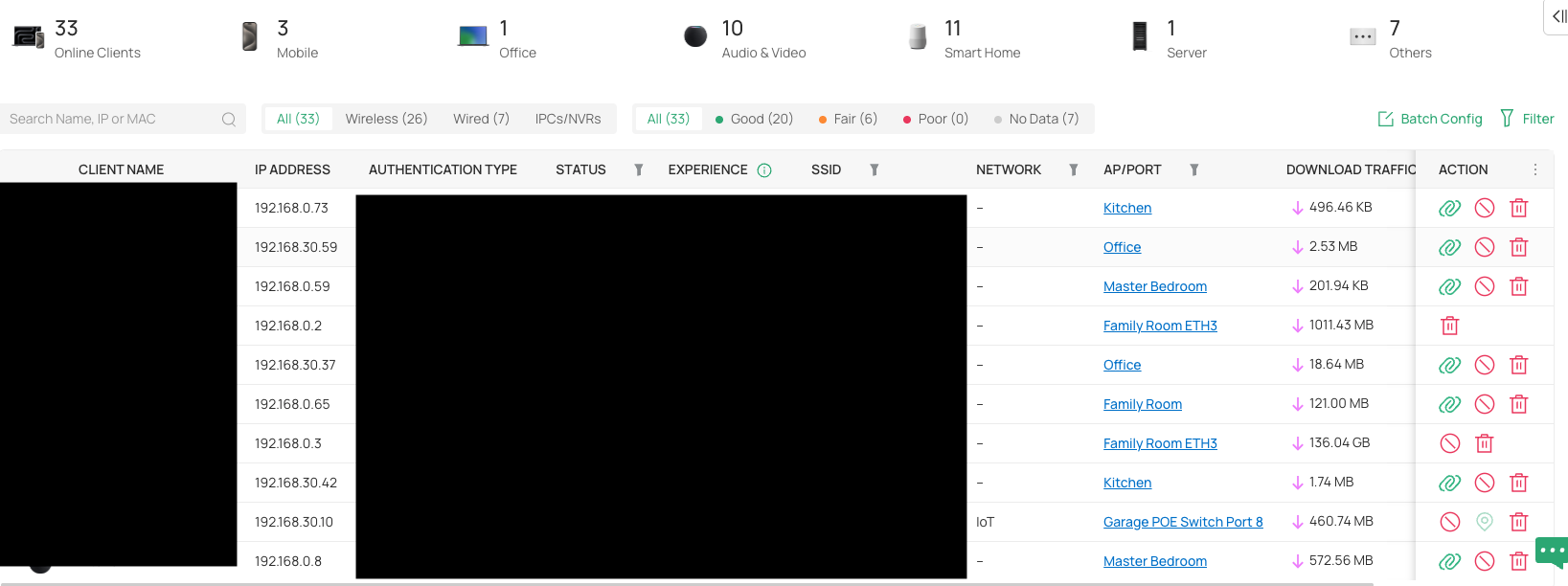
As an alternative I can filter most things by their VLAN tag (e.g., 20, 30) except Default (1), which only shows one item. I have my Wireless devices set Default in WLAN settings. The list is probably missing 10-15+ devices (Like its missing all of my wireless devices)...
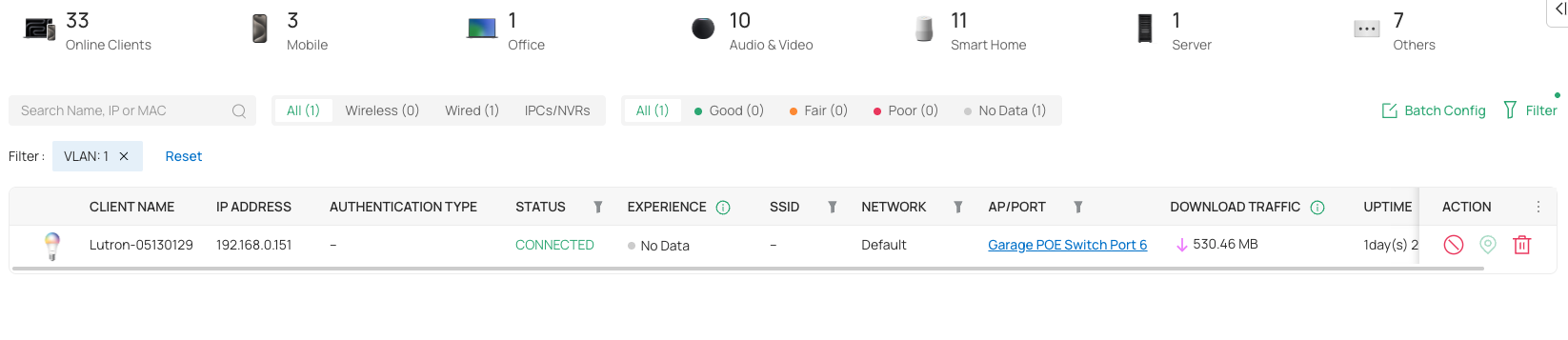
The only devices getting proper Network tags are via my main SG2210MP. Seems my 655-Wall are stripping that info out? As my other switch, a SG2008, is connected via a 655-Wall. Actually devices plugged into that switch show as connected to the 655-Wall...
- Copy Link
- Report Inappropriate Content
Hi @GoodOmens
Thanks for the feedback. To understand the situation better, please let us know the following info:
1. Is the topology displaying correctly?
2. For those not displaying VLAN info, are they all plugged into the switch SG2008P? If not, how are they connected to the network? re they specific clients, or does this occur randomly across all clients?
3. Please share a screenshot of the device page.
- Copy Link
- Report Inappropriate Content
1. Almost. It doesn't display devices connected directly to Device #8 (Media Cabinet switch). It shows them connected to #4 (Family Room) or in one case as #4 connected to the POE switch. #4 is a Ethernet NIC plugged into the Media Cabinet. LLDP is enabled for Gateway, Switch, and EAP.
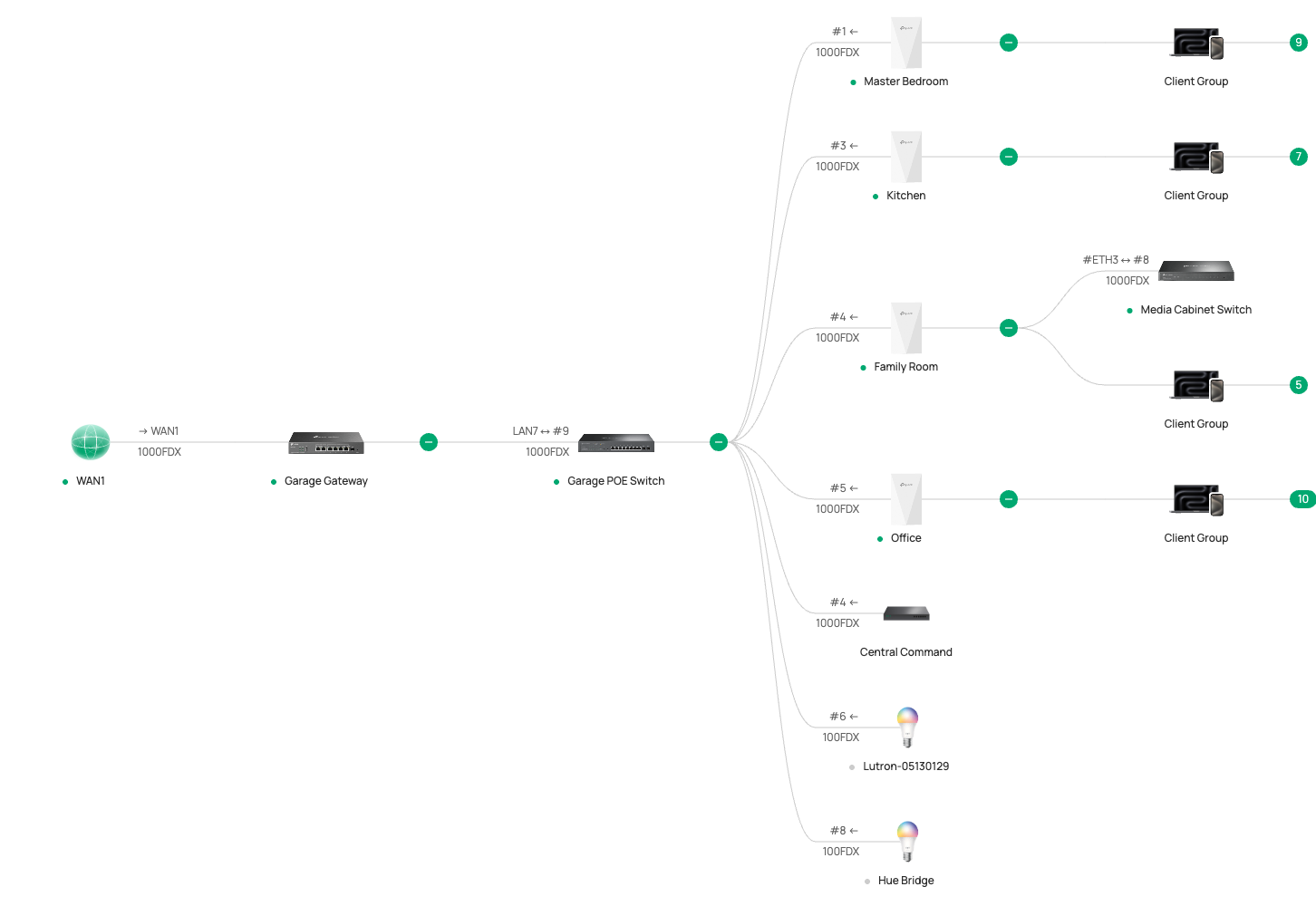
2. Devices not showing a Network tag are either connected wirelessly to EAP655-wall (On 1.6) or via the SG2008 plugged into a EAP655-wall (Via the PoE port)
3.

- Copy Link
- Report Inappropriate Content

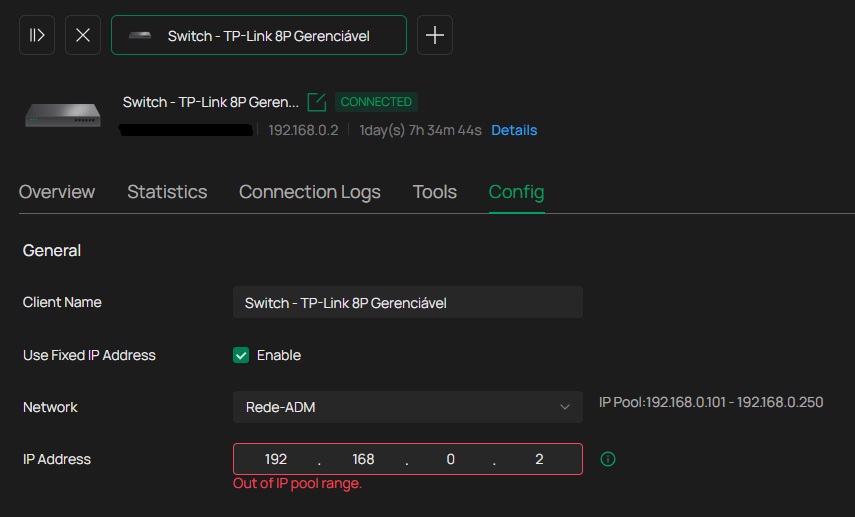
@Vincent-TP V6.1 is a massive leap forward, especially with the new Health Dashboards and Device Timelines. However, the new restriction on DHCP reservations outside the pool is a significant pain point for those of us managing critical infrastructure. We typically keep servers and static assets outside the dynamic range to avoid conflicts and maintain a clean subnet architecture. Please consider making this validation optional.
Additionally, since the UI is becoming so fluid and health-focused, it would be a game-changer to have a 'Critical Asset' toggle for specific clients. Being able to 'flag' a server or a NAS and receive an immediate alert if it goes offline would bridge the gap between simple networking and proactive monitoring. Keep up the great work!
- Copy Link
- Report Inappropriate Content
Hi @GoodOmens
Thanks for the feedback. Please see the answer below:
GoodOmens wrote
Finally Gateway level LAN->LAN IP Group and Port ACLs
In the client page are these filterings correct? I have three VLANS, IoT, Guest, Default. Most things aren't tagged with what VLAN they are on:
>>>Network is not equal to VLAN, it's short for Network Name. The “SSID” column displays the network connections of wireless clients, while the “Network” column displays the network connections of wired clients. In other words, just as wired clients do not have SSID connections, wireless clients do not have a value for “Network.” Therefore, the current behavior is expected.
As an alternative I can filter most things by their VLAN tag (e.g., 20, 30) except Default (1), which only shows one item. I have my Wireless devices set Default in WLAN settings. The list is probably missing 10-15+ devices (Like its missing all of my wireless devices)...
>>>When WLAN is set to Default, the VLAN for wireless clients is Untag, not 1. Therefore, wireless clients cannot be found by searching for VLAN 1. This is also as expected.
The only devices getting proper Network tags are via my main SG2210MP. Seems my 655-Wall are stripping that info out? As my other switch, a SG2008, is connected via a 655-Wall. Actually devices plugged into that switch show as connected to the 655-Wall...
>>>This is because the SG2008 is plugged into the downlink port of the EAP655-wall. It's well noted and we will optimize it in the subsequent firmware updates. Thank you for your feedback.
- Copy Link
- Report Inappropriate Content
Thanks for posting here. Please see the answer below:
Huemmer wrote
@Vincent-TP V6.1 is a massive leap forward, especially with the new Health Dashboards and Device Timelines. However, the new restriction on DHCP reservations outside the pool is a significant pain point for those of us managing critical infrastructure. We typically keep servers and static assets outside the dynamic range to avoid conflicts and maintain a clean subnet architecture. Please consider making this validation optional.
>>> We will avoid this in the official firmware release. Thank you for your feedback.
Additionally, since the UI is becoming so fluid and health-focused, it would be a game-changer to have a 'Critical Asset' toggle for specific clients. Being able to 'flag' a server or a NAS and receive an immediate alert if it goes offline would bridge the gap between simple networking and proactive monitoring. Keep up the great work!
>>>Thanks for the feedback. This is a new feature request. To gather more voters and more detailed descriptions of these needs to ensure that the relevant departments fully understand and can conduct thorough assessments for functional support, you may start a feature request post.
- Copy Link
- Report Inappropriate Content

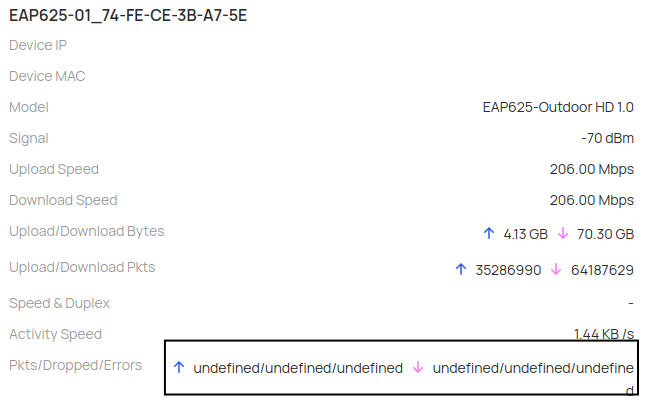
@Vincent-TP
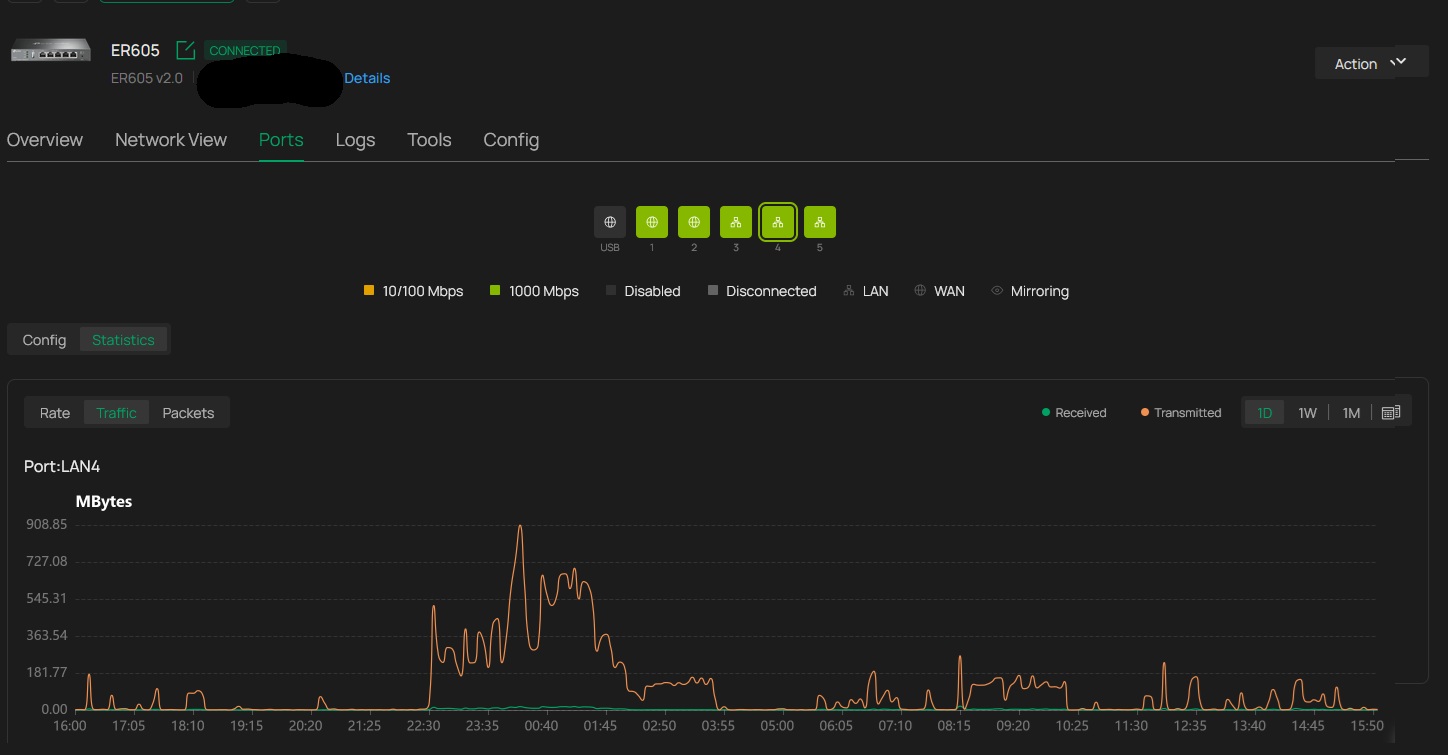
I found a bug in the section where I view LAN and WAN statistics. The Omada Cloud continues to function normally.
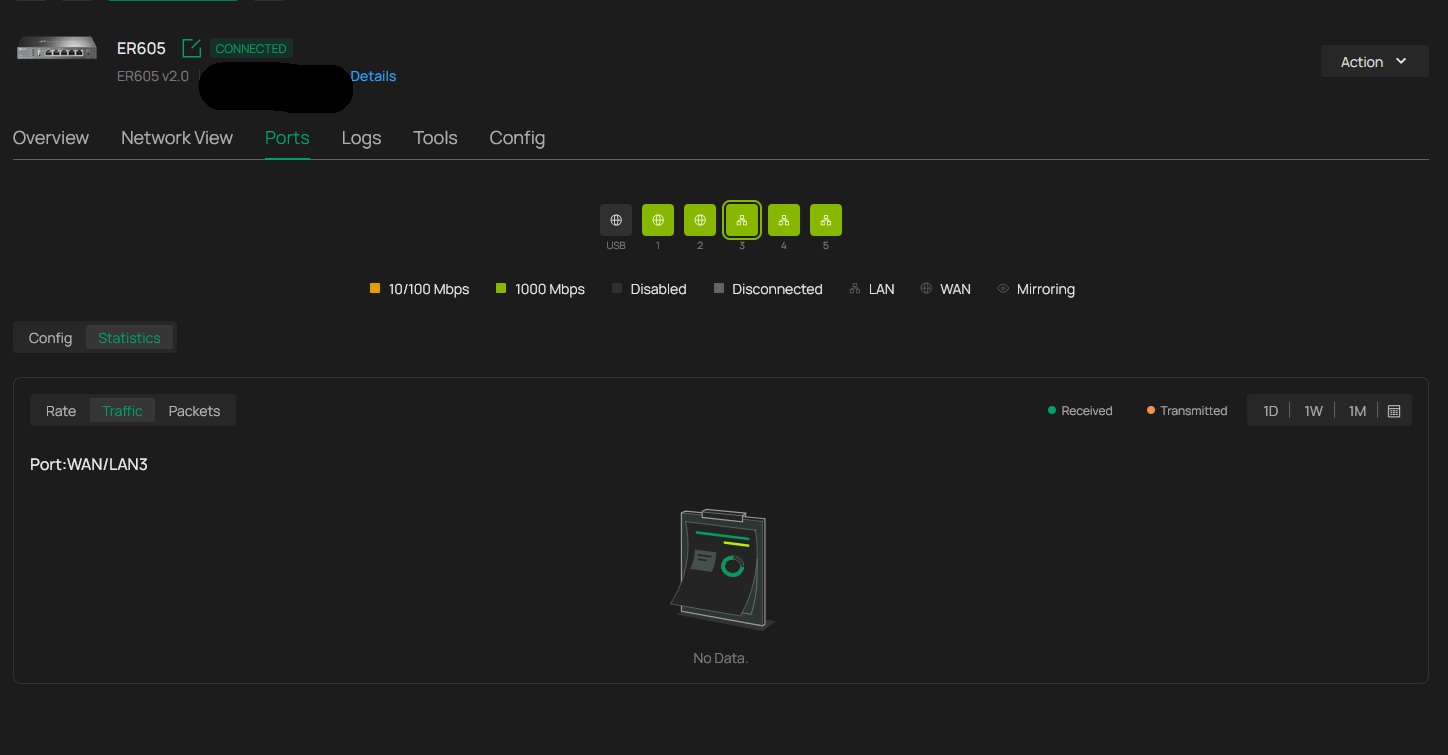
This screenshot is from Omada Cloud.
- Copy Link
- Report Inappropriate Content
Information
Helpful: 1
Views: 20076
Replies: 48
Voters 0
No one has voted for it yet.