
ER605 Block ping from WAN

Hello
I want to ask about "Block ping from WAN" function in FireWall section (ER605 HW v2.20 latest firmware 2.3.3).
The box is checked and I can't ping my WAN and that's OK.
When uncheck box and save, I can ping my WAN and that's OK.
When I try to check box again to block ping from WAN and save I can still ping my WAN :(
After reboot everything is OK, ping from WAN is blocked.
Is it normal that uncheck box allow ping without reboot (immediately) but checking box again doesn't block ping from WAN right away? (till reboot).
Checked with Omada controller and ER605 in standalone mode and the same behavior.
I didn't check other options in FireWall section.
Is it bug or normal behavior (feature).
Thank you for explanation.
- Copy Link
- Subscribe
- Bookmark
- Report Inappropriate Content


We tested locally: after re-enabling “Loock Ping from WAN,” we waited two minutes and then pinged the WAN address; the ping failed, but we could not reproduce the issue you reported.
If you can reproduce it consistently, please re-enable the option, wait two minutes, capture a mirror packet trace, and verify whether the ICMP packets actually reach the WAN interface.How to capture packets using Wireshark on SMB router or switch
- Copy Link
- Report Inappropriate Content
After re-enabling it, wait a few minutes and then try pinging the WAN again to see if it still responds.
- Copy Link
- Report Inappropriate Content
I've waited 38 minutes :( Didn't work. Ping isn't blocked again. Only after reboot.
- Copy Link
- Report Inappropriate Content
We tested locally: after re-enabling “Loock Ping from WAN,” we waited two minutes and then pinged the WAN address; the ping failed, but we could not reproduce the issue you reported.
If you can reproduce it consistently, please re-enable the option, wait two minutes, capture a mirror packet trace, and verify whether the ICMP packets actually reach the WAN interface.How to capture packets using Wireshark on SMB router or switch
- Copy Link
- Report Inappropriate Content
- Copy Link
- Report Inappropriate Content
Yes, you can filter it this way.
- Copy Link
- Report Inappropriate Content
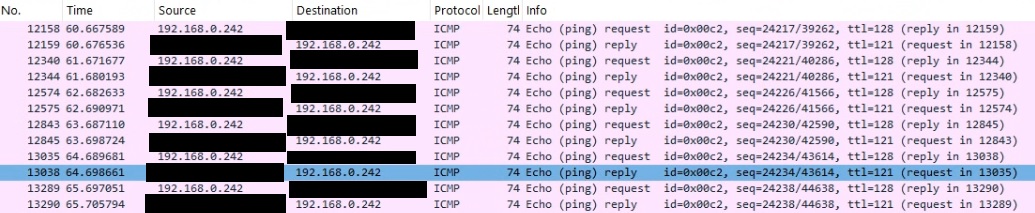
Yes, I confirm that WAN is responding (15 minutes after "disable ping from WAN" option). After gateway reboot ping is blocked.
- Copy Link
- Report Inappropriate Content
Information
Helpful: 0
Views: 772
Replies: 6
Voters 0
No one has voted for it yet.