
2
Votes

[ISSUE/REQUEST] Devices behind ES switches don't show IP addresses in Omada Controller client list

  This repeated request has been merged into the main thread Feature request: Easy Managed switch should collect client IP and report to the controller. Please vote on the main thread.

 
2
Votes

[ISSUE/REQUEST] Devices behind ES switches don't show IP addresses in Omada Controller client list

  This repeated request has been merged into the main thread Feature request: Easy Managed switch should collect client IP and report to the controller. Please vote on the main thread.
[ISSUE/REQUEST] Devices behind ES switches don't show IP addresses in Omada Controller client list
[ISSUE/REQUEST] Devices behind ES switches don't show IP addresses in Omada Controller client list
2025-12-17 15:12:50 - last edited 2025-12-28 02:40:44

No devices that are connected to any of my ES series switches are showing their addresses at all in the omada controller's client list, while devices connected directly to the wireless gateway are showing:
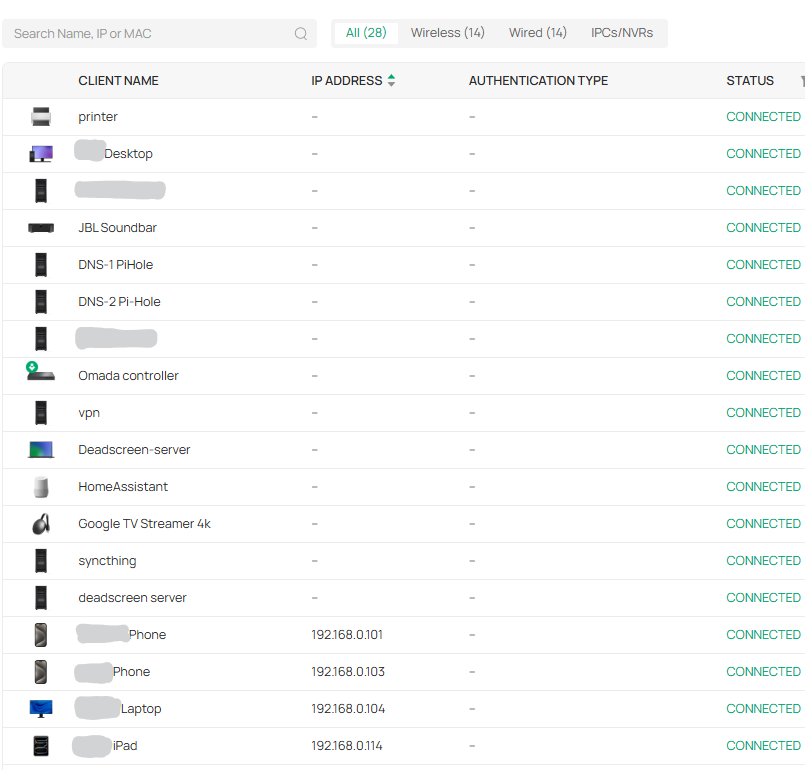
 

Now I understand there have been threads about this before, however nearly everything that is missing it's address info has a static ip in the dhcp reservations table.

if the controller knows it's giving the client that ip address, I would expect that it shows that reserved ip address in the table (perhaps with an indicator showing that it's a reserved address, not one that's been found through the switch's ARP tables?)


Are there any plans for an update to this client list? or is the expected fix simply "buy a different switch next time"
These are marketed as "small business" switches, and this seems like pretty basic functionality that I'm not getting.

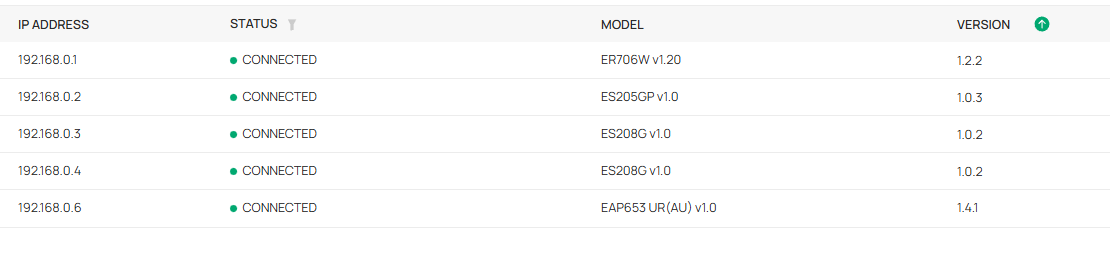
my hardware:
 

#1
Options
1 Accepted Solution
Re:[ISSUE/REQUEST] Devices behind ES switches don't show IP addresses in Omada Controller client list-Solution
2025-12-22 08:24:33 - last edited 2025-12-28 02:40:44

Hi、  @Bensbey 


Thanks for posting here.

Please check the response below:

https://community.tp-link.com/en/business/forum/topic/781634?replyId=1512224


Side Note: I had moved this post to the Requests & Suggestions block to gather more voters. Please don't forget to cast your vote.

Recommended Solution
#2
Options
4 Reply
Re:[ISSUE/REQUEST] Devices behind ES switches don't show IP addresses in Omada Controller client list-Solution
2025-12-22 08:24:33 - last edited 2025-12-28 02:40:44

Hi、  @Bensbey 


Thanks for posting here.

Please check the response below:

https://community.tp-link.com/en/business/forum/topic/781634?replyId=1512224


Side Note: I had moved this post to the Requests & Suggestions block to gather more voters. Please don't forget to cast your vote.

Recommended Solution
#2
Options
Re:[ISSUE/REQUEST] Devices behind ES switches don't show IP addresses in Omada Controller client list
2025-12-28 02:40:38
Thank you mate, I guess I'll just wait till that gets implemented. Is there somewhere I can sign up to be notified of beta branches/patch notes?
#3
Options
Re:[ISSUE/REQUEST] Devices behind ES switches don't show IP addresses in Omada Controller client list
2025-12-29 02:45:54

Hi  @Bensbey 


You can subscribe to the following post; we will update it once there is a pre-release version for gateways.

Get the Latest Firmware Releases for Omada Routers Here - Subscribe for Updates

#4
Options
Re:[ISSUE/REQUEST] Devices behind ES switches don't show IP addresses in Omada Controller client list
a week ago

  @Bensbey Found this thread as I was exspirencing the same problem, the "request feture" thread mentioned above has been denined and locked so it don't look hopeful. I did find a work around which hopefuly might be helpfull to someone:


This only works if you have a omada gateway/router which is handeling DHCP

  • open a terminal into the gateway and type the following commands
  • "enable"
  • "configure"
  • "show dhcp server client-list"


This will spit out the client list of the DHCP server which you can download and search (I've written a very bad bash script to import it into a spreadsheet).


The whole problem baffles me really as a generic ISP router can display the DHCP client list with all the IP addresses but a fancey "business" grade SDN can't manage it! I understand that non-DHCP assigned IP addresses could be different but at least give us the information that the gateway has in an easier way than running terminal commands!


Anyway rant over, hope this helps the next person searching for an asnwer.

#5
Options


